Calculations in Tableau: Calculated Fields, Table Calculations and LOD Expressions
Write calculated fields (row-level and aggregate), use string, date, number and logical functions, handle nulls, then master table calculations (running total, percent of total, difference and growth, rank, moving average, and Compute Using) and Level of Detail expressions (FIXED, INCLUDE, EXCLUDE), with every result checked against pandas.
- Write row-level and aggregate calculated fields and know which one a question needs
- Use IF/ELSEIF, CASE, IIF, ZN, IFNULL, DATEDIFF, DATETRUNC and string functions
- Apply quick table calculations and control them with Compute Using
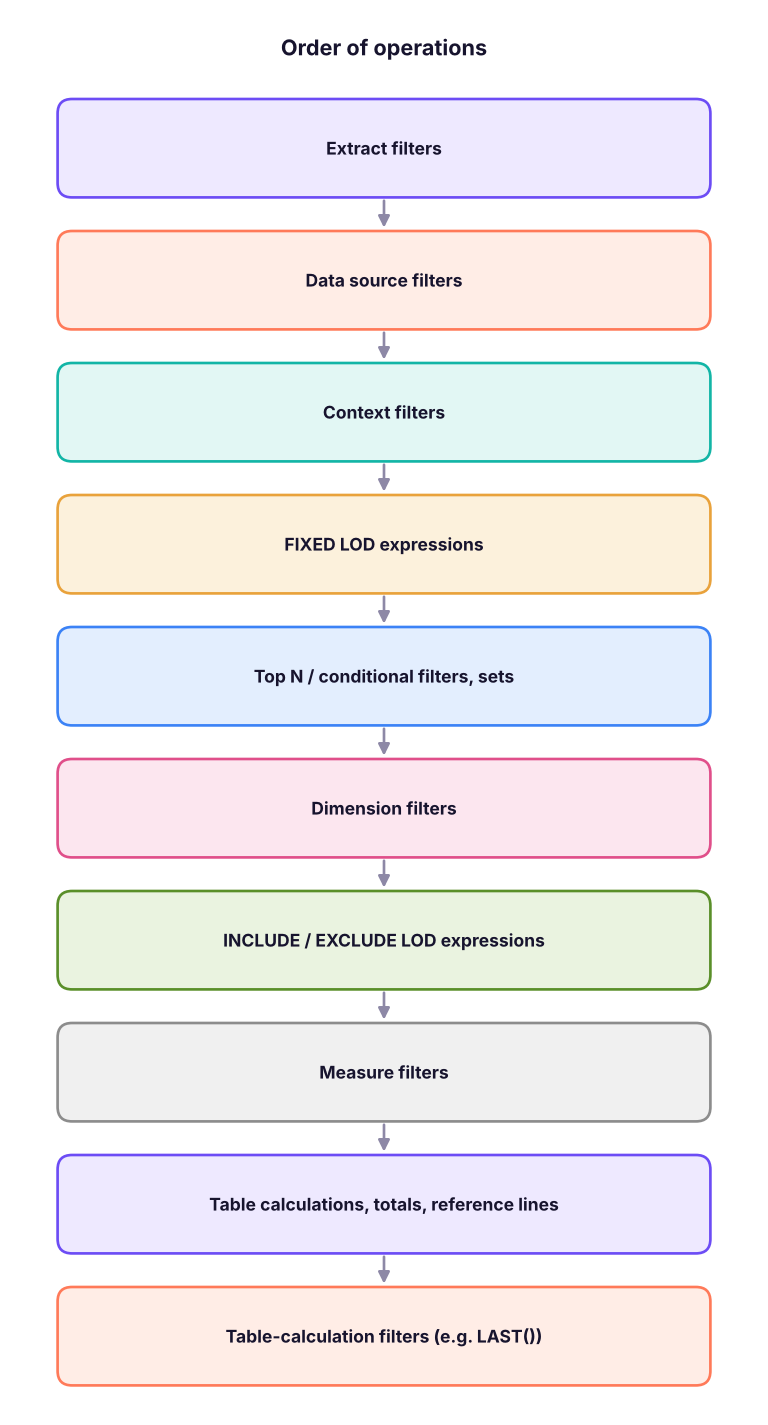
- Write FIXED, INCLUDE and EXCLUDE LOD expressions and explain where they sit in the order of operations
- Solve classic interview problems: profit margin, customer first-purchase cohorts and percent of total
Three kinds of calculation
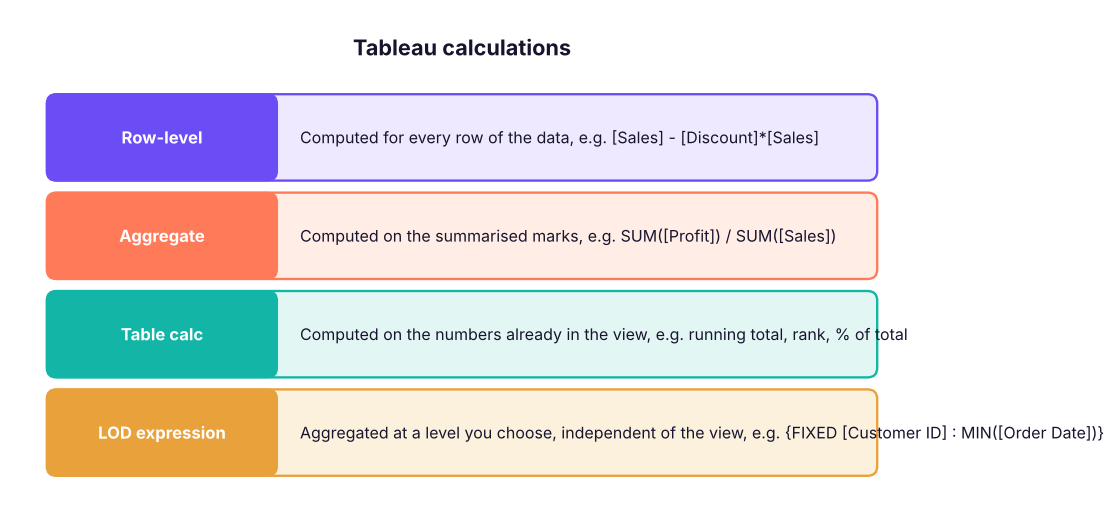
Create one with Analysis → Create Calculated Field (or right-click a field → Create → Calculated Field). Field names go in square brackets; comments start with //.
import pandas as pd, numpy as np
df = pd.read_csv("superstore_sales.csv", parse_dates=["order_date", "ship_date"])
print(df[["sales", "profit", "discount"]].describe().round(1).loc[["mean", "min", "max"]])sales profit discount mean 31854.1 2902.4 0.1 min 42.0 -75873.8 0.0 max 619290.0 149424.9 0.4
Row-level vs aggregate: the profit-margin trap
The most common beginner bug in Tableau (and Power BI) is averaging ratios.
| Calculated field | Formula | What it means |
|---|---|---|
| Margin (row) | [Profit] / [Sales] |
Margin of each order line; in the view it becomes SUM or AVG of those ratios: wrong |
| Margin (aggregate) | SUM([Profit]) / SUM([Sales]) |
Total profit ÷ total sales for whatever the mark represents: right |
by_cat = df.groupby("category").apply(lambda g: pd.Series({
    "aggregate margin %": g.profit.sum() / g.sales.sum() * 100,
    "average of row margins %": (g.profit / g.sales).mean() * 100}), include_groups=False)
by_cat.round(2)| aggregate margin % | average of row margins % | |
|---|---|---|
| category | ||
| Furniture | -2.35 | -2.38 |
| Office Supplies | 14.95 | 13.76 |
| Technology | 11.29 | 9.95 |
The two columns differ because the average of row ratios gives a ₹500 order the same weight as a ₹5 lakh order. Format the aggregate field as a percentage (right-click → Default Properties → Number Format → Percentage).
Useful functions
| Purpose | Tableau | Example |
|---|---|---|
| Logic | IF … THEN … ELSEIF … ELSE … END |
IF SUM([Profit]) < 0 THEN "Loss" ELSE "Profit" END |
| Logic | CASE [Region] WHEN "South" THEN … END, IIF(test, then, else) |
Short mappings |
| Nulls | ZN([Profit]), IFNULL([x], 0), ISNULL([x]) |
Replace nulls with 0 |
| Dates | DATEDIFF('day', [Order Date], [Ship Date]), DATETRUNC('month', [Order Date]), DATEPART('weekday', …), DATEADD, TODAY() |
Shipping days, month start |
| Strings | LEFT, RIGHT, MID, SPLIT([Customer Name], " ", 1), CONTAINS, UPPER, TRIM, REPLACE |
First name |
| Numbers | ROUND, ABS, CEILING, FLOOR, INT |
Rounding |
| Type | STR(), INT(), FLOAT(), DATE() |
Conversions |
| Aggregates | SUM, AVG, COUNT, COUNTD, MIN, MAX, MEDIAN, ATTR |
COUNTD([Order ID]) = orders |
df["ship_days"] = (df.ship_date - df.order_date).dt.days           # DATEDIFF('day', [Order Date], [Ship Date])
df["first_name"] = df.customer_name.str.split(" ").str[0]          # SPLIT([Customer Name], " ", 1)
df["order_size"] = np.select([df.sales >= 50000, df.sales >= 10000], ["Large", "Medium"], "Small")   # IF/ELSEIF
print(df.groupby("ship_mode").ship_days.mean().round(1).sort_values())
print(df.order_size.value_counts().to_dict())ship_mode
Same Day 0.0
First Class 1.5
Second Class 3.0
Standard Class 5.6
Name: ship_days, dtype: float64
{'Small': 3359, 'Medium': 1838, 'Large': 1126}Table calculations
A table calculation works on the numbers already in the view, so its result depends on the layout. Right-click a measure → Quick Table Calculation:
| Quick table calc | Use |
|---|---|
| Running Total | Cumulative sales through the year |
| Difference / Percent Difference | Month-on-month or year-on-year change |
| Percent of Total | Share of each category |
| Rank | Top products |
| Percentile | Position in a distribution |
| Moving Average | Smooth noisy monthly data (Edit → previous 2 values + current) |
| YTD Total / YTD Growth / YoY Growth | Financial reporting |
Compute Using (addressing and partitioning)
Compute Using tells Tableau the direction of the calculation. Fields it computes along are addressing fields; the remaining fields partition the view into separate calculations. Example: Category on Rows, MONTH on Columns, Running Total of Sales:
- Compute Using Table (across) → running total along months, restarting for each category (partitioned by Category).
- Compute Using Table (down) → running total down the categories within each month.
m = df[df.order_date.dt.year == 2025].assign(month=lambda x: x.order_date.dt.to_period("M"))
t = m.pivot_table(index="category", columns="month", values="sales", aggfunc="sum") / 1e5
running = t.cumsum(axis=1)              # Table (across): restarts per category
print(running.iloc[:, [0, 1, 2, -1]].round(1))
share = t.sum(axis=1) / t.values.sum() * 100   # Percent of Total, Table (down)
print((share).round(1).to_dict())month 2025-01 2025-02 2025-03 2025-12
category
Furniture 12.9 16.8 28.7 127.6
Office Supplies 2.6 4.8 9.4 39.7
Technology 38.0 70.8 119.4 616.5
{'Furniture': 16.3, 'Office Supplies': 5.1, 'Technology': 78.7}Common table-calculation functions you write yourself: RUNNING_SUM(SUM([Sales])), WINDOW_AVG(SUM([Sales]), -2, 0) (3-month moving average), LOOKUP(SUM([Sales]), -1) (previous value), RANK(SUM([Sales])), INDEX(), SIZE(), TOTAL(SUM([Sales])).
YoY growth as a calculation: (SUM([Sales]) - LOOKUP(SUM([Sales]), -1)) / ABS(LOOKUP(SUM([Sales]), -1)) with YEAR(Order Date) in the view.
y = df.groupby(df.order_date.dt.year).sales.sum()
print(((y / y.shift(1) - 1) * 100).round(1).dropna().to_dict(), "% YoY"){2024: 13.5, 2025: 19.8} % YoYLevel of Detail (LOD) expressions
LODs compute an aggregate at a level you choose, regardless of the dimensions in the view.
| Syntax | Meaning | Example |
|---|---|---|
{FIXED [Dim] : AGG([Measure])} |
Exactly at [Dim], ignoring the view (but after context filters) | {FIXED [Customer ID] : MIN([Order Date])} first purchase |
{INCLUDE [Dim] : AGG(...)} |
View's dimensions plus [Dim] | Average sales per customer by region |
{EXCLUDE [Dim] : AGG(...)} |
View's dimensions minus [Dim] | Region total next to each category, for % of region |
{ : SUM([Sales])} |
Table-scoped (grand total) | % of grand total without table calcs |
FIXED: customer cohorts by first-purchase year
[First Purchase] = {FIXED [Customer ID] : MIN([Order Date])}, then YEAR([First Purchase]) on Rows and COUNTD([Customer ID]) gives new customers per year: an acquisition cohort.
first = df.groupby("customer_id").order_date.min().rename("first_purchase")
d2 = df.merge(first, on="customer_id")
cohort = d2.groupby([d2.first_purchase.dt.year.rename("cohort"), d2.order_date.dt.year.rename("order year")]).customer_id.nunique().unstack(fill_value=0)
cohort| order year | 2023 | 2024 | 2025 |
|---|---|---|---|
| cohort | |||
| 2023 | 540 | 397 | 415 |
| 2024 | 0 | 193 | 156 |
| 2025 | 0 | 0 | 52 |