
Dashboards, Actions, Stories and Publishing in Tableau (Capstone)
Turn sheets into an interactive dashboard and a data story. Plan the layout with containers, add filter, highlight, URL, parameter and set actions, design for phones, tell a story with Story Points, publish to Tableau Public or Cloud, and complete two capstones, a Superstore India sales dashboard and the video-game regional sales case study from class.
- Lay out a dashboard with tiled and floating objects, containers and device layouts
- Add filter, highlight, URL, go-to-sheet, parameter and set actions
- Build a Story with Story Points that explains an insight step by step
- Publish to Tableau Public or Cloud and set up refresh, permissions and subscriptions
- Deliver an executive dashboard and a written insight summary
Plan before you build

People read a screen in a Z-pattern: top-left first. Put the KPI cards across the top, the main trend or map in the middle, and the detail (tables, Top N) at the bottom. Keep to about 5–7 views and one colour meaning per dashboard (for example orange = loss everywhere).
Building the dashboard
| Element | Use |
|---|---|
| Size | Fixed (e.g. 1200 × 800) for predictable layouts, Automatic or Range for flexible screens |
| Tiled vs floating | Tiled objects snap into a grid; floating objects sit on top (legends, logos). Prefer tiled. |
| Containers | Horizontal and vertical containers group objects; Distribute Contents Evenly keeps KPI cards equal |
| Objects | Text (titles), Image (logo), Web Page (not on Tableau Public), Blank (spacing), Navigation and Download buttons, Extension |
| Show/Hide button | Collapsible filter panel on a floating container |
| Device layouts | Device Preview → Phone: stack KPIs and one chart vertically |
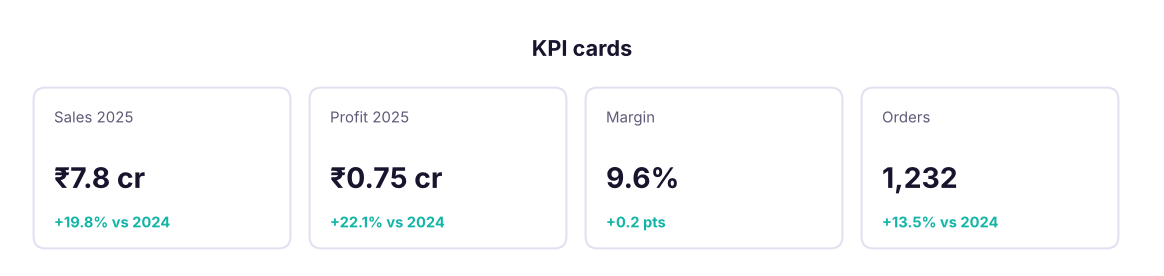
KPI cards
Each card is a sheet: the measure on Text, Mark type Text, a formatted label such as ₹<SUM(Sales)> cr, and a small YoY calculation in the second line with ▲/▼ and colour.
import pandas as pd, numpy as np
df = pd.read_csv("superstore_sales.csv", parse_dates=["order_date"])
y = df.groupby(df.order_date.dt.year).agg(sales=("sales", "sum"), profit=("profit", "sum"), orders=("order_id", "nunique"), customers=("customer_id", "nunique"))
cur, prev = y.loc[2025], y.loc[2024]
for k in y.columns:
    unit = 1e7 if k in ("sales", "profit") else 1
    val = f"₹{cur[k] / unit:,.2f} cr" if unit > 1 else f"{cur[k]:,.0f}"
    print(f"{k:10s} 2025: {val:>12s}   YoY {cur[k] / prev[k] - 1:+.1%}")
print(f"margin 2025: {cur.profit / cur.sales:.1%} (2024: {prev.profit / prev.sales:.1%})")sales 2025: ₹7.84 cr YoY +19.8% profit 2025: ₹0.75 cr YoY +22.1% orders 2025: 1,232 YoY +13.5% customers 2025: 623 YoY +5.6% margin 2025: 9.6% (2024: 9.4%)
Dashboard actions
Dashboard → Actions → Add Action:
| Action | What happens | Example |
|---|---|---|
| Filter | Clicking a mark filters other sheets | Click a state on the map → the bar charts show only that state |
| Highlight | Matching marks stay bright, others fade | Hover a category to highlight it everywhere |
| Go to Sheet | Navigates to another dashboard | Click a KPI to open a detail page |
| URL | Opens a web page, with field values in the link | Open a product page or a Google search for the customer |
| Change Parameter | Clicking sets a parameter value | Click a region to set the "Selected region" parameter used in titles |
| Change Set Values | Clicking adds/removes marks from a set | Drill-in: show sub-categories only for the clicked category (set on a calculation) |
Choose Run action on: Select / Hover / Menu and what happens when clearing the selection (show all values is the usual choice). Use Use as Filter (the funnel icon on a sheet) for the quick version.
Create a set on Category; a calculation IF [Category Set] THEN [Sub-Category] ELSE [Category] END on Rows; a Change Set Values action targeting the set. Clicking a category expands it to its sub-categories in the same chart, and clicking again collapses it.
Stories
A Story is a sequence of Story Points, each a captioned snapshot of a sheet or dashboard with its filters. Use it for a presentation: "1. Sales grew 20% in 2025 → 2. Growth came from Technology in the South → 3. Tables and Bookcases lose money → 4. Recommendation".
Publishing and sharing
| Destination | How | Notes |
|---|---|---|
| Tableau Public | File → Save to Tableau Public | Free; public; you can allow viewers to download the workbook; embed code for your portfolio site |
| Tableau Cloud / Server | Server → Publish Workbook | Choose project, permissions, embedded or prompted credentials, refresh schedule |
| Subscriptions and alerts | On the published view | Email snapshots on a schedule; alerts when a measure crosses a threshold |
| Export | Worksheet/Dashboard → Export Image, PowerPoint, PDF, Crosstab | For offline reports |
| Embedding | Share → copy embed code | Place a dashboard inside a website or portal |
Before publishing: give every sheet a clear title, hide unused sheets (right-click the dashboard tab → Hide All Sheets), add tooltips in plain language, set the default filters, and test on the phone layout.
Capstone 1: Superstore India executive dashboard
Build a one-page dashboard for the Head of Sales:
- KPI row: Sales, Profit, Margin, Orders for the selected year with YoY change.
- Trend: monthly Sales (bars) and Margin (line) on a dual axis.
- Map: filled map of profit margin by state (diverging palette).
- Category → sub-category bars with the drill-in set action; loss-makers in orange.
- Top 10 customers table with a Top N parameter.
- Filters: Year (single value), Region, Segment, applied to all sheets.
d25 = df[df.order_date.dt.year == 2025]
sub = d25.groupby("sub_category").agg(sales=("sales", "sum"), profit=("profit", "sum"))
sub["margin %"] = (sub.profit / sub.sales * 100).round(1)
print("2025 loss-making sub-categories:"); print(sub[sub.profit < 0].round(0))
st = d25.groupby("state").agg(sales=("sales", "sum"), profit=("profit", "sum")); st["margin %"] = st.profit / st.sales * 100
print("\nHighest and lowest margin states:", st["margin %"].idxmax(), f"{st['margin %'].max():.1f}%", "|", st["margin %"].idxmin(), f"{st['margin %'].min():.1f}%")2025 loss-making sub-categories:
sales profit margin %
sub_category
Bookcases 3918268.0 -169018.0 -4.0
Tables 5297064.0 -286188.0 -5.0
Highest and lowest margin states: West Bengal 13.7% | Telangana 7.5%Write three insight sentences under the dashboard, for example: what grew, what lost money, and what you recommend (discount caps on loss-making sub-categories, focus on the highest-margin states).
Capstone 2: Regional video-game sales (the class case study)
The same business case you solved in Excel in class: how do video-game sales vary across North America, Europe, Japan and other regions, and where are the opportunities?
vg = pd.read_csv("video_game_sales.csv")
print(vg.shape, "| years", vg.year.min(), "to", vg.year.max())
regions = ["na_sales", "eu_sales", "jp_sales", "other_sales"]
best_genre = vg.groupby("genre")[regions].sum().idxmax()
print("Best genre by region:", best_genre.to_dict())
vg["decade"] = (vg.year // 10 * 10).astype(str) + "s"
print((vg.groupby("decade")[regions].sum()).round(1))(2400, 11) | years 2010 to 2025
Best genre by region: {'na_sales': 'Sports', 'eu_sales': 'Sports', 'jp_sales': 'Role-Playing', 'other_sales': 'Sports'}
na_sales eu_sales jp_sales other_sales
decade
2010s 312.5 249.4 136.8 108.9
2020s 188.1 148.9 83.8 62.6Tableau tasks:
1. Pivot the four regional sales columns into Region / Sales on the Data Source page (select the columns → Pivot), so Region becomes one dimension.
2. Top 5 games per region: Region on Rows, Name on Rows, SUM(Sales) on Columns, a Top 5 by Sales computed per region using RANK(SUM([Sales])) with Compute Using = Name, filtered ≤ 5.
3. Regional sales by decade: a calculated field STR(INT(YEAR([Year])/10)*10) + "s" (or ([Year] // 10) * 10 if Year is a number) and a stacked bar coloured by Region.
4. Best genre in each region: highlight table of Genre × Region with the maximum per region marked using WINDOW_MAX.
5. A stacked bar of regional distribution over time with a clear title, then assemble all four into a dashboard with a Region filter action.
Summary
- Plan the questions and the layout before building; use containers and a Z-pattern.
- Actions make dashboards interactive: filter, highlight, go to sheet, URL, parameter and set actions.
- Stories present insights step by step.
- Publish to Tableau Public for portfolios and to Cloud/Server for work, with refresh schedules and permissions.
1. Which action makes clicking a state on a map filter every other chart?
2. Which feature expands a category into its sub-categories in place when clicked?
3. Where should the KPI cards usually go?
4. What is a Story in Tableau?
5. Which is NOT available on Tableau Public?
6. How do you make one Region filter apply to all sheets on a dashboard?
Publish both dashboards to Tableau Public. For each, write: the audience, three questions it answers, three insights with numbers, and two recommendations. Add the links to your resume and LinkedIn Featured section.
Show solution
Superstore: KPI row, dual-axis trend, margin map, drill-in category chart, Top N customers, three filters applied to all sheets, filter actions from the map and the category chart. Video games: pivoted regions, Top 5 per region (RANK table calc), decade stacked bar, genre × region highlight table, filter action on Region. Insights should quote numbers from your own views.
Q: How do you design a dashboard for executives? Start from their decisions: 3–5 KPIs with comparisons at the top, one trend, one breakdown, one exception list; consistent colours; filters applied to all sheets; tooltips that explain; a phone layout; and a short written insight.
Q: Filter action vs highlight action? A filter action removes non-selected data from target sheets; a highlight action keeps all data but fades the non-matching marks, preserving context.
Q: How do you share a Tableau dashboard securely? Publish to Tableau Cloud or Server with project permissions, use row-level security (user filters or entitlement tables with USERNAME()), schedule extract refreshes, and share via links, subscriptions or embedding with authentication. Never use Tableau Public for confidential data.
Practise more online
Free, trusted places to test yourself on this topic. Links open the original site in a new tab.