
How AI Agents Work and How to Build One Without Code
Understand the agent loop (perceive, reason, act, observe), the building blocks of an agent (model, instructions, tools, memory, knowledge, guardrails), the main design patterns, and when not to use an agent. Then build agents without code in Claude (Projects, Skills, connectors), n8n, Make, Zapier Agents and Replit Agent, and evaluate them like a product.
- Explain the agent loop and the components of an AI agent
- Choose between a workflow, a single agent and a multi-agent system
- Build a no-code agent in Claude, n8n or Zapier with tools, memory and guardrails
- Write agent instructions and tool descriptions that work
- Evaluate an agent with a test set, success metrics and human-in-the-loop controls
What makes something an agent
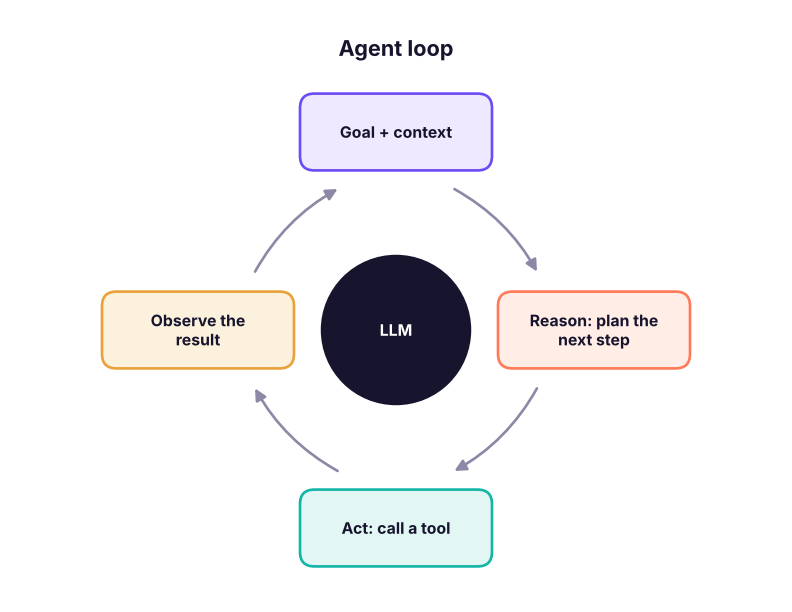
A chatbot answers. An agent pursues a goal: it decides which steps to take, uses tools, looks at the results and keeps going until the goal is met or it needs a human.
# A toy agent loop: the "model" chooses tools until the goal is met. Real agents let the LLM make these choices.
inventory = {"SKU-1": 0, "SKU-2": 14}
def check_stock(sku): return inventory[sku]
def create_po(sku, qty): return f"PO created for {qty} x {sku}"
goal_skus, log = ["SKU-1", "SKU-2"], []
for sku in goal_skus:                                 # plan: check each SKU
    stock = check_stock(sku); log.append(f"check_stock({sku}) -> {stock}")      # act + observe
    if stock < 5: log.append(create_po(sku, 50))                               # decide next action from the observation
log.append("Done: low-stock items reordered; summary sent to the manager")
print("\n".join(log))check_stock(SKU-1) -> 0 PO created for 50 x SKU-1 check_stock(SKU-2) -> 14 Done: low-stock items reordered; summary sent to the manager
The building blocks
| Block | What it is | Example |
|---|---|---|
| Model | The LLM that reasons | Claude Sonnet for most agents, a smaller model for routing |
| Instructions | Role, goal, rules, tone, when to stop or escalate | "You are a refunds assistant. Never approve above ₹5,000; create a ticket instead." |
| Tools | Actions via APIs or MCP | Search orders, create ticket, send email |
| Knowledge | Documents the agent retrieves (RAG) | Policy handbook, FAQs |
| Memory | What it remembers within and across sessions | Conversation window, customer profile |
| Guardrails | Limits and checks | Approval before sending, PII masking, spending caps |
| Orchestration | How steps and agents are connected | Single agent, router, planner + workers |
Workflow, agent or multi-agent?
| Pattern | Use when | Example |
|---|---|---|
| Workflow with AI steps | The steps are known and fixed | Classify email → extract fields → update CRM |
| Single agent with tools | The path varies by request | Support assistant that looks up orders, policies and tickets |
| Router | Different request types need different specialists | Billing vs technical vs sales |
| Planner + workers / multi-agent | Big tasks that split into parallel parts | Research a market: one agent per competitor, one writer |
| Human-in-the-loop | Money, legal, customer-facing actions | Agent drafts; a person approves |
Most business value comes from workflows with one or two AI steps. Add agent autonomy only where the path genuinely varies, and keep a human approval step for anything irreversible.
Build agents without code
Claude (Projects, connectors, Skills)
- Create a Project ("Customer insights agent"), add instructions (role, goal, output format) and upload knowledge files.
- Turn on connectors (Drive, Gmail, Slack, Jira) so Claude can act with tools; turn on web search if needed.
- Add Skills: packaged instructions and scripts Claude loads when relevant (for example your PRD format or brand style).
- Use Research for multi-step investigations, and scheduled tasks or Claude Code for recurring work.
n8n AI Agent
Chat Trigger or Gmail Trigger → AI Agent node with a chat model (Claude), Window Buffer Memory, tools (Google Sheets, HTTP Request, a sub-workflow, a Vector Store retriever, MCP Client) → output. Add an IF before risky actions and a Slack approval step with a Wait node.
Zapier Agents and Make AI Agents
- Zapier Agents: describe the job in plain English, give it access to apps (thousands available), set triggers (new email, schedule, form) and let it act; review its activity log.
- Make AI Agents: an agent module inside a scenario that chooses which scenario tools to run, with Make's visual routers around it.
Replit Agent and app builders
Replit Agent, Lovable and Bolt build whole apps from a prompt, including a backend and database, so you can wrap an agent in a real product UI (for example an internal "HR policy assistant" web app).
Writing instructions that work
Role: You are the order-support agent for NovaMart, an online store in India.
Goal: Resolve order questions in one reply when possible.
Tools: get_order(order_id), get_policy(topic), create_ticket(summary, priority).
Rules:
- Always look up the order before answering. Quote amounts in ₹.
- Refunds above ₹5,000, legal threats or angry customers: create_ticket with priority "high" and tell the customer a person will reply within 4 hours.
- Never ask for card numbers or OTPs.
Output: a short reply in the customer's language, then a one-line internal note.
Stop when the question is answered or a ticket is created.
Evaluating an agent like a product
| Metric | How |
|---|---|
| Task success rate | A test set of 30–100 real requests with expected outcomes |
| Correct tool use | Did it call the right tool with the right arguments? |
| Escalation accuracy | Did it hand over the cases it should have? |
| Safety | Red-team prompts: injection, PII, policy violations |
| Cost and latency | Tokens and seconds per task |
| User outcome | CSAT, deflection rate, time saved |
results = [("refund under limit", "resolved", "resolved"), ("refund 9000", "escalated", "escalated"), ("where is my order", "resolved", "resolved"),
           ("angry legal threat", "escalated", "resolved"), ("change address", "resolved", "resolved"), ("asks for OTP", "refused", "refused")]
ok = sum(exp == got for _, exp, got in results)
print(f"success {ok}/{len(results)} = {ok / len(results):.0%}")
print("failures:", [case for case, exp, got in results if exp != got])success 5/6 = 83% failures: ['angry legal threat']
The failed case (a legal threat answered instead of escalated) becomes a new rule and a new test, which is how agents improve release by release.
Summary
- Agents loop: reason, act with tools, observe, repeat, until the goal is met or a human is needed.
- Components: model, instructions, tools, knowledge, memory, guardrails, orchestration.
- Prefer workflows for fixed steps; agents for variable paths; humans approve risky actions.
- Build without code in Claude, n8n, Zapier, Make or Replit; evaluate with test sets and metrics.
1. What distinguishes an agent from a chatbot?
2. The steps are always the same: classify, extract, update CRM. What should you build?
3. Which component limits what an agent may do, such as refunds above a cap?
4. How should you evaluate an agent before launch?
5. In n8n, what gives an agent conversation memory?
6. What should happen before an agent sends money or emails customers?
Build a "meeting follow-up agent" without code: input a meeting transcript; the agent extracts decisions and action items, creates tasks in your tool (Asana, Jira or a Sheet), drafts a follow-up email for your approval, and posts a summary to Slack. Write its instructions, list its tools, and create a 10-case test set.
Show solution
Use Claude with connectors or n8n (Chat/Form Trigger → AI Agent with Sheets/Jira, Gmail draft and Slack tools, Window Buffer Memory). Instructions must define the output format, owners and due dates, and require approval before sending email. Test cases should include missing owners, conflicting dates, confidential items and a transcript with an injected instruction.
Q: When would you not use an agent? When the steps are fixed, accuracy must be deterministic, latency or cost is tight, or the action is high risk without a review step. A workflow, rules or a form is simpler and more reliable.
Q: How do you design human-in-the-loop for an agent? Classify actions by risk; auto-run read-only and low-risk actions; require approval for writes that affect customers, money or data; show the agent's reasoning and proposed action; log decisions; and feed overrides into evaluation.
Q: What metrics would you track for an AI support agent? Resolution and deflection rate, escalation accuracy, CSAT, handling time, cost per conversation, safety incidents and the percentage of answers with correct sources.
Q: Single agent or multi-agent? Start with one agent and good tools; split into specialists only when tasks are clearly separable or the context gets too large, because coordination adds cost and failure modes.
Q: How do you write a good tool description? Say exactly when to use the tool, what each parameter means with allowed values, what it returns, and when not to use it; then test with realistic prompts.
Learn more
Practise more online
Free, trusted places to test yourself on this topic. Links open the original site in a new tab.