
Claude Code Complete Tutorial: From First Prompt to Agents, MCP, Hooks and Automation
Learn Claude Code, Anthropic's agentic coding tool, from installation to advanced workflows. Work in the terminal, IDE, desktop and web; give context with CLAUDE.md; use plan mode, permissions and checkpoints; run slash commands, custom commands and Skills; add MCP servers; automate with hooks, subagents, headless mode and GitHub Actions; and follow best practices that work for PMs, analysts and engineers.
- Install Claude Code and complete a task end to end in a real project
- Give Claude the right context with CLAUDE.md, files and plan mode
- Control safety with permissions, checkpoints and reviews
- Extend Claude Code with custom commands, Skills, MCP servers, hooks and subagents
- Automate work with headless mode and GitHub Actions, and know when to use each surface
What Claude Code is
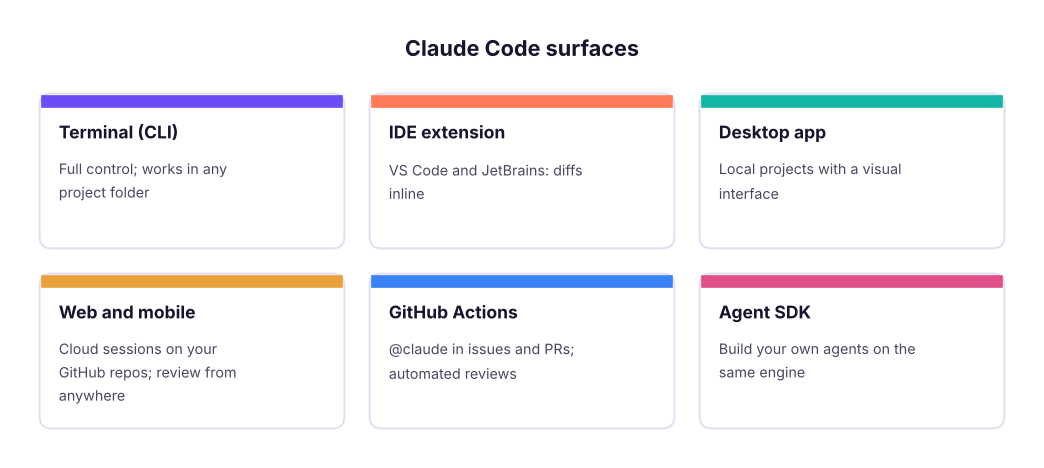
Claude Code is an agent that works inside your project: it reads files, runs commands, edits code, runs tests and opens pull requests, while you watch and approve. It runs in the terminal, in VS Code / JetBrains, in the Claude desktop app, on the web (cloud sessions connected to GitHub) and on mobile, and it is used by non-engineers too: PMs build prototypes and analyses, analysts clean data and build reports.
Install and first session
- Install: follow the current command on the Claude Code docs page (native installer for macOS/Linux/Windows, or
npm install -g @anthropic-ai/claude-codewith Node.js 18+). - Open a terminal in your project folder and run
claude. Sign in with your Claude subscription or an API key. - Ask: "Explain this project's structure and how to run it." Claude reads files and summarises.
- Ask for a small change: "Add input validation to the signup form and a test for it." Review each proposed edit and command, then approve.
- Run
/initto create a CLAUDE.md with build commands and conventions for future sessions.
Context: CLAUDE.md and how to brief Claude
CLAUDE.md files are loaded automatically: the project one (shared in git), personal ones (~/.claude/CLAUDE.md) and folder-level ones. Put in them: how to build and test, code style, architecture notes, "never do" rules, and how to publish. Keep them short and specific.
Good prompts give the goal, constraints and how to verify:
Goal: add a "download CSV" button to the orders page.
Constraints: reuse the existing Table component; no new dependencies; Indian date format.
Done when: the button downloads the filtered rows, a unit test covers the CSV builder, and `npm test` passes.
Plan first, then implement.
Use @path/to/file to point at files, paste screenshots for UI bugs, and ask Claude to read docs URLs.
Plan mode, permissions and checkpoints
| Feature | What it does |
|---|---|
| Plan mode (Shift+Tab to cycle modes) | Claude researches and proposes a plan without editing; you approve before it acts |
| Permission modes | Ask before edits/commands (default), auto-accept edits, or plan only; allowlist safe commands in settings.json |
| Checkpoints / rewind | Every edit is checkpointed; Esc Esc or /rewind restores code and conversation |
/clear, /compact |
Start fresh or summarise long sessions to save context |
| Thinking | Ask Claude to "think hard" for tricky design problems |
Built-in slash commands worth knowing
| Command | Use |
|---|---|
/init |
Create CLAUDE.md |
/model |
Switch model |
/permissions |
Manage allowed tools and commands |
/mcp |
List and authenticate MCP servers |
/agents |
Create and manage subagents |
/hooks |
Configure hooks |
/review, /security-review |
Review the current changes |
/cost, /context |
See usage and what fills the context |
/resume |
Continue a previous session |
Extending Claude Code
Custom slash commands and Skills
- Custom commands: Markdown files in
.claude/commands/(project) or~/.claude/commands/(personal);/release-notescan run your team's exact release-notes prompt with$ARGUMENTS. - Skills: folders with a
SKILL.md(instructions + optional scripts) that Claude loads automatically when relevant, e.g. "our PRD format", "brand slide style", "how to deploy". Plugins bundle commands, skills, agents, hooks and MCP servers for sharing.
MCP servers
claude mcp add connects tools (GitHub, Jira, Sentry, Postgres, Figma, Playwright browser, your own). Claude can then read a Figma frame and build the UI, query a read-only database to answer a data question, or open a browser to test the app.
Hooks
Hooks run your own commands at moments in Claude's workflow (before or after a tool call, when a session ends). Examples: run the formatter after every edit, block edits to .env files, send a Slack message when a long task finishes.
Subagents
Specialised agents with their own instructions, tools and context window, e.g. a "code reviewer", "test writer" or "data analyst". Claude delegates to them, keeping the main conversation focused.
Automation
| Mode | How | Use |
|---|---|---|
| Headless | claude -p "summarise yesterday's error logs" --output-format json |
Scripts, cron jobs, CI |
| GitHub Actions | Install the Claude GitHub app / action; mention @claude in an issue or PR |
Implement issues, fix CI, review PRs |
| Cloud sessions | Start tasks on claude.ai/code against a GitHub repo | Parallel work without your laptop |
| Agent SDK | Python/TypeScript SDK with the same agent loop and tools | Build your own production agents |
Best practices
practices = {"Explore → plan → code → verify": "Ask Claude to read and plan before editing; finish with tests or a demo",
             "Give it a way to check its work": "Tests, a build command, screenshots, a sample input/output",
             "Small, reviewable steps": "One feature per session; commit often; use branches",
             "Keep context clean": "/clear between unrelated tasks; CLAUDE.md for durable rules",
             "Never paste secrets": "Use env vars and secret stores; review diffs before pushing"}
for k, v in practices.items(): print(f"- {k}: {v}")- Explore → plan → code → verify: Ask Claude to read and plan before editing; finish with tests or a demo - Give it a way to check its work: Tests, a build command, screenshots, a sample input/output - Small, reviewable steps: One feature per session; commit often; use branches - Keep context clean: /clear between unrelated tasks; CLAUDE.md for durable rules - Never paste secrets: Use env vars and secret stores; review diffs before pushing
For PMs and analysts
- Prototype: "Build a clickable prototype of the onboarding flow in this Figma file using our component library," then share a preview link.
- Data analysis: point Claude at CSVs or a read-only database and ask for cleaned data, charts and a written summary.
- Specs and research: read the codebase to answer "how does pricing work today?" before writing a PRD.
- Automation scripts: small scripts that pull data from APIs into Sheets or Slack.
Summary
- Claude Code is an agent in your project: it reads, edits, runs and verifies, with your approval.
- CLAUDE.md, clear goals and a verification step give the best results; plan mode and checkpoints keep you safe.
- Extend with custom commands, Skills, MCP servers, hooks and subagents; automate with headless mode, GitHub Actions, cloud sessions and the Agent SDK.
1. What is CLAUDE.md for?
2. Which mode lets Claude research and propose before changing anything?
3. How do you undo a set of Claude's edits?
4. What are hooks?
5. How do you run Claude Code in a script or CI job?
6. What best improves the quality of Claude's code changes?
In a small project (or a new folder), use Claude Code to: run /init, build a small web page that reads a CSV of sales and shows a chart, add a test, create a custom command /weekly-report that summarises the CSV, and add one hook that runs the formatter after edits.
Show solution
Check: CLAUDE.md lists run/test commands; the page renders; the test passes; .claude/commands/weekly-report.md contains the prompt with $ARGUMENTS; the hook is in .claude/settings.json under PostToolUse for Edit/Write tools running your formatter.
Q: How do you keep an AI coding agent safe in a real codebase? Permissions and allowlists, plan mode for big changes, branches and PR reviews, tests in CI, no secrets in context, hooks that block sensitive files, and least-privilege MCP servers.
Q: How would a PM use Claude Code? Prototype features, answer "how does it work today" questions from the codebase, analyse data, write scripts that automate reporting, and review changes in plain language.
Q: Subagents vs Skills? Subagents are separate agents with their own context and tools for delegated tasks; Skills are packaged instructions and scripts that the main agent loads when a task needs them.
Q: What is headless mode used for? Running Claude Code non-interactively from scripts, scheduled jobs and CI, with structured output.
Q: How do you measure the impact of AI coding tools on a team? Lead time for changes, PR throughput and review time, defect and rollback rates, test coverage, and developer satisfaction, compared with a baseline.
Learn more
Practise more online
Free, trusted places to test yourself on this topic. Links open the original site in a new tab.