
Power Query, Star Schema & Data Modelling (Adventure Cycles)
Prepare and model data the professional way. Clean data in Power Query, load a star schema (fact and dimension tables), create one-to-many relationships, understand filter direction, build and mark a date table, create hierarchies, and avoid the most common modelling mistakes, using the Adventure Cycles case study.
- Apply common Power Query steps and read the Applied Steps and M code
- Explain fact tables, dimension tables and the star schema, and why they beat one wide table
- Create relationships with the right cardinality and filter direction, and explain how filters flow
- Build a date table, mark it as a date table and add hierarchies
- Diagnose common modelling problems (many-to-many, ambiguous paths, missing dates)
Why modelling matters more than visuals
Beautiful visuals on a bad model give wrong or slow answers. In Power BI the data model decides what numbers mean: how tables relate, which table filters which, and how fast DAX runs. The golden rule: model as a star schema.
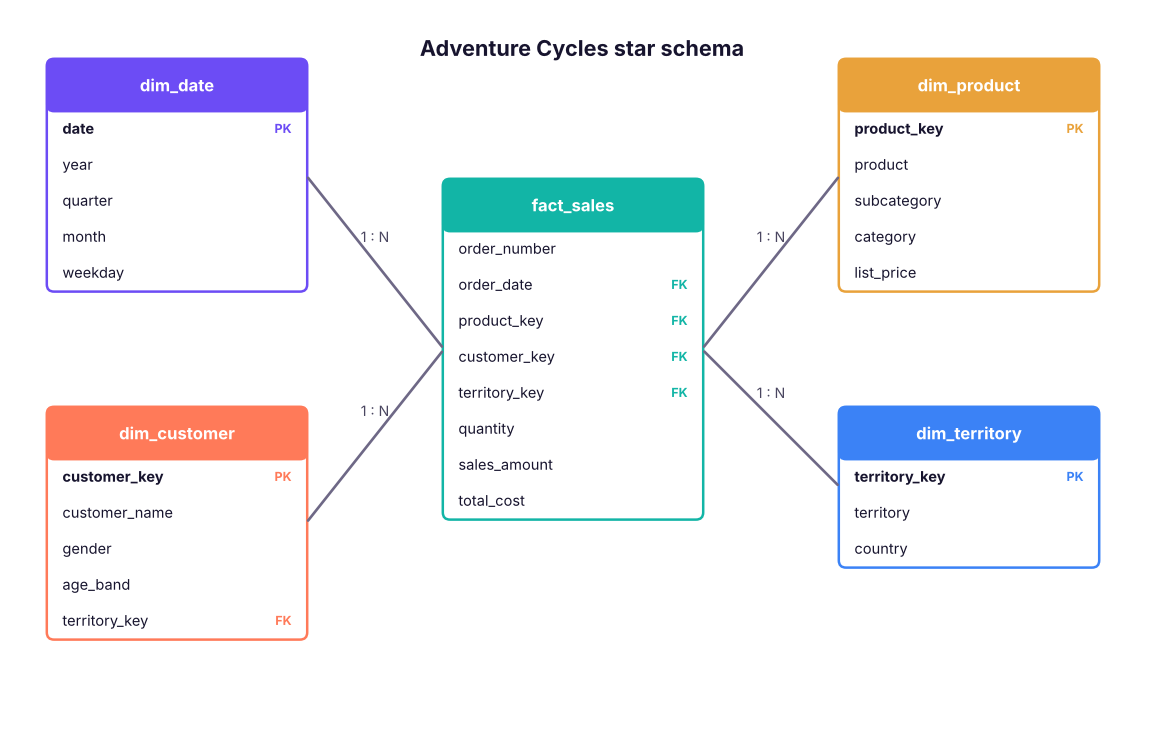
| Fact table | Dimension table | |
|---|---|---|
| Describes | Events or transactions (a sale, a click, a shipment) | The "who, what, where, when" of those events |
| Rows | Many (millions) | Fewer (thousands) |
| Columns | Keys + numeric measures (quantity, amount, cost) | Keys + descriptive attributes (name, category, city) |
| Changes | Grows constantly | Changes rarely |
| Example | fact_sales |
dim_product, dim_customer, dim_date |
Why a star beats one big flat table: smaller file (text stored once), faster visuals, one place to fix a name, correct filtering across several facts, and simpler DAX. A snowflake (dimensions normalised into sub-dimensions) works but adds joins; prefer a star in Power BI.
The Adventure Cycles dataset
A fictional bicycle company sells bikes, components, clothing and accessories in India, the UAE and Singapore. The model has one fact table and four dimensions (plus the date table):
import pandas as pd
D = "adventure_cycles/"
fact = pd.read_csv(D + "fact_sales.csv", parse_dates=["order_date"]); prod = pd.read_csv(D + "dim_product.csv")
cust = pd.read_csv(D + "dim_customer.csv"); terr = pd.read_csv(D + "dim_territory.csv"); dates = pd.read_csv(D + "dim_date.csv", parse_dates=["date"])
for name, df in [("fact_sales", fact), ("dim_product", prod), ("dim_customer", cust), ("dim_territory", terr), ("dim_date", dates)]:
    print(f"{name:14s} {df.shape[0]:>6,} rows × {df.shape[1]} columns")
fact.head(4)fact_sales 9,000 rows × 9 columns dim_product 45 rows × 6 columns dim_customer 1,200 rows × 5 columns dim_territory 6 rows × 3 columns dim_date 1,096 rows × 6 columns
| order_number | order_date | product_key | customer_key | territory_key | quantity | unit_price | sales_amount | total_cost | |
|---|---|---|---|---|---|---|---|---|---|
| 0 | SO50387 | 2023-01-01 | 11 | 103 | 1 | 3 | 114,400 | 343,200 | 201,360 |
| 1 | SO55797 | 2023-01-01 | 32 | 798 | 1 | 3 | 200 | 570 | 390 |
| 2 | SO51236 | 2023-01-01 | 9 | 750 | 5 | 1 | 126,700 | 120,365 | 78,380 |
| 3 | SO55082 | 2023-01-01 | 13 | 759 | 1 | 1 | 79,600 | 75,620 | 46,670 |
Power Query: prepare each table
Open Transform Data. Typical steps for each table (all recorded in Applied Steps):
| Table | Steps |
|---|---|
fact_sales |
Set types (order_date Date; quantity Whole number; amounts Fixed decimal number), remove blank rows, add Profit = [sales_amount] - [total_cost] as a custom column, keep only needed columns |
dim_product |
Trim/clean text, set list_price and standard_cost as decimals, remove duplicates on product_key |
dim_customer |
Replace M/F with Male/Female, remove duplicates on customer_key |
dim_territory |
Check there is one row per territory_key |
dim_date |
Set date to Date; sort month by month_no later in the model |
Query settings (right pane) shows each step; click any step to see the data at that point, and delete a step to undo it. Rename queries (Sales, Product…) because those names become table names in the model.
Common transformations (from class and beyond)
| Goal | Where | Notes |
|---|---|---|
| Promote headers, set types | Home | Always check types: wrong types break relationships |
| Remove duplicates / blank rows | Home → Remove rows | Needed for dimension keys |
| Split column by delimiter | Transform → Split Column | e.g. IN-2025-00042 |
| Replace values, trim, clean, format | Transform | |
| Unpivot columns | Transform → Unpivot | Turn Jan, Feb, Mar columns into rows (Excel Lesson 12) |
| Merge queries | Home → Merge | A join; use to bring a category into the fact (but prefer relationships) |
| Append queries | Home → Append | Stack monthly files |
| Group by | Transform → Group By | Pre-aggregate large tables |
| Conditional / Custom column | Add Column | M formulas |
| Reference vs Duplicate | Right-click query | Reference creates a new query that starts from the output of another (changes flow through); Duplicate copies the steps |
| Parameters | Home → Manage Parameters | A variable such as a file path or a start date, used in queries (Lesson 4) |
| Disable load | Right-click query | Keep helper queries out of the model |
What is "query folding"?
When the source is a database (SQL Server, Snowflake), Power Query translates your steps into SQL and lets the database do the work, instead of downloading everything first. A step that cannot be translated "breaks folding" and everything after it runs locally. Check by right-clicking a step → View Native Query. Keep foldable steps (filter, select columns, merge, group) before non-foldable ones.
let
    Source   = Csv.Document(File.Contents("C:\Data\fact_sales.csv"), [Delimiter=",", Encoding=65001]),
    Promoted = Table.PromoteHeaders(Source, [PromoteAllScalars=true]),
    Typed    = Table.TransformColumnTypes(Promoted, {{"order_date", type date}, {"quantity", Int64.Type},
                   {"sales_amount", Currency.Type}, {"total_cost", Currency.Type}}),
    Profit   = Table.AddColumn(Typed, "profit", each [sales_amount] - [total_cost], Currency.Type)
in
    Profit
Relationships
A relationship links a column in one table to a column in another so that filters can flow between them. In Model view, drag dim_product[product_key] onto fact_sales[product_key]. Power BI usually detects relationships on same-named columns (Home → Manage relationships → Autodetect).
Cardinality
| Type | Meaning | Use |
|---|---|---|
| One-to-many (1:*) | A key is unique in one table, repeated in the other | The standard: dimension → fact |
| One-to-one (1:1) | Unique on both sides | Splitting a wide table |
| Many-to-many (*:*) | Duplicates on both sides | Avoid; use a bridge table |
Check uniqueness before creating a one-to-many: if the "one" side has duplicates Power BI will complain.
checks = {"dim_product[product_key]": prod.product_key, "dim_customer[customer_key]": cust.customer_key, "dim_territory[territory_key]": terr.territory_key, "dim_date[date]": dates.date}
for name, col in checks.items(): print(f"{name:30s} unique: {col.is_unique}")
orphans = {"product_key": ~fact.product_key.isin(prod.product_key), "customer_key": ~fact.customer_key.isin(cust.customer_key), "territory_key": ~fact.territory_key.isin(terr.territory_key)}
for k, m in orphans.items(): print(f"fact rows with no matching {k}: {m.sum()}")dim_product[product_key] unique: True dim_customer[customer_key] unique: True dim_territory[territory_key] unique: True dim_date[date] unique: True fact rows with no matching product_key: 0 fact rows with no matching customer_key: 0 fact rows with no matching territory_key: 0
Unique keys on the "one" side and no orphans on the "many" side: the model is safe.
Filter direction
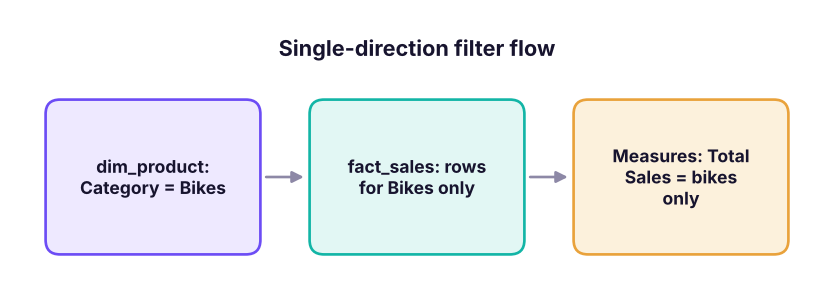
| Setting | Behaviour | Advice |
|---|---|---|
| Single (dimension → fact) | A selection in a dimension filters the fact | Default and best |
| Both (bi-directional) | Filters also flow back from fact to dimension | Use only when needed (many-to-many, "show only customers who bought"); can cause ambiguity and slowness |
| Active vs inactive relationship | Only one active path between two tables; an inactive one can be switched on in DAX with USERELATIONSHIP |
e.g. Order Date and Ship Date both link to the date table |
Seeing the model work
Total sales by product category and by country, using the relationships (a join in pandas):
m = fact.merge(prod, on="product_key").merge(terr, on="territory_key")
m["profit"] = m.sales_amount - m.total_cost
out = m.pivot_table(index="category", columns="country", values="sales_amount", aggfunc="sum", margins=True, margins_name="Total") / 1e6
out.round(1).rename_axis("Sales (₹ million)")| country | India | Singapore | UAE | Total |
|---|---|---|---|---|
| Sales (₹ million) | ||||
| Accessories | 6.7 | 1.7 | 1.3 | 9.8 |
| Bikes | 320.6 | 74.8 | 71.3 | 466.8 |
| Clothing | 6.0 | 1.3 | 1.1 | 8.5 |
| Components | 73.5 | 18.8 | 17.2 | 109.6 |
| Total | 406.9 | 96.7 | 91.0 | 594.6 |