DAX Time Intelligence, Ranking, Parameters & Dynamic Measures
Make dashboards answer "compared with when?". Build year-to-date, month-to-date, same-period-last-year, month-on-month and year-on-year measures, rolling averages, rankings with RANKX and TOPN, what-if parameters, field parameters and dynamic measure switching, and know visual calculations and calculation groups.
● Power BI classes 3–4✦ Power BI Desktop 2026 (field parameters, calculation groups, visual calculations)Advanced⏱ 150 min
Time-intelligence functions move or expand the date filter: "this year to date", "the same period last year". They only work when:
You have a date table with every date (Lesson 2),
it is marked as a date table, and
it is related to the fact table's date column.
Always use the date table'sDate column inside time functions, never the fact table's date.
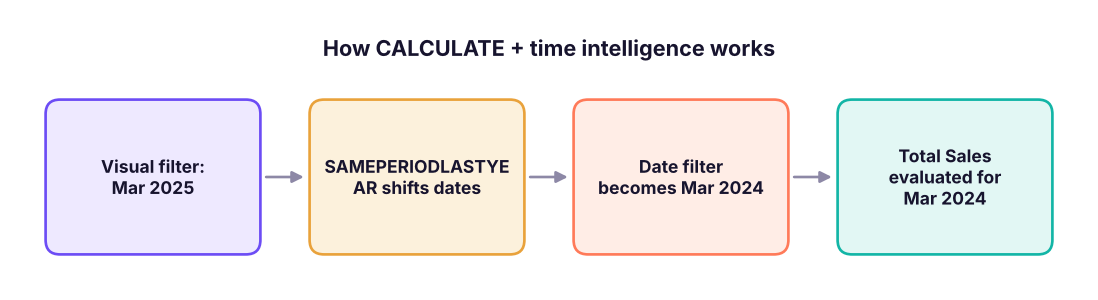
Time intelligence changes the date filter, then CALCULATE re-evaluates the measure. SAMEPERIODLASTYEAR shifts the selected dates back exactly one year.
(Values in ₹ million.) In a Power BI matrix with dim_date[month] on rows and these measures in the Values area you would see exactly this.
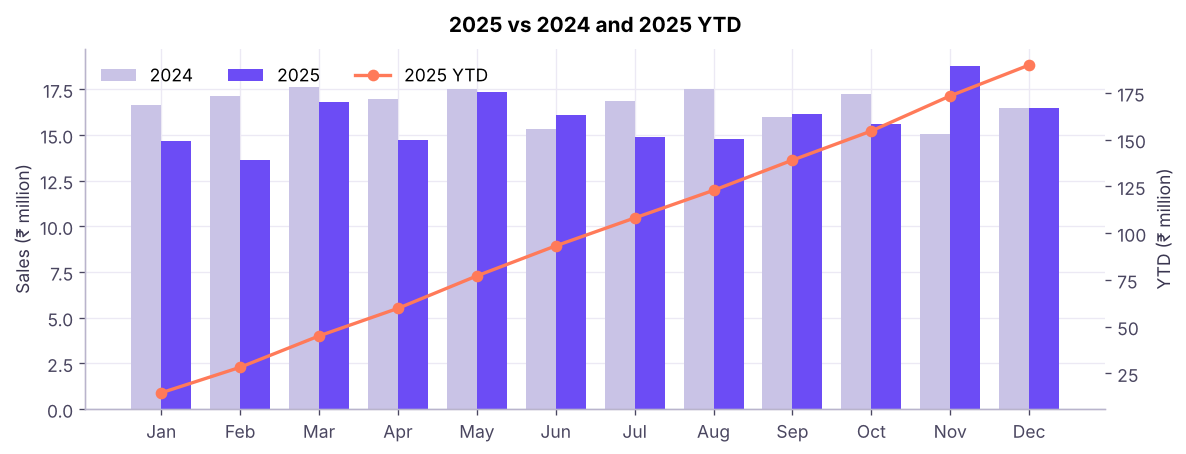
Monthly sales for 2025 against the same month in 2024, with year-to-date sales on the right axis. This is the classic "this year vs last year" chart.
Common mistakesCommon time-intelligence bugs
Date table not marked / has gaps: SAMEPERIODLASTYEAR returns blank or wrong values.
Using the fact table's date column in the function: use dim_date[date].
Comparing partial periods: the current month has data for 10 days, last year's month has 31, so YoY looks terrible. Compare "to date" with DATESYTD and SAMEPERIODLASTYEAR, or restrict to complete months.
Fiscal year: pass "31-3" as the year-end argument to TOTALYTD, and create Fiscal Year and Fiscal Quarter columns in the date table.
Showing a "last year" value in months with no data (future months): wrap with IF ( [Total Sales] <> BLANK (), … ).
Rolling windows and running totals
DAX
-- Rolling 3-month sales ending at the last visible date
Sales Rolling 3M =
CALCULATE ( [Total Sales], DATESINPERIOD ( dim_date[date], MAX ( dim_date[date] ), -3, MONTH ) )
-- Rolling 3-month average of monthly sales (average over the months in the window)
Avg Monthly Sales R3M =
DIVIDE ( [Sales Rolling 3M], 3 ) -- valid once three full months exist in the window-- Running total across all dates up to the current one
Sales Running Total =
CALCULATE ( [Total Sales], FILTER ( ALL ( dim_date[date] ), dim_date[date] <= MAX ( dim_date[date] ) ) )
In SQL this was SUM() OVER (ORDER BY … ROWS BETWEEN …) (SQL Lesson 12). DAX does the same thing by redefining the date filter.
-- Rank of each product category by sales within the current context
Category Rank = RANKX ( ALL ( dim_product[category] ), [Total Sales], , DESC, DENSE )

-- Show only the top 5 products: sales of a product if it is in the top 5, else blank
Top 5 Product Sales =
VAR top5 = TOPN ( 5, ALL ( dim_product[product] ), [Total Sales], DESC )
RETURN CALCULATE ( [Total Sales], KEEPFILTERS ( top5 ) )

-- Everything outside the top 5, as one "Others" value
Others Sales = [Total Sales] - [Top 5 Product Sales]
For simple Top N visuals, you do not need DAX: in the Filters pane, choose the visual's field → Filter type Top N → Show items Top 5 → By value Total Sales → Apply filter. Use DAX when the Top N must respond to slicers in a custom way or you need an "Others" bar.
Python
prod_sales = f.merge(p, on="product_key").groupby(["category", "product"]).sales_amount.sum().sort_values(ascending=False)
top5 = prod_sales.head(5)
print((top5 / 1e6).round(1).to_string())
print(f"\nTop 5 total : {top5.sum() / 1e6:,.1f} M   |   Others: {(prod_sales.sum() - top5.sum()) / 1e6:,.1f} M   |   Top 5 share: {top5.sum() / prod_sales.sum():.1%}")
Output
category  product
Bikes     Road Bike E-331        51.3
          Mountain Bike C-245    42.4
          Touring Bike A-507     39.7
          Mountain Bike D-662    36.2
          Mountain Bike B-168    35.9

Top 5 total : 205.4 M   |   Others: 389.2 M   |   Top 5 share: 34.5%
Parameters
What-if parameter
Modeling → New parameter → Numeric range: name Price Change %, from −20 to +20, increment 1, default 0, and tick Add slicer. Power BI creates a table and a measure Price Change % Value. Use it in your own measure to simulate:
Home → Manage parameters creates parameters used inside queries, for example StartDate or a ServerName. Use them to switch between a test and a production database, or to filter large tables at load time. In the Service, parameters can be changed in dataset settings.
Dynamic measure switching
A very popular pattern: a slicer that lets users choose which measure the chart shows (Sales, Profit, Orders).
The modern way: Field parameters. Modeling → New parameter → Fields: add Total Sales, Total Profit, Orders; tick Add slicer. Power BI creates a table with the three measures; use that table's field on a chart's axis or values and the slicer swaps the measure. A field parameter can also switch axis fields (Category, Country, Year).
Format strings can be dynamic too (Power BI 2024+ "dynamic format string"): thousands for sales, percentage for margin.
KPI visuals and forecasting
KPI visual: needs a value (indicator), a trend axis (date) and a target (for example last year's sales). Colours show good/bad.
Gauge: current vs target; min/max/target set in the format pane.
Forecasting: in a line chart with a date axis, Analytics pane → Forecast → set forecast length (for example 6 months), confidence interval (95%) and seasonality (12 points). Power BI uses exponential smoothing (ETS). It is a quick what-comes-next view, not a replacement for proper forecasting models (ML track).
Analytics pane also offers constant lines, average, min/max, percentile lines, trend lines, and anomaly detection.
Newer DAX features worth knowing
Feature
What it is
Calculation groups
A reusable "time-intelligence switcher": define Current, YTD, LY, YoY % once and apply them to every measure (created in Tabular Editor or in the model view in recent versions)
Visual calculations
DAX written inside a visual that can refer to other fields in the visual (running sum, moving average, % of parent) with simple functions such as RUNNINGSUM, MOVINGAVERAGE, PREVIOUS, FIRST
DAX query view
EVALUATE queries to test and debug measures; Copilot can write DAX here
User-defined functions (DAX UDFs)
Reusable functions defined with the FUNCTION keyword (preview)
INFO.* functions
Query model metadata (INFO.TABLES(), INFO.MEASURES())
DAX
-- Visual calculation (typed in the visual's formula bar)
Running Sales = RUNNINGSUM ( [Total Sales] )
Moving Avg 3  = MOVINGAVERAGE ( [Total Sales], 3 )
Do it with AIDo it with AI
Copilot can write time-intelligence measures from a sentence ("Show sales year to date versus last year"). It works best if the date table is marked, columns and tables have clear names, and you add descriptions to measures (Model view → Properties). Check the generated DAX uses your dim_date[date] (not the fact table's date), and confirm one value by hand.
Summary
Key takeaways
Time intelligence needs a continuous, marked date table, related to the fact; always reference the date table's column.
TOTALYTD, SAMEPERIODLASTYEAR, DATEADD, PARALLELPERIOD, DATESINPERIOD build YTD, last-year, MoM, YoY and rolling windows; DIVIDE ( current − previous, previous ) gives growth.
RANKX ranks, TOPN selects the top items (add an "Others" measure); the Filters-pane Top N is the no-code route.
What-if parameters simulate scenarios; field parameters let users switch measures or axes; the disconnected table + SWITCH pattern does the same in older models.
Know calculation groups, visual calculations and the DAX query view for advanced work.
Quick quiz6 questions · tap an answer to check it
1. Which measure shows year-to-date sales?
Answer: B. TOTALYTD accumulates from the start of the year to the current date.
2. SAMEPERIODLASTYEAR returns blank for every month. What should you check first?
Answer: B. Time intelligence relies on a valid date table.
3. Which formula gives month-on-month growth?
Answer: B. Growth rate = (current − previous) ÷ previous, using DIVIDE.
4. What does a field parameter let users do?
Answer: B. Field parameters create a slicer that swaps fields in visuals.
5. In the Indian financial year (April–March), how do you build YTD sales?
Answer: B. The third argument sets the year-end date.
6. What is the correct way to compute "Others" after a Top 5?
Answer: B. Others = overall total − Top N total.
ExerciseTime-intelligence measures
For Adventure Cycles write measures for: (1) sales for the last 12 months ending at the selected date; (2) YoY % by category; (3) the best month of each year; (4) a what-if parameter "Discount %" from 0 to 30 that reduces Total Sales and shows simulated profit margin.
Q: What do you need for time-intelligence functions to work?
A date table with continuous dates covering the data, marked as a date table, related to the fact table by date.
Q: How would you calculate YoY growth?Sales LY = CALCULATE ( [Total Sales], SAMEPERIODLASTYEAR ( dim_date[date] ) ) then YoY % = DIVIDE ( [Total Sales] - [Sales LY], [Sales LY] ).
Q: How can users choose which metric a chart shows?
Field parameters (modern) or a disconnected table with a SWITCH ( SELECTEDVALUE (…), … ) measure.
Q: How do you show Top N plus an "Others" bar?
A Top N measure using TOPN/KEEPFILTERS and an Others measure = total − Top N.
Practise more online
Free, trusted places to test yourself on this topic. Links open the original site in a new tab.