
Power BI Service, Connectivity Modes, Security & Capstone
Take a report from Desktop to the people who need it. Understand Import, DirectQuery, Live connection, composite models and Direct Lake, publish to the Service, schedule refresh with a gateway, share through workspaces and apps, secure data with row-level security, tune performance, work with Copilot and Fabric, and complete the Adventure Cycles capstone.
- Compare Import, DirectQuery, Live connection, Composite and Direct Lake modes and choose one
- Publish a report, configure scheduled refresh and a gateway, and share via workspaces, apps and links
- Implement and test row-level security (static and dynamic) with DAX filters
- Use Performance Analyzer and best practices to speed up a model
- Describe Microsoft Fabric, Copilot and governance basics, and deliver an end-to-end capstone
Connectivity modes
How does Power BI get its data: copy it into the model (Import) or ask the source each time (DirectQuery)?
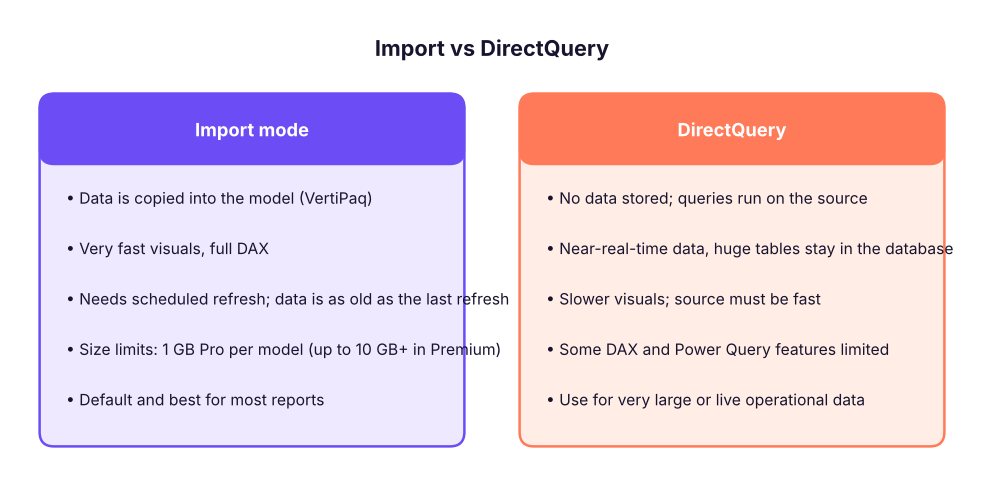
| Mode | Data stored in Power BI? | Refresh | Typical use |
|---|---|---|---|
| Import | Yes (compressed copy) | Scheduled (up to 8/day Pro, 48/day Premium) | Most reports; Excel, CSV, SQL |
| DirectQuery | No | Live per interaction | Large SQL databases, near-real-time dashboards |
| Live connection | No: connects to an existing semantic model (Analysis Services or a published Power BI dataset) | Live | One governed model shared by many reports |
| Composite model | Mix: some tables Import, some DirectQuery, plus other semantic models | Both | Large fact in DirectQuery, small dimensions imported (dual storage mode) |
| Direct Lake (Fabric) | Reads Delta tables in OneLake directly | Automatic on data change | Import-like speed with no copy; Fabric only |
Start with Import. Move to DirectQuery or Direct Lake only if data volume or freshness requirements force you to. Reduce the data first: only needed columns, aggregated tables, filtered date range.
Publishing and the Service
- In Desktop: Home → Publish → sign in with a work/school account → choose a workspace (not "My workspace" if you want to share).
- The Service now has a semantic model (the data and model) and a report (the visuals): the same objects in two items.
- Open the report in the browser, check it, and Share with people or add it to an app.
- Configure scheduled refresh (Settings → Semantic model → Scheduled refresh) with credentials; for on-premises sources install a gateway.
Workspaces, apps and sharing
| Concept | Meaning |
|---|---|
| Workspace | A shared container for semantic models, reports, dashboards. Roles: Admin, Member, Contributor, Viewer |
| App | A packaged, read-only, curated set of reports/dashboards published to a wider audience (best way to distribute) |
| Share link | Give a person or group access to one report (they need appropriate licence) |
| Dashboard | One page of pinned tiles from several reports; supports alerts and mobile |
| Subscriptions & alerts | Email snapshots on a schedule; data alerts on card/gauge thresholds |
| Export / Analyze in Excel / Embed | PDF/PowerPoint export, live pivot tables on the model, secure embedding in portals |
| Deployment pipelines | Move content Dev → Test → Prod with controlled changes |
| Endorsement, sensitivity labels, lineage view | Governance: certified datasets, data classification, impact analysis |
Refresh and gateways
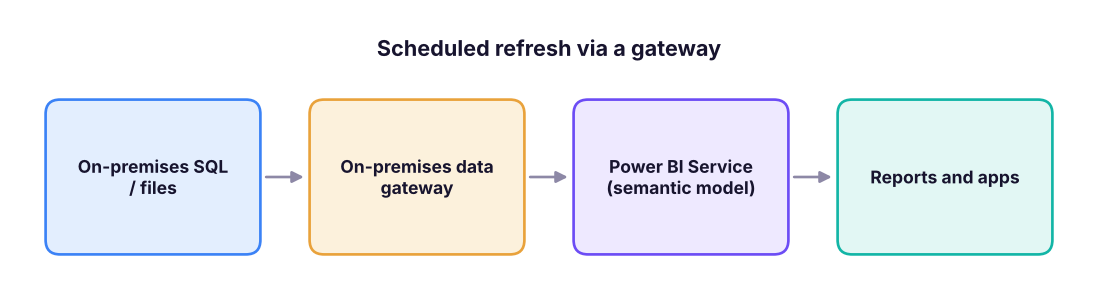
- Cloud sources (Azure SQL, SharePoint Online, OneDrive files) refresh directly without a gateway.
- A standard gateway serves many users; a personal gateway is for one person's testing.
- Incremental refresh (right-click a table → Incremental refresh) loads only new or changed partitions (for example the last 7 days) instead of the whole fact table: essential for big tables. It needs
RangeStartandRangeEndparameters (Power Query). - Refresh failures (expired credentials, changed schema, gateway offline) appear in the refresh history; enable failure notifications.
Row-level security (RLS)
RLS restricts the rows a user can see: a country manager sees only their country.
Static RLS
- Modeling → Manage roles → Create. Name the role
India. - Select the table
dim_territoryand add a DAX filter:[country] = "India". - Create roles
UAEandSingaporethe same way. Save. - View as (Modeling → View as) → choose a role to test what that person sees.
- Publish; in the Service: Semantic model → Security → add users or groups to each role.
Because filters flow from dim_territory to fact_sales through the relationship, the India role sees only India's sales everywhere:
import pandas as pd
D = "adventure_cycles/"
f = pd.read_csv(D + "fact_sales.csv"); t = pd.read_csv(D + "dim_territory.csv"); m = f.merge(t, on="territory_key")
role_view = m.groupby("country").agg(orders=("order_number", "count"), sales=("sales_amount", "sum"))
role_view["sales"] = (role_view.sales / 1e6).round(1)
role_view.rename(columns={"sales": "sales (₹ M) visible to that role"}).assign(**{"all-company total (₹ M)": round(f.sales_amount.sum() / 1e6, 1)})| orders | sales (₹ M) visible to that role | all-company total (₹ M) | |
|---|---|---|---|
| country | |||
| India | 6135 | 406.9 | 594.6 |
| Singapore | 1487 | 96.7 | 594.6 |
| UAE | 1378 | 91.0 | 594.6 |
Dynamic RLS
One role for everyone, driven by a security table mapping user emails to territories:
-- Table 'UserSecurity'(user_email, territory_key); role filter on dim_territory:
[territory_key]
    IN CALCULATETABLE ( VALUES ( UserSecurity[territory_key] ),
                        UserSecurity[user_email] = USERPRINCIPALNAME () )
USERPRINCIPALNAME() returns the signed-in user's email. Add a person to the table and they get access automatically: no role edits.
- RLS applies to Viewers only. Workspace Admins, Members and Contributors can see all data.
- RLS does not hide column names or the existence of tables; use object-level security for that.
- Filters must flow along relationships: apply RLS to a dimension, not the fact, where possible.
- RLS with DirectQuery depends on the source's behaviour; test with View as.
- Do not store secrets or personal data you do not need in the model. In India, handling personal data is governed by the DPDP Act 2023.
Performance tuning
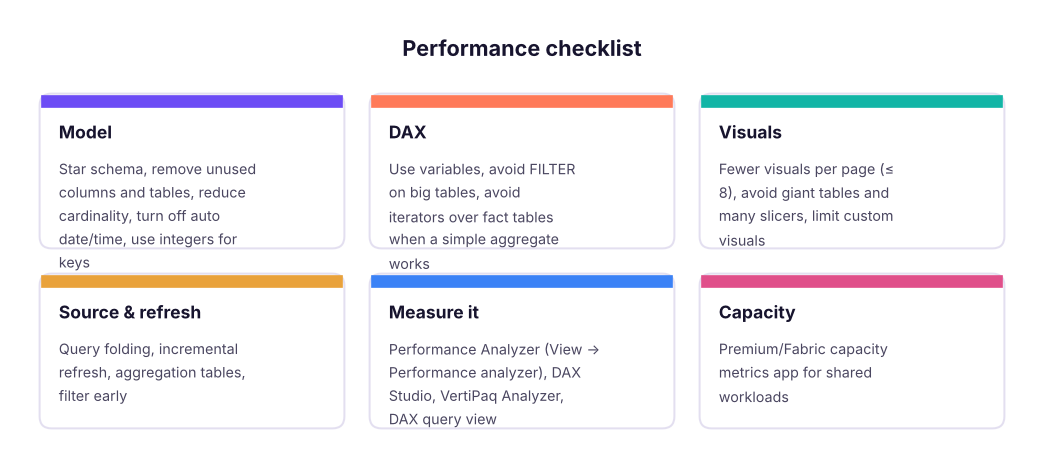
Performance Analyzer (View → Performance analyzer → Start recording → refresh visuals) shows, for each visual, the time spent in DAX query, Visual display and Other. If DAX dominates, optimise the measure or model; if display dominates, simplify the visual.
Practical wins:
| Problem | Fix |
|---|---|
| File is huge | Remove columns you do not use; store IDs as integers; split date and time; use Whole number/Fixed decimal rather than text |
| Slow card or matrix | Rewrite measures with variables; avoid nested FILTER ( ALL ( bigTable ) ) |
| Slow refresh | Query folding, incremental refresh, filter at source |
| Slow DirectQuery | Aggregations table (Import) in front of the big table; index the source |
| Many identical measures | Calculation groups or one base measure referenced by others |
Microsoft Fabric, Copilot and AI
Microsoft Fabric unifies data engineering, data factory, data warehouse, data science, real-time analytics and Power BI over one data lake called OneLake (Delta/Parquet files). Power BI's semantic models can use Direct Lake over lakehouse tables. For data professionals: learn SQL (this track), Python (next track), and then Fabric notebooks, pipelines and lakehouses.
| Fabric item | Role |
|---|---|
| Lakehouse / Warehouse | Stores data (files + SQL endpoint) |
| Dataflow Gen2 | Power Query in the cloud |
| Notebook | Python/Spark for data science and engineering |
| Pipeline | Orchestrates data movement |
| Semantic model | The Power BI model (formerly "dataset") |
| Eventstream / Real-time | Streaming data |
Copilot in Power BI (needs a Fabric or Premium capacity): create a report page from a prompt, suggest measures and write DAX, summarise a page or report, and answer questions about the data. Prep data for AI (add descriptions, synonyms, verified answers) improves the answers. Treat it as a fast assistant, not an authority.
Governance and good practice
- One certified semantic model per subject area, many thin reports on top (live connection).
- Name items consistently (
Sales – Overview,Sales_Model); keep an owner and a description. - Version control: PBIP + Git, deployment pipelines, a test workspace.
- Document measures (description property) and keep a measure dictionary.
- Limit who can export data; use sensitivity labels.
- Monitor usage (usage metrics report) and remove unused reports.
- Train users: the best dashboard is useless if nobody trusts or understands it.
Capstone: Adventure Cycles performance review
The sales director wants a 3-page Power BI report for the Adventure Cycles leadership team and country managers: (1) Executive summary, (2) Products and customers, (3) Country detail (drill-through). It must show YTD and vs-last-year numbers, let managers filter by year, country and category, and each country manager must see only their own country.
Deliverables checklist
| Step | What to produce |
|---|---|
| 1. Requirements | Audience, questions, KPIs, refresh frequency, security |
| 2. Data | Load the five CSV tables; clean in Power Query |
| 3. Model | Star schema, relationships, marked date table, hierarchies (Lessons 1–2) |
| 4. Measures | Sales, Profit, Margin %, Orders, AOV, YTD, LY, YoY %, Rank, Top 5 + Others (Lessons 3–4) |
| 5. Report | Three pages, theme, tooltips, drill-through, bookmarks, mobile layout (Lesson 5) |
| 6. Security | RLS roles by country, tested with View as |
| 7. Publish | Workspace, scheduled refresh, app, subscriptions (this lesson) |
| 8. Documentation | One-page "how to read this report" and a measure dictionary |
The analysis the report must support: verify your page numbers against this independent calculation.
m = f.merge(t, on="territory_key").merge(pd.read_csv(D + "dim_product.csv"), on="product_key"); m["profit"] = m.sales_amount - m.total_cost
m["order_date"] = pd.to_datetime(m.order_date); m["year"] = m.order_date.dt.year
kpi = m.groupby("year").agg(sales=("sales_amount", "sum"), profit=("profit", "sum"), orders=("order_number", "nunique"))
kpi["margin_%"] = (kpi.profit / kpi.sales * 100).round(1); kpi["YoY_sales_%"] = (kpi.sales.pct_change() * 100).round(1)
kpi[["sales", "profit"]] = (kpi[["sales", "profit"]] / 1e6).round(1)
kpi| sales | profit | orders | margin_% | YoY_sales_% | |
|---|---|---|---|---|---|
| year | |||||
| 2023 | 204.2 | 72.2 | 3004 | 35.4 | NaN |
| 2024 | 200.4 | 70.8 | 3022 | 35.3 | -1.9 |
| 2025 | 189.9 | 67.2 | 2974 | 35.4 | -5.2 |