
Generative AI for Analysts: How It Works, Prompting & AI vs GenAI vs Agentic AI
Understand what generative AI is and how large language models behave (tokens, context, temperature, hallucination), how AI, machine learning, deep learning, GenAI and agentic AI differ, and how to write prompts that give analysts accurate, checkable results, with reusable templates and privacy rules.
- Explain the relationship between AI, ML, deep learning, generative AI and agentic AI
- Describe in plain language how an LLM generates text and why it can be confidently wrong (hallucination)
- Write prompts using role, context, task, format and constraints, with examples and step-by-step reasoning
- Use prompt templates for common analyst tasks and know what never to paste into an AI tool
- Choose a suitable tool and check an AI answer before using it
The AI family tree
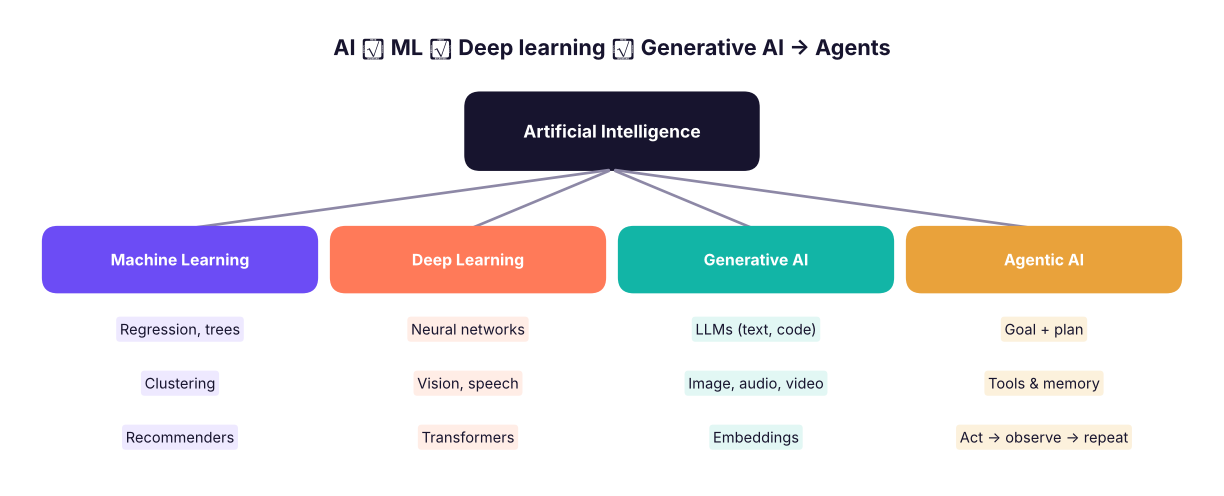
| Term | What it means | Example |
|---|---|---|
| AI | Machines doing tasks that normally need human intelligence | Rule-based chess engine, spam filter |
| Machine learning (ML) | Systems that learn patterns from data instead of following hand-written rules | Predict loan default from past loans |
| Deep learning | ML with many-layered neural networks | Image recognition, speech-to-text |
| Generative AI (GenAI) | Models that create new content (text, images, code, audio) | ChatGPT, Claude, Gemini, Copilot, Midjourney |
| LLM | Large language model: the GenAI engine for text and code | GPT, Claude, Gemini, Llama |
| Agentic AI | An LLM plus goals, tools and a loop: it plans, calls tools (run SQL, search, edit files), checks results and continues until the goal is met | An analyst agent that explores a database and writes the report |
| AGI | Hypothetical AI at human level across tasks | Not here yet; ignore the hype |
AI vs GenAI vs agentic AI
| Traditional ML | Generative AI | Agentic AI | |
|---|---|---|---|
| Output | A prediction (number, label) | New content (text, code, image) | A completed multi-step task |
| Input | Structured data | A prompt (text, files, images) | A goal in plain language |
| Control | You train and deploy a model | You ask once, get one answer | The system decides the next step |
| Example | "Will this customer churn?" → 0.82 | "Summarise these reviews" → paragraph | "Find why sales fell in Q3 and draft a memo" → runs queries, charts, writes |
| Main risk | Bias, drift | Hallucination | Hallucination plus actions: wrong tool calls, runaway cost, security |
How an LLM works (without maths)
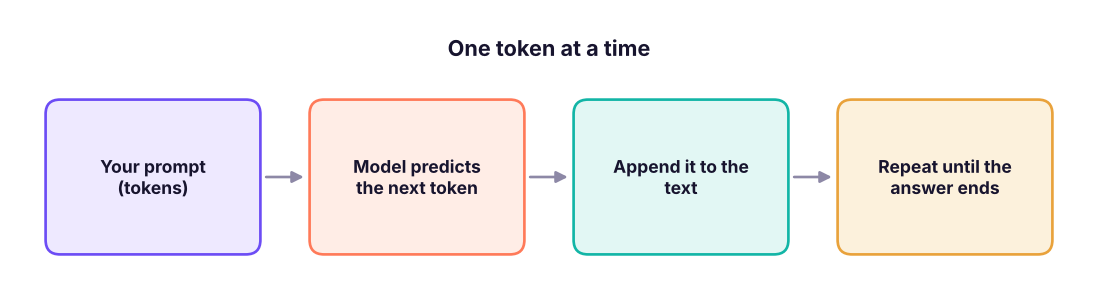
An LLM is trained on vast amounts of text to predict the next token (a word or word piece). Repeating that prediction one token at a time produces sentences, code and tables. It has learnt statistical patterns of language, facts and reasoning styles, but it does not look things up unless it is given a tool or documents.
| Concept | Meaning | Why analysts care |
|---|---|---|
| Token | Roughly ¾ of an English word (about 4 characters) | Limits and costs are measured in tokens |
| Context window | How much text the model can consider at once (prompt + answer) | A long file may not fit; the model forgets what is outside |
| Temperature | Randomness of word choice | Low (0–0.3) for SQL, maths and extraction; higher for brainstorming |
| System prompt | Hidden instructions that set behaviour | Custom GPTs/Projects store your standing instructions |
| Training cut-off | The model's knowledge stops at some date | It may not know recent tools or prices; give it documents |
| Grounding / RAG | Supplying real documents or data in the prompt (Retrieval-Augmented Generation) | Cuts hallucination: "answer only from this file" |
| Tool use / function calling | The model asks the app to run a calculator, database query or code | Makes answers computed instead of guessed |
| Multimodal | Accepts images, PDFs, audio as well as text | Paste a chart screenshot and ask what it shows |
Because an LLM generates plausible text, it can state false things with complete confidence: invented statistics, non-existent functions, wrong column names, fake citations. Never use an AI answer as a fact until you have checked it: run the code, recompute the number, open the source.
Prompt engineering for analysts
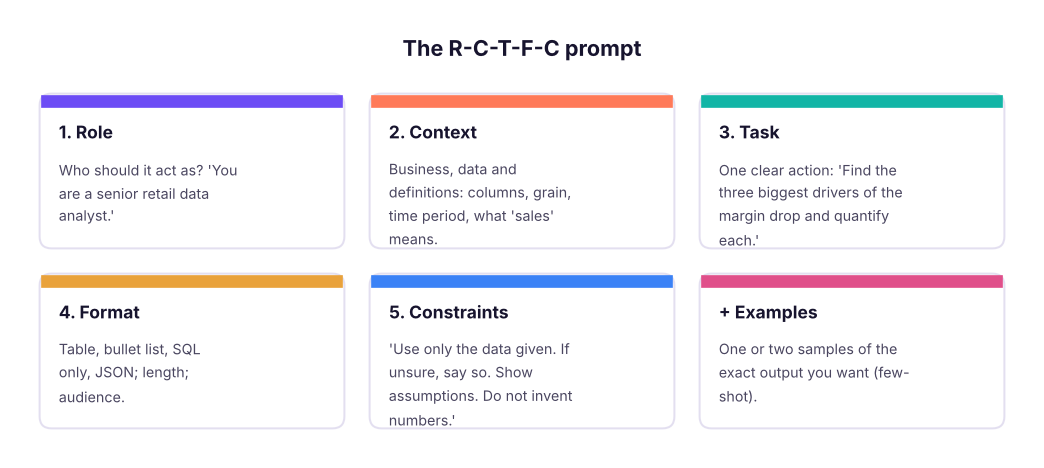
A prompt is an instruction plus the material the model needs. The most reliable structure has five parts:
Weak vs strong prompt
Weak: "Analyse my sales data."
Strong:
Role: You are a senior retail data analyst for an Indian omnichannel retailer.
Context: Table superstore(order_id, order_date, region, category, sub_category, sales, discount, profit),
         one row per order line, Jan 2023–Dec 2025, amounts in rupees. Margin = profit / sales.
Task: Explain why overall margin is only about 9%. Look at category, sub-category and discount band.
Format: (1) a 3-bullet summary for the CFO, (2) a table of the 5 worst sub-categories (sales, profit, margin),
        (3) the SQL Server queries you used.
Constraints: Use only the columns listed. State any assumption. If a number cannot be computed from the table, say so.
The strong prompt names the grain, the metric definition, the output format and the rules for uncertainty. The result is far more likely to be right and checkable.
Core techniques
| Technique | How | Use for |
|---|---|---|
| Be specific | Name columns, periods, units, audience | Everything |
| Few-shot examples | Show 2–3 input→output pairs | Classification, extraction, tone matching |
| Step by step | "First list the assumptions, then compute, then summarise" | Multi-step analysis; makes errors visible |
| Ask for checks | "Then list three ways this answer could be wrong" | Self-critique |
| Structured output | "Return JSON with keys…" | Feeding results into code |
| Delimiters | Put data in """triple quotes""" or XML tags |
Stops the model confusing instructions with data |
| Iterate | Treat the first answer as a draft; refine with follow-ups | Always |
| Give it the schema, not the data | Column names and 5 sample rows, not the whole file | Privacy, token limits |
Prompt templates for common analyst jobs
| Job | Template (replace brackets) |
|---|---|
| Explain a formula | "Explain this Excel formula step by step for a beginner and give a simpler alternative: [formula]" |
| Write SQL | "Dialect: SQL Server. Tables: [schema with keys and grain]. Write a query that [question]. Return only SQL, then list assumptions." |
| Debug code/SQL | "This [language] query gives [wrong result / this error]. Expected: [x]. Query: [code]. Find the cause and show the fix." |
| Clean data | "Here are 10 sample values of column [x]: [list]. Propose normalisation rules and a mapping table; flag ambiguous cases." |
| Interpret results | "Here is a result table: [table]. Write 3 insights for a non-technical manager, each with a number, and 2 caveats." |
| Choose a chart | "I want to show [message] to [audience] with [data]. Recommend a chart and what to label." |
| Draft a report | "Turn these findings into a one-page memo with: situation, key findings, recommendation, risks. Keep it under 250 words." |
| Interview practice | "Act as an interviewer for a data analyst role; ask one SQL question at a time and give feedback on my answer." |
Prompt: "Explain this formula: =IFERROR(INDEX($C:$C,MATCH(1,($A:$A=F2)*($B:$B=G2),0)),"Not found")" A good answer says it looks up C where A equals F2 and B equals G2 (a two-condition lookup), returns "Not found" if none, and notes it needs array evaluation in older Excel. You can verify by testing it on 3 rows.
Choosing and using AI tools
| Tool type | Examples | Good for | Watch out |
|---|---|---|---|
| General chat assistants | Claude, ChatGPT, Gemini, Copilot, Grok, Perplexity | Explaining, drafting, code, brainstorming | Data privacy; hallucination |
| Search-grounded | Perplexity, Gemini with search, Copilot with web | Fresh facts with citations | Check the cited pages; sources vary in quality |
| Document/notebook tools | NotebookLM, Projects, Custom GPTs | Answering only from your files | Quality depends on the files |
| Embedded in apps | Copilot in Excel/Power BI, Gemini in Sheets, Metabase/ MinusX, Claude in Excel | Work where the data is | Permissions; see next lessons |
| Coding assistants and agents | Claude Code, Cursor, GitHub Copilot, Codex | Writing and running code, analysis scripts | Review diffs; run tests; secrets |
Never paste
- Personal data (names with phone numbers, emails, Aadhaar/PAN, health, salary of identifiable people) unless your company's approved tool and policy allow it.
- Confidential business data (unreleased financials, customer lists, contracts, source code, credentials, API keys) into public tools.
- Anything you are not allowed to share: client data under NDA.
Use enterprise versions with data-protection terms, mask or sample the data (replace names with IDs, share the schema and 5 fake rows), and follow your organisation's AI policy. In India, personal data is also covered by the Digital Personal Data Protection Act, 2023.
A verification habit for every AI answer
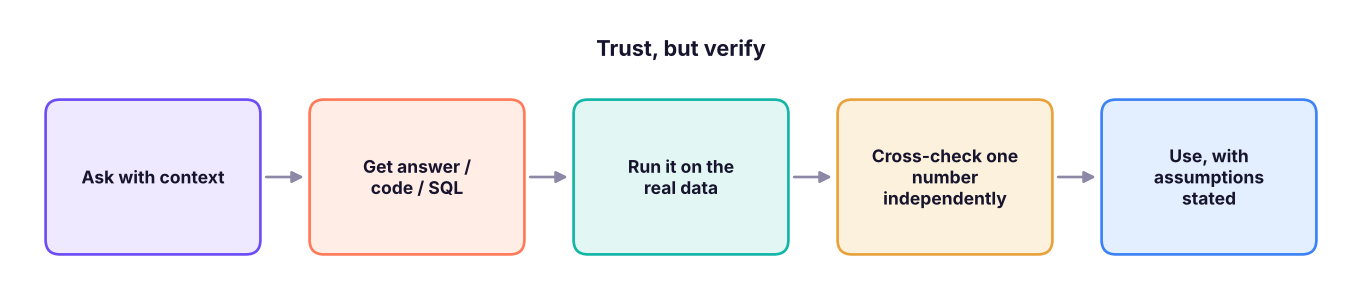
Here is why verification matters. Suppose an AI writes the following query for "average order value per region". It looks right, runs without error and returns plausible numbers, but it averages order lines, not orders:
import duckdb, pandas as pd
con = duckdb.connect()
con.execute("CREATE TABLE superstore AS SELECT * FROM read_csv_auto('superstore_sales.csv')")
wrong = con.execute("SELECT region, ROUND(AVG(sales), 0) AS avg_order_value FROM superstore GROUP BY region ORDER BY region").df()
right = con.execute("""SELECT region, ROUND(AVG(order_total), 0) AS avg_order_value
                       FROM (SELECT region, order_id, SUM(sales) AS order_total FROM superstore GROUP BY region, order_id) GROUP BY region ORDER BY region""").df()
pd.DataFrame({"region": wrong.region, "AI query (per line)": wrong.avg_order_value, "Correct (per order)": right.avg_order_value})| region | AI query (per line) | Correct (per order) | |
|---|---|---|---|
| 0 | East | 30,521 | 60,684 |
| 1 | North | 32,038 | 61,892 |
| 2 | South | 32,580 | 64,925 |
| 3 | West | 32,192 | 64,067 |
The AI's version understates order value by roughly half, because an average order has about two lines. A one-line sanity check (total sales ÷ number of orders) would have caught it:
tot = con.execute("SELECT SUM(sales) / COUNT(DISTINCT order_id) FROM superstore").fetchone()[0]
print(f"Total sales / distinct orders = {tot:,.0f}")Total sales / distinct orders = 62,942
- Wrong grain: counting lines as orders, double-counting after a join (Lesson 8 in SQL).
- Invented columns or functions: the code references a field that does not exist.
- Silent assumptions: it picks a date range, currency or definition without saying.
- Plausible but unverified numbers: especially when asked to "estimate" or "recall" data it cannot see.
- Over-agreeing: if you assert something wrong, it may follow you. Ask it to challenge your assumption.
- Stale knowledge: new tool versions, prices, laws.
Responsible use
- Accountability stays with you: you sign off on the analysis, not the model.
- Bias: models mirror training data; check outputs for unfair assumptions about people or regions.
- Transparency: tell stakeholders when AI helped, and keep the prompt and verification notes.
- Copyright and attribution: do not present generated text or images as someone else's work; check licences.
- Security: treat prompts and uploaded files as data leaving your machine; beware prompt injection when an AI reads untrusted documents or web pages.
Pick a task you did earlier in this course (for example the SQL discount analysis). Ask an AI assistant to produce the answer from the schema, run its SQL, and compare with the result in this handbook. Where it differs, work out why (grain? date range? definition?). This single exercise teaches more about AI limits than any lecture.
Summary
- AI ⊃ ML ⊃ deep learning ⊃ generative AI; agentic AI = an LLM with goals, tools and a loop.
- LLMs predict the next token; they do not look things up unless given documents or tools. They can hallucinate, so verify every answer.
- Good prompts have role, context, task, format and constraints, use examples and step-by-step reasoning, and give the schema (not the sensitive data).
- Use templates for SQL, formulas, cleaning, insights, memos and interview practice; iterate.
- Never paste personal or confidential data into public tools; mask or sample, and follow your company policy.
- The analyst's loop: ask with context → run on real data → cross-check one number → state assumptions.
1. Which statement best describes agentic AI?
2. Why can an LLM state wrong facts confidently?
3. Which setting is best for generating SQL?
4. What makes a prompt more reliable for analysis?
5. A teammate wants to paste a customer list with phone numbers into a public chatbot. Best advice?
6. An AI query returns an "average order value" half the size of total sales ÷ orders. The likely error is:
Rewrite this weak prompt into a strong one and list three checks you will run on the answer: "Tell me about churn in my telecom data." The data is telecom_churn.csv with columns customer_id, senior_citizen, tenure_months, contract, internet_service, payment_method, monthly_charges, total_charges, support_calls, churn (Yes/No).
Show solution
Strong prompt: "Role: senior telecom data analyst. Context: table telecom_churn(…columns…), one row per subscriber, churn = Yes/No. Task: find which contract types, tenure bands and support-call counts have the highest churn rate and quantify each. Format: a table (group, customers, churners, churn %), three bullets for a retention manager, and the SQL/pandas code used. Constraints: use only these columns, state assumptions, do not infer causes you cannot test, flag small groups (< 50 customers)." Checks: (1) recompute the overall churn rate by hand (count of Yes ÷ rows) and match it; (2) confirm each group's customer counts add up to the total; (3) spot-check one group with an independent query.
Q: Difference between AI, ML and generative AI? AI is the broad field; ML learns patterns from data to predict or classify; generative AI (a deep-learning subset) creates new content such as text, code and images.
Q: What is a hallucination and how do you reduce it? Confident but false output. Reduce it by grounding answers in provided documents or data (RAG), using tools that compute results, lowering temperature, asking for sources and assumptions, and verifying independently.
Q: How do you write a good prompt for a data task? State the role, context (schema, grain, definitions), a single clear task, the required output format, and constraints (use only given data, state assumptions); give examples; iterate.
Q: What is agentic AI? Systems where an LLM plans and executes multi-step tasks using tools, observes results and continues until a goal is met, with human oversight for risky actions.