AI with SQL: Text-to-SQL, Docker, Metabase & MinusX
Use AI to write, explain and debug SQL safely. Learn how text-to-SQL works and where it fails, give the model the right schema, protect your database with read-only access, install Docker, run Metabase on your own data, connect an AI assistant such as MinusX, and validate every generated query.
● DVA with AI · class 2✦ Docker, Metabase and AI assistants, 2026Intermediate⏱ 130 min
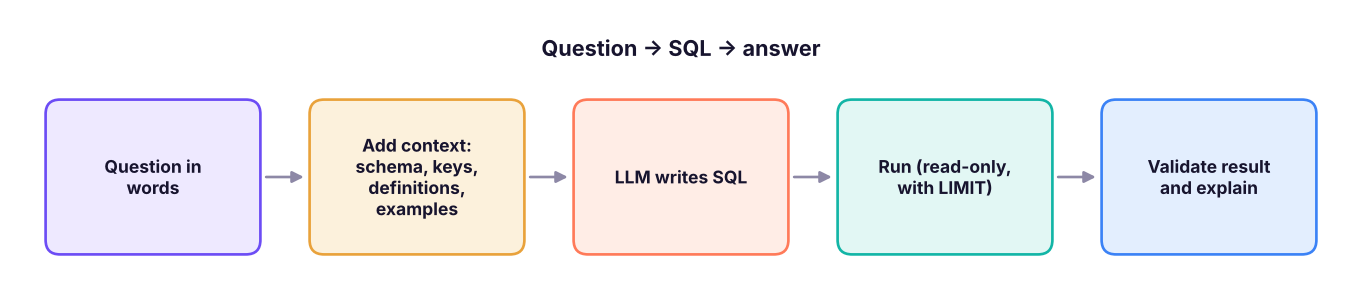
Text-to-SQL turns a business question in plain language into a SQL query: "Which region had the highest profit in 2025?" → SELECT region, SUM(profit) …. LLMs are good at SQL syntax, but correct SQL for your database needs your context.
Text-to-SQL pipeline. Quality depends mostly on the context you supply, not on the model alone.
What goes wrong without context
Problem
Example
Prevention
Wrong tables/columns
Uses customer_name in orders, where it does not exist
Provide the schema (tables, columns, types, keys)
Wrong grain / fan-out
Joins orders to items and then COUNT(*) for "orders"
State the grain: "one row per order line"; add "count distinct order_id" rule
Wrong definitions
"Active customer", "net sales", "this year"
Provide a metric dictionary
Dialect mismatch
LIMIT instead of TOP in SQL Server
Name the database and version
Dates
Uses YEAR(date) = 2025 (slow) or the wrong fiscal year
State calendar vs fiscal year and preferred patterns
Hallucinated values
WHERE region = 'Northern' when data says North
Provide sample values for categorical columns
Unsafe actions
DELETE/DROP suggestions
Read-only connection; review before running
A schema prompt that works
Text
You are a senior analytics engineer. Write SQL for Microsoft SQL Server 2022.

SCHEMA (all in dbo):
customers(customer_id PK, customer_name, segment, city, state, region)
  - segment in ('Consumer','Corporate','Home Office'); region in ('North','South','East','West')
orders(order_id PK, order_date DATE, ship_date DATE, ship_mode, customer_id FK -> customers)
order_items(item_id PK, order_id FK -> orders, product_id FK -> products, quantity, discount, sales, profit)
  - one row per product line; sales and profit in rupees
products(product_id PK, product_name, category, sub_category, list_price)

DEFINITIONS:
- "Orders" = COUNT(DISTINCT orders.order_id). "Margin %" = SUM(profit) / SUM(sales).
- Financial year runs April–March. Use half-open date ranges (>= start AND < next start).

QUESTION: For FY2025 (Apr 2025–Mar 2026), show margin % by category and by discount band (0, 1–20%, >20%).

RULES: Return only SQL; add comments; no SELECT *; list any assumptions after the query.
Notice the pieces: dialect, schema with keys, valid values, grain, definitions, date convention and output rules. This is the difference between a lucky answer and a reliable one.
TipKeep a reusable "context file"
Save your schema, definitions and sample queries in one text file (or in an AI Project / custom instructions). Paste it into every session. Many BI tools (Metabase, Power BI Copilot, Snowflake Cortex, Looker) call this a semantic layer or "AI context": descriptions, synonyms and verified queries.
Reviewing AI-generated SQL: a checklist
Does every table/column exist? (Run it; fix any "invalid column name".)
Is the grain right? After each join, did rows multiply? Are distinct counts used for orders and customers?
Are filters correct? Date ranges half-open? Status filters? NULL handling?
Do aggregates match the definition?SUM(profit)/SUM(sales) not AVG(margin).
Does the total reconcile? Compare with a simple query: SELECT SUM(sales) FROM order_items.
Is it safe and cheap? No writes; a TOP/LIMIT while testing; no accidental cross join.
Is it readable? CTEs, aliases and comments you could explain in an interview.
Let's see this in practice. A typical AI answer to "profit margin by discount band" that forgets SUM(profit)/SUM(sales) and averages row margins instead:
The two queries differ in every band (18.2% vs 17.5% and 2.0% vs 1.2% for the first two) because large order lines matter more in the weighted version than small ones. Which one the business wants must be written in the definitions part of your prompt. The checklist question "does the aggregate match the definition?" catches this.
Guardrails for letting AI near a database
Guardrail
How
Read-only login
Create a database user with SELECT only on approved views (GRANT SELECT ON …); never give AI tools db_owner
Expose views, not raw tables
A vw_sales_for_ai view with clean names, no personal data columns
Row and time limits
Timeouts, TOP 1000, query cost limits
Masking
Hide phone, email, ID columns; use dynamic data masking
Human review
Show the SQL before running it; log queries
Verified questions
Keep a library of approved queries for key metrics
No secrets in prompts
Connection strings and passwords stay in the tool's secret store
Docker: running tools in containers
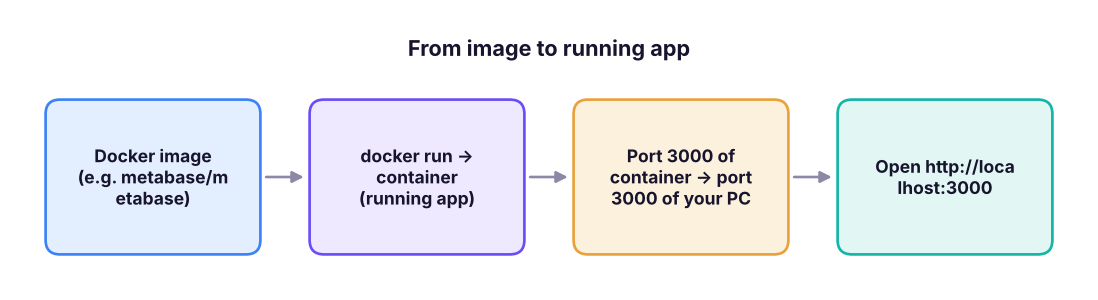
Docker packages an application and everything it needs into a container, so it runs the same on any machine. Instead of installing Java, a database and an app by hand, you run one command.
An image is a read-only template; a container is a running instance of it. Many containers can run from one image.
Step by stepInstall Docker Desktop
Download Docker Desktop for Windows, Mac or Linux from the Docker website and install it. On Windows it uses WSL 2 (Windows Subsystem for Linux); the installer enables it, and you may need to restart.
Start Docker Desktop and wait until it says "Engine running".
Open a terminal (PowerShell, Terminal) and check: docker --version and docker run hello-world.
Note your machine needs virtualisation enabled in BIOS and about 4 GB of free RAM for small tools.
Command
Meaning
docker pull metabase/metabase:latest
Download an image
docker run -d -p 3000:3000 --name metabase metabase/metabase
Run it in the background (-d), map port 3000, name it
docker ps / docker ps -a
List running / all containers
docker logs -f metabase
Follow its logs (see start-up progress)
docker stop metabase / docker start metabase
Stop / start again
docker rm metabase
Delete the container (not the image)
docker images
List downloaded images
docker compose up -d
Start everything defined in a compose.yaml file
Metabase: open-source BI for everyone
Metabase is an open-source business-intelligence tool: connect a database, ask questions with a point-and-click question builder (no SQL needed), or write SQL, then save charts into dashboards. It is popular in start-ups because non-technical colleagues can self-serve.
Step by stepRun Metabase and connect your data
Start it: docker run -d -p 3000:3000 --name metabase metabase/metabase. First start takes a minute or two (check docker logs -f metabase).
Open http://localhost:3000, create the admin account, and choose Add your data.
Pick your database type (PostgreSQL, MySQL, SQL Server, BigQuery, Snowflake, SQLite files via drivers, CSV upload in newer versions), enter host, port, database name, username and password. Use the read-only user. If the database also runs on your PC, use the host host.docker.internal from inside the container.
Metabase scans the tables. Browse them under Browse data.
New → Question: choose a table, pick columns, add Filter, Summarize (Sum of sales by region), choose a visualisation, Save.
New → Dashboard: add saved questions, add filters (date, region) and connect them to the question fields.
For anything you want to keep, run Metabase with a proper application database instead of the default embedded one, and mount a volume, for example:
A saved query (builder or SQL) with a visualisation
Model
A curated, cleaned table (a saved query with documented columns) for people to build on
Metric
A named, reusable calculation such as "Net revenue"
Dashboard
A page of questions with shared filters
Collection
Folders with permissions
Segment / filters
Reusable row filters
Permissions
Which groups see which databases and tables; row-level sandboxing (paid plans)
Metabot / AI features
Built-in AI assistance for questions and SQL in recent versions (availability depends on the edition and plan; check Metabase's current documentation)
Try it on the retail data: connect to your SQL Server RetailDB, then build three questions: Sales by region, Monthly sales (summarise by order_date: Month), and Top 10 customers. Then verify each one against this handbook's tables:
SQL
SELECT region, ROUND(SUM(sales), 0) AS sum_of_sales FROM superstore GROUPBY region ORDERBY sum_of_sales DESC;
Result
region
sum_of_sales
South
53,952,769
West
51,958,521
North
49,018,161
East
46,484,119
4 rows × 2 columns
MinusX: an AI assistant inside your BI tool
MinusX is an open-source AI assistant delivered as a Chrome extension that adds a chat sidebar to tools such as Metabase and Jupyter notebooks. Instead of copying your data into a chatbot, you work in Metabase and ask the sidebar things like "Why did sales drop in March?" or "Write a query for monthly profit by category". According to its public description, it reads a simplified view of the page (metadata such as table and column names), then operates the tool by clicking, typing and writing queries, and lets you accept or reject its edits.
Aspect
How it behaves
What you should still do
Context
Sees the page, selected tables/columns and the query editor
Make sure the right database and tables are selected
Actions
Writes and runs SQL, edits questions, explains results
Read the SQL before accepting
Models
Supports several LLM providers (you may supply your own API key)
Check the provider's data policy
Privacy
Vendor says raw data is not sent; metadata and your prompts are
Verify the current policy; never expose sensitive tables
Cost
Free and paid plans; model API usage may cost
Check current pricing
Step by stepUsing an AI assistant with Metabase
Install the Chrome extension from the Chrome Web Store (search "MinusX") and pin it; open your Metabase tab and open the sidebar.
Add your model/API key in settings if required.
Select the database/table in Metabase so the assistant knows the context.
Ask a precise question ("Monthly sales and profit by category for 2025, as a line chart; sales = SUM(sales), profit = SUM(profit)").
Review the generated SQL, run it, check totals against a simple query, then save it as a question.
Ask follow-ups: "Explain the biggest drop", "Break it down by region", "Why is Furniture negative?"
Watch outAI assistants and sensitive data
Anything the assistant can see, the model provider may receive. Use a read-only role limited to non-sensitive views, keep personal columns out of the connected schema, use an enterprise model agreement for company data, and keep a record of which prompts were run. If your company bans browser extensions that read pages, ask IT before installing any.
Other ways to use AI with SQL
Use
How
Explain a query
Paste the query (not the data) and ask for a line-by-line explanation and the business meaning
Optimise
Paste query + execution plan + table sizes; ask for rewrites and indexes; test each
Convert dialects
"Convert this SQL Server query to PostgreSQL; list functions that differ"
Generate test data
"Create INSERT statements for 20 fictional customers across four regions" (no real data)
Write documentation
Column descriptions, data dictionaries, comments
Data quality checks
"Write queries to find nulls, duplicates, orphans and out-of-range values for these tables"
Platform AI
Snowflake Cortex Analyst, BigQuery Gemini, Databricks Genie, SSMS Copilot, Azure Data Studio/VS Code Copilot, Fabric Copilot: all follow the same principle: context in, SQL out, you verify
2026 updateTrend: the semantic layer
Teams that succeed with text-to-SQL do not rely on the raw schema: they define metrics (net sales, active customer) once in a semantic layer (dbt Semantic Layer, Cube, LookML, Power BI semantic models, Metabase models/metrics) and let AI query that. The AI then picks from governed metrics instead of reinventing definitions, which removes most wrong-number errors.
Summary
Key takeaways
Text-to-SQL works when you provide dialect, schema with keys, valid values, grain, metric definitions and date rules.
Review every query: columns exist, grain is right, filters correct, aggregates match the definition, totals reconcile, nothing writes.
Protect the database with read-only logins on curated views, row limits and human review; never expose secrets or personal columns.
Docker runs tools in containers (docker run -d -p 3000:3000 metabase/metabase); Metabase gives self-service questions, models and dashboards.
An assistant such as MinusX adds an AI sidebar to Metabase; treat it as a fast junior analyst whose SQL you review, and check privacy terms.
A governed semantic layer makes AI answers consistent.
Quick quiz6 questions · tap an answer to check it
1. Why does giving the AI your schema and metric definitions improve results?
Answer: B. Context is the main driver of text-to-SQL accuracy; review is still required.
2. Which command starts Metabase in a container on port 3000?
Answer: B.-d runs detached and -p 3000:3000 maps the port.
3. Which login is safest for an AI tool?
Answer: B. Least privilege limits damage if the AI makes a mistake.
4. A generated query averages profit/sales row by row to get a margin. Why is that risky?
Answer: B. Weighted vs unweighted aggregates differ; define the metric in the prompt.
5. What is a semantic layer?
Answer: B. It standardises metrics so every query uses the same logic.
6. What should you do before saving an AI-generated Metabase question?
Answer: B. Validation protects you from plausible but wrong numbers.
ExerciseSchema prompt and review
(1) Write a schema prompt for the employees table (HR data: emp_id, gender, age, department, job_title, education, hire_date, years_at_company, monthly_income, job_satisfaction, overtime, performance_rating, city, attrition) including at least three definitions. (2) Ask any AI assistant for a query that returns attrition % by department and overtime. (3) Review the result with the checklist and reconcile the overall attrition % (25.9%) with a simple query.
Show solution
Definitions to include: "Attrition %" = employees with attrition = 'Yes' ÷ all employees; monthly_income is in rupees; "tenure band" = 0–2, 3–5, 6+ years. Reconciliation query: SELECT ROUND(100.0 * SUM(CASE WHEN attrition = 'Yes' THEN 1 ELSE 0 END) / COUNT(*), 1) FROM employees; should return 25.9. The weighted total from the grouped result (sum of leavers ÷ sum of employees across all groups) must also equal 25.9.
Interview cornerQuestions you may be asked
Q: How would you use AI to speed up SQL work safely?
Provide schema, definitions and dialect; generate and explain queries; review for grain, filters and definitions; run read-only with limits; reconcile totals; keep verified queries in a library.
Q: What is Docker and why is it useful for data tools?
A container platform that packages apps with their dependencies so the same setup runs anywhere; useful to spin up Metabase, databases or Jupyter in one command and share reproducible environments.
Q: What are the risks of connecting an AI assistant to a database?
Data exposure to a model provider, destructive queries, wrong answers presented as facts, and prompt injection; mitigate with read-only access to curated views, masking, review and logging.
Q: What is Metabase?
An open-source BI tool where users can ask questions with a visual builder or SQL, build dashboards and share them, with permission control by group.
Practise more online
Free, trusted places to test yourself on this topic. Links open the original site in a new tab.