The AI-Assisted Analyst Workflow, Agents & Governance (Capstone)
Combine everything into one repeatable workflow: frame a question, brief the AI, analyse with code, verify, visualise and write the story. See how an analyst agent works (plan, tools, observe, repeat) with a runnable toy example, learn MCP and tool-calling basics, and finish with governance, ethics and a telecom-churn capstone.
● DVA with AI · wrap-up✦ 2026Intermediate⏱ 140 min
A telecom company has 3,000 subscribers in telecom_churn.csv (tenure, contract type, internet service, payment method, charges, support calls, churn Yes/No). The retention head asks: Who is most likely to churn, and what should we do about it? We will follow the workflow and use AI-style assistance where it helps, checking everything.
Steps 1–2: frame and brief
Text
Decision: choose which customers get a retention offer next quarter (budget: 300 offers).
Metric: churn rate = churners / customers in the group. Report groups with at least 50 customers only.
Schema: telecom_churn(customer_id, senior_citizen 0/1, tenure_months, contract {Month-to-month, One year, Two year},
        internet_service {Fiber, DSL, No internet}, payment_method, monthly_charges, total_charges, support_calls, churn {Yes, No})
Rules: use only this table; state assumptions; do not claim causes; show code.
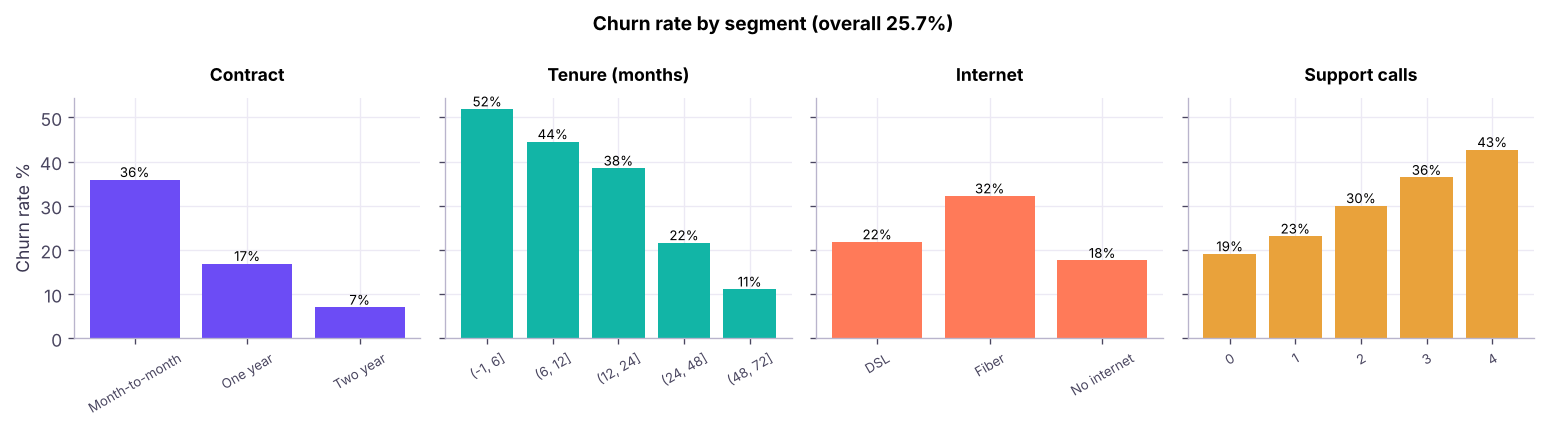
Churn rate by contract type, tenure band, internet service and support calls. Month-to-month customers, new customers, fibre users and frequent callers churn most.
Step 4: verify before you believe
Python
# 1. Reconcile: group counts add up; 2. a second method gives the same answer; 3. check small groups
g = churn_by("contract", min_n=0)
print("Group customers sum to total :", g.customers.sum() == len(tc))
print("Group churners sum to total  :", g.churners.sum() == tc.churned.sum())
import duckdb
sql = duckdb.sql("SELECT contract, COUNT(*) n, ROUND(100.0*AVG(CASE WHEN churn='Yes' THEN 1 ELSE 0 END),1) churn_pct FROM tc GROUP BY contract ORDER BY contract").df()
print("SQL cross-check:\n", sql.to_string(index=False))
print("\nCombinations with fewer than 50 customers are excluded from rankings; check:", (tc.groupby(['contract','internet_service']).size() < 50).sum(), "such groups")
Output
Group customers sum to total : True
Group churners sum to total  : True
SQL cross-check:
       contract    n  churn_pct
Month-to-month 1690       35.9
      One year  739       16.9
      Two year  571        7.0

Combinations with fewer than 50 customers are excluded from rankings; check: 0 such groups
Associations are not causes: month-to-month customers may also be newer or on fibre. To look at several factors together, combine them:
Key takeawaysA recommendation a manager can act on
Target the top segments by expected churners, not only by churn rate: they hold most of the preventable loss.
Offer a discounted switch to a 1-year contract for month-to-month customers in their first year, and a service check for fibre customers with 2+ support calls.
Measure with an A/B test: random half of the target list gets the offer; compare churn after 90 days (the test design is in the ML track, hypothesis-testing lessons).
Limit: this analysis is descriptive; it does not prove that contracts cause churn or estimate the offer's effect.
How an AI agent does analysis
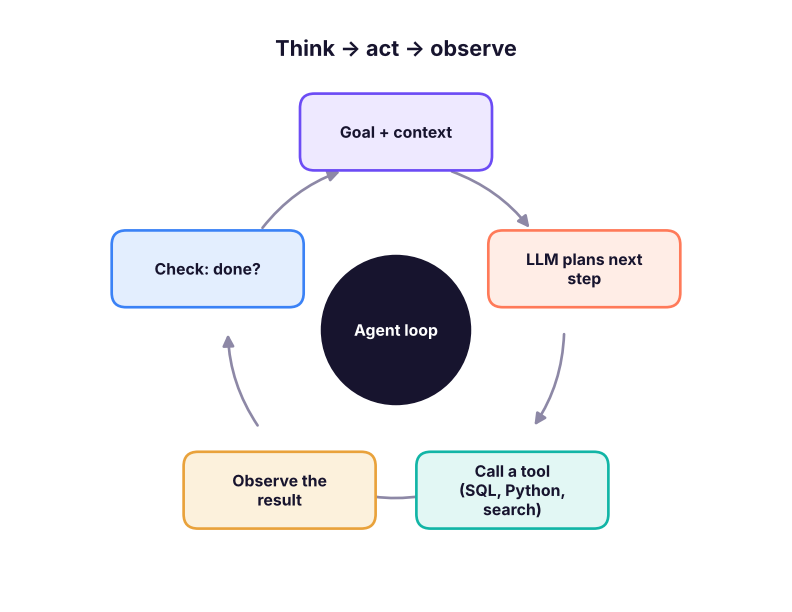
An agent turns the workflow above into a loop that an LLM drives:
The agent loop. The model decides the next action, a tool executes it, and the result goes back into the model's context.
Read-only DB, max queries, no network, human approval for writes
Evaluation
How you know it worked
Unit tests on metrics, golden questions, human review
A toy agent you can run (no LLM)
To make the loop concrete, here is a miniature "analyst agent" in which a hard-coded planner stands in for the LLM. It has one tool (read-only SQL) and a rule: stop when it has found the top three churn drivers.
Python
import duckdb
db = duckdb.connect(); db.execute("CREATE TABLE tc AS SELECT * FROM read_csv_auto('telecom_churn.csv')")
defrun_sql(q): # TOOL: read-only SQL with a row limit
assert q.strip().lower().startswith("select"), "only SELECT statements are allowed"returndb.execute(q).df().head(20)
defplanner(memory): # stands in for the LLM: decides the next tool call
todo = [c for c in ["contract", "internet_service", "payment_method", "support_calls"] if c notin memory]
if todo andlen(memory) < 4:
c = todo[0]
returnf"SELECT {c} AS grp, COUNT(*) AS n, ROUND(100.0*AVG(CASE WHEN churn='Yes' THEN 1 ELSE 0 END),1) AS churn_pct FROM tc GROUP BY {c} HAVING COUNT(*) >= 50", c
returnNone, None
memory, log = {}, []
whileTrue:
q, key = planner(memory)
if q isNone: break
res = run_sql(q); memory[key] = res; log.append(f"ran query on '{key}' -> best group: {res.sort_values('churn_pct').iloc[-1].grp} ({res.churn_pct.max()}%)")
print("\n".join(log))
spread = {k: v.churn_pct.max() - v.churn_pct.min() for k, v inmemory.items()}
print("\nDrivers ranked by spread in churn rate (percentage points):")
for k, v insorted(spread.items(), key=lambda x: -x[1]): print(f" {k:18s} {v:5.1f}")
Output
ran query on 'contract' -> best group: Month-to-month (35.9%)
ran query on 'internet_service' -> best group: Fiber (32.2%)
ran query on 'payment_method' -> best group: Net banking (28.5%)
ran query on 'support_calls' -> best group: 4.0 (42.7%)

Drivers ranked by spread in churn rate (percentage points):
  contract            28.9
  support_calls       23.6
  internet_service    14.6
  payment_method       5.0
A real agent replaces planner with an LLM call that reads the memory and writes the next SQL, adds many more tools, and decides when to stop. Everything else (read-only guard, row limit, log) is the same safety scaffolding you should demand from any agent.
Tool calling and MCP
Tool (function) calling: the model returns a structured request such as {"tool": "run_sql", "arguments": {"query": "SELECT …"}}; your code runs it and sends the result back.
Model Context Protocol (MCP) is an open standard for connecting AI applications to tools and data sources through a common interface, so one connector (a "server") for your database, files or SaaS app works with many AI clients. For analysts it means an assistant can query a governed database or semantic layer through an approved server instead of you pasting data around.
RAG (retrieval-augmented generation) gives the model documents (metric definitions, past reports) to ground its answers (GenAI track).
Multi-agent systems split work among specialised agents (a SQL agent, a chart agent, a reviewer); more moving parts mean more to test.
Evaluating AI analytics
What to evaluate
How
Correctness of numbers
A set of "golden questions" with known answers (total sales by year, churn by contract) run on every change
SQL quality
Execution accuracy (does the result match the reference result?), not just text similarity
Faithfulness of narrative
Every number in the text must appear in the tables; automatic check by extracting numbers
Safety
Attempted writes blocked, personal data not exposed, prompt-injection tests
Cost and latency
Tokens, tool calls and time per task
Usefulness
Do users make better decisions? Track adoption and feedback
Governance, ethics and your career
Policy: know your organisation's approved tools, data-classification rules and retention.
Human in the loop for decisions that affect people (credit, hiring, pricing, health): AI assists; accountable humans decide.
Fairness: test whether results differ unfairly across groups (gender, age, region) before acting.
Explainability: record the data, prompt, code and checks behind each insight; be able to re-run it.
Skills that stay valuable: asking the right question, domain knowledge, data modelling, SQL/Python fluency to read and verify AI output, statistics and experimentation, storytelling and stakeholder management. The analysts who thrive are those who use AI for speed and can prove their answers.
2026 updateWhat is changing in 2026
Analytics agents are moving into the BI tools themselves (Copilot in Power BI/Fabric, Gemini in Looker and BigQuery, Snowflake Cortex, Databricks Genie, Metabase AI features). Vendors compete on accuracy with governed semantic layers, so expect "ask a question of certified metrics" to become a standard feature. Learn the concepts here and re-check each product's current capabilities, pricing and data-handling terms before adopting it.
Summary
Key takeaways
Follow a seven-step workflow: frame, brief, analyse, verify, visualise, write, recommend; AI accelerates but you own framing, verification and judgement.
Always verify: reconcile totals, cross-check with a second method, exclude tiny groups, and remember associations are not causes.
An agent = goal + LLM planner + tools + memory + guardrails in a loop; tool calling and MCP connect models to tools and governed data.
Evaluate AI analytics with golden questions, execution accuracy, faithfulness checks, safety tests and cost tracking.
Keep humans accountable, log the work, check fairness and follow data policy.
Quick quiz6 questions · tap an answer to check it
1. In the agent loop, which part executes a SQL query?
Answer: B. The LLM plans; tools perform actions such as running SQL.
2. What is MCP?
Answer: B. The Model Context Protocol standardises how AI clients use external tools and data.
3. Why report churn only for groups with at least 50 customers?
Answer: B. Small samples produce noisy rates.
4. Which statement about our churn findings is correct?
Answer: B. Descriptive analysis shows patterns, not causes; use an experiment to test an intervention.
5. What is a "golden question" set?
Answer: B. They enable regression testing of answers.
6. Which control best limits damage if an agent writes a bad query?
Answer: B. Technical guardrails beat instructions alone.
ExerciseRun the workflow on a new question
Using superstore_sales.csv, follow the seven steps for: "Which customer segment × region combinations should sales focus on next quarter?" Write the brief, run the analysis (use groupby or SQL), verify with two methods, produce one chart and write a five-sentence recommendation that includes one limitation.
Show solution
Brief: define "focus" (for example profit, not just sales; minimum 100 order lines). Analysis: group by segment and region, compute sales, profit, margin and lines; filter groups with ≥ 100 lines. Verify: group totals equal the overall totals; repeat with SQL; check one group manually. Chart: bubble or bar of profit by segment × region. Recommendation example: "Focus on [top profit segment-region] (profit ₹X, margin Y%); protect [healthy group]; reduce discounts in [low-margin group]. Limitation: three years of data, no cost-to-serve or competitor information; profits include discounts that may not repeat."
Interview cornerQuestions you may be asked
Q: Walk me through how you use AI in your analysis workflow.
I frame the decision, give the AI a clear brief with schema and definitions, use it to draft and explain SQL or Python, run everything myself, reconcile totals and cross-check with a second method, use AI for chart and narrative drafts, then I validate each number and take responsibility for the recommendation.
Q: What is an AI agent and how is it different from a chatbot?
A chatbot responds once to a prompt; an agent pursues a goal across multiple steps by calling tools, observing results and deciding what to do next, so it needs stronger guardrails and evaluation.
Q: How do you stop an AI analytics tool from giving wrong numbers?
Governed semantic layer, read-only access to curated data, golden-question tests, execution-based evaluation, human review of important outputs, and logging.
Q: A model says "contract type drives churn". What do you say?
The data shows an association; to claim causation we would need an experiment or a causal method, controlling for tenure and other factors.
Practise more online
Free, trusted places to test yourself on this topic. Links open the original site in a new tab.