
Embeddings and Vector Search: Meaning as Numbers, Similarity and Vector Databases
Learn the foundation of semantic search and RAG. What embeddings are, how word and sentence embeddings are learned (trained here from scratch on our reviews), cosine similarity, document embeddings, building a vector index, exact vs approximate nearest-neighbour search (IVF, HNSW), evaluating retrieval with recall@k, hybrid keyword + vector search, and choosing embedding models and vector databases.
- Explain embeddings and why similar meanings produce nearby vectors
- Learn word embeddings from co-occurrence and build document embeddings
- Use cosine similarity and build exact and approximate vector indexes
- Measure retrieval quality with recall@k and latency
- Choose an embedding model, chunking strategy and vector store for an application
What is an embedding?
An embedding is a list of numbers (a vector) that represents the meaning of a word, sentence, image or product. Models are trained so that similar meanings produce nearby vectors.
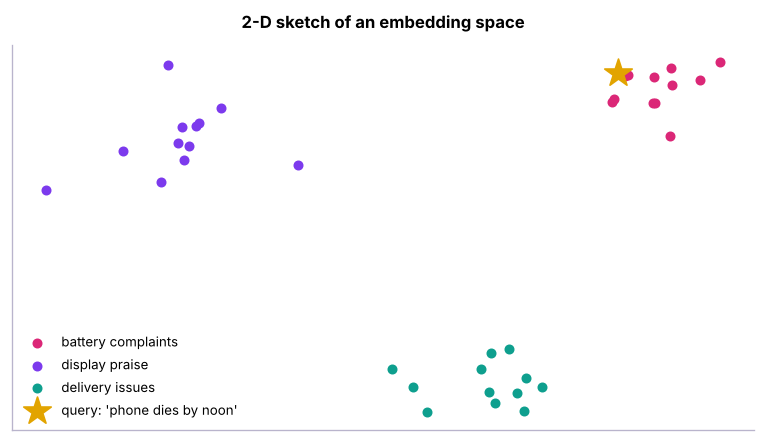
Real embeddings have 256–3,072 dimensions. Uses: semantic search, RAG (next lesson), recommendations ("similar products"), clustering and de-duplication, classification features, anomaly detection.
Learning word embeddings from scratch
"You shall know a word by the company it keeps" (J. R. Firth). Words that appear in similar contexts get similar vectors. Word2Vec and GloVe learn this with neural networks; the classic PPMI + SVD method below captures the same idea in a few lines.
import re, collections, pandas as pd
from sklearn.decomposition import TruncatedSVD
from scipy.sparse import coo_matrix
rv = pd.read_csv("customer_reviews.csv")
docs = [re.findall(r"[a-z]+", t.lower()) for t in rv.review_text]
counts = collections.Counter(w for d in docs for w in d)
vocab = [w for w, c in counts.items() if c >= 5]; idx = {w: i for i, w in enumerate(vocab)}
pairs = collections.Counter()
for d in docs:
    ids = [idx[w] for w in d if w in idx]
    for i, a in enumerate(ids):
        for b in ids[max(0, i - 3): i] + ids[i + 1: i + 4]: pairs[a, b] += 1      # co-occurrence within ±3 words
r, c, v = zip(*[(a, b, n) for (a, b), n in pairs.items()])
M = coo_matrix((v, (r, c)), shape=(len(vocab), len(vocab))).tocsr().astype(float)
total = M.sum(); row = np.asarray(M.sum(1)).ravel(); col = np.asarray(M.sum(0)).ravel()
M = M.tocoo(); pmi = np.log((M.data * total) / (row[M.row] * col[M.col])); keep = pmi > 0
PPMI = coo_matrix((pmi[keep], (M.row[keep], M.col[keep])), shape=M.shape).tocsr()
W = TruncatedSVD(50, random_state=0).fit_transform(PPMI); W /= np.linalg.norm(W, axis=1, keepdims=True)
def similar(word, k=6):
    s = W @ W[idx[word]]; return [vocab[i] for i in np.argsort(-s)[1:k + 1]]
print(len(vocab), "words, 50-dimensional vectors")
for w in ["battery", "delivery", "superb", "slow", "refund"]: print(f"{w:9s} → {similar(w)}")213 words, 50-dimensional vectors battery → ['batery', 'lasts', 'day', 'barely', 'half', 'a'] delivery → ['delivry', 'was', 'courier', 'replacement', 'buttons', 'packaging'] superb → ['highly', 'bahut', 'loved', 'recommend', 'badiya', 'rich'] slow → ['painfully', 'times', 'is', 'charging', 'disappointed', 'this'] refund → ['still', 'has', 'pending', 'display', 'charging', 'courier']
Even this small corpus learns useful structure: "battery" sits near "lasts", "barely" and "half (a day)", "superb" near "loved", "highly" and "recommend", and "slow" near "painfully" and "charging". It even links the misspelling "batery" to "battery". But it only knows words that appear in these 3,000 reviews. Modern embedding models learn from billions of sentences, so they also know that "phone dies by noon" means poor battery life.
Cosine similarity
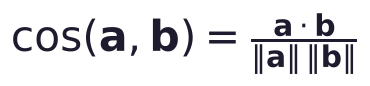
1 = same direction (same meaning), 0 = unrelated, −1 = opposite. With normalised vectors (length 1), cosine similarity is just the dot product, which is why vector databases normalise embeddings.
def cos(a, b): return float(a @ b / (np.linalg.norm(a) * np.linalg.norm(b)))
for a, b in [("battery", "lasts"), ("delivery", "courier"), ("superb", "loved"), ("superb", "slow")]: print(f"cos({a}, {b}) = {cos(W[idx[a]], W[idx[b]]):.2f}")cos(battery, lasts) = 0.75 cos(delivery, courier) = 0.60 cos(superb, loved) = 0.78 cos(superb, slow) = 0.05
Document embeddings and semantic search
A simple document vector: the TF-IDF-weighted average of its word vectors. (Sentence-embedding models do this far better with a transformer.)
from sklearn.feature_extraction.text import TfidfVectorizer
tf = TfidfVectorizer(vocabulary=vocab, token_pattern=r"[a-z]+").fit(rv.review_text.str.lower())
def embed(texts):
    T = tf.transform([t.lower() for t in texts]); D = T @ W
    return D / np.maximum(np.linalg.norm(D, axis=1, keepdims=True), 1e-9)
E = embed(rv.review_text.tolist())
def search(query, k=4):
    s = E @ embed([query])[0]; out, seen = [], set()
    for i in np.argsort(-s):                                   # skip duplicate texts
        txt = rv.review_text.iloc[i].rstrip(".!:) ")
        if txt.lower() in seen: continue
        seen.add(txt.lower()); out.append((round(float(s[i]), 2), txt[:80]))
        if len(out) == k: break
    return out
for q in ["charging takes forever", "parcel came late and broken", "support team was very helpful"]:
print("query:", q); [print(" ", r) for r in search(q)]query: charging takes forever
(0.85, 'Charging is painfully slow')
(0.78, 'Regret buying this. Charging is painfully slow')
(0.78, 'Very disappointed. Charging is painfully slow')
(0.77, 'Charging is painfully slow, not worth it')
query: parcel came late and broken
(0.86, 'Delivery was totally late')
(0.82, 'Very disappointed. Delivery was late')
(0.8, 'Bekaar product. Delivery was late')
(0.79, 'Sound is tinny, delivery was super late, not worth it')
query: support team was very helpful
(0.79, 'Superb product. Price is very totally reasonable for these features, customer su')
(0.77, 'Highly recommend. Packaging was very neat and safe, battery backup is superb, cu')
(0.77, 'Bahut badiya. Packaging was really neat and safe, service centre staff were supe')
(0.75, 'Highly recommend. Service centre staff were helpful, charges really very fast')Vector indexes: exact and approximate search
Comparing a query with every vector (exact / brute-force search) is fine for thousands of items. For millions, use approximate nearest neighbour (ANN) indexes that check only promising regions.
import time
rng = np.random.default_rng(0)
N, d = 100_000, 64
centres = rng.normal(size=(2000, d))                                   # real embeddings are clustered by topic, not uniform
X = (centres[rng.integers(0, 2000, N)] + rng.normal(0, .35, (N, d))).astype(np.float32); X /= np.linalg.norm(X, axis=1, keepdims=True)
queries = X[rng.choice(N, 100, replace=False)] + rng.normal(0, .05, (100, d)).astype(np.float32)
t0 = time.perf_counter(); exact = np.argsort(-(queries @ X.T), axis=1)[:, :10]; t_exact = time.perf_counter() - t0
from sklearn.cluster import MiniBatchKMeans
nlist = 256; km = MiniBatchKMeans(nlist, random_state=0, n_init=3, batch_size=4096).fit(X)          # IVF: partition vectors into cells
assign = km.labels_; cells = {c: np.where(assign == c)[0] for c in range(nlist)}
def ivf_search(q, nprobe=8, k=10):
    near = np.argsort(-(km.cluster_centers_ @ q))[:nprobe]; cand = np.concatenate([cells[c] for c in near])
    return cand[np.argsort(-(X[cand] @ q))[:k]]
for nprobe in (1, 4, 16):
    t0 = time.perf_counter(); approx = np.array([ivf_search(q, nprobe) for q in queries]); t = time.perf_counter() - t0
    recall = np.mean([len(set(a) & set(e)) / 10 for a, e in zip(approx, exact)])
print(f"IVF nprobe={nprobe:2d}: recall@10 {recall:.2f} | {1000 * t / 100:.2f} ms/query (exact: {1000 * t_exact / 100:.2f} ms/query)")IVF nprobe= 1: recall@10 0.89 | 0.08 ms/query (exact: 2.12 ms/query) IVF nprobe= 4: recall@10 0.98 | 0.19 ms/query (exact: 2.12 ms/query) IVF nprobe=16: recall@10 1.00 | 0.81 ms/query (exact: 2.12 ms/query)
| Index | Idea | Trade-off |
|---|---|---|
| Flat (exact) | Compare with everything | Perfect recall, slow at scale |
| IVF | Cluster vectors; search a few nearest clusters (nprobe) |
Tune recall vs speed |
| HNSW | Navigable small-world graph of neighbours | Very fast, high recall, more memory |
| Product quantisation (PQ) | Compress vectors into short codes | Huge datasets in little memory |
Libraries: FAISS, hnswlib, ScaNN, Annoy. In production, ANN indexes live inside vector databases.
Evaluate retrieval
Create a small labelled set of queries with their relevant documents and measure recall@k (share of relevant documents found in the top k) and MRR (how high the first relevant result ranks).
aspect_rx = {"battery": r"batter|charg", "delivery": r"deliver|courier|box arrived|packag", "service": r"support|service|refund|replacement|care"}
labelled = {"phone battery dies quickly": "battery", "my order came late": "delivery", "the customer care was useless": "service"}
from sklearn.feature_extraction.text import TfidfVectorizer as TV
bm = TV(ngram_range=(1, 2), sublinear_tf=True).fit(rv.review_text); B = bm.transform(rv.review_text)
def precision_at_k(scores, aspect, k=10):
    rel = rv.review_text.str.lower().str.contains(aspect_rx[aspect]).to_numpy(); top = np.argsort(-scores)[:k]; return rel[top].mean()
for q, a in labelled.items():
    dense = E @ embed([q])[0]; sparse = (B @ bm.transform([q]).T).toarray().ravel()
    hybrid = 0.5 * dense / dense.max() + 0.5 * sparse / max(sparse.max(), 1e-9)
print(f"{q:32s} precision@10 dense {precision_at_k(dense, a):.1f} | keyword {precision_at_k(sparse, a):.1f} | hybrid {precision_at_k(hybrid, a):.1f}")phone battery dies quickly precision@10 dense 0.8 | keyword 0.6 | hybrid 0.6 my order came late precision@10 dense 0.3 | keyword 0.6 | hybrid 0.4 the customer care was useless precision@10 dense 1.0 | keyword 1.0 | hybrid 1.0
No method wins every query: the small home-made embeddings beat keywords on "battery dies", keywords win on "order came late" (exact words such as "late"), and the hybrid lands in between. With strong embedding models on large real corpora, hybrid search (keyword/BM25 + vector, then optional re-ranking with a cross-encoder or LLM) is usually the most robust production choice: keywords catch exact terms (product codes, names), vectors catch paraphrases.
Real embedding models
# Voyage AI (recommended by Anthropic for use with Claude) - pip install voyageai
import voyageai
vo = voyageai.Client()                                    # VOYAGE_API_KEY in the environment
docs_emb = vo.embed(texts, model="voyage-3.5", input_type="document").embeddings
query_emb = vo.embed(["phone dies by noon"], model="voyage-3.5", input_type="query").embeddings[0]

# OpenAI - pip install openai
from openai import OpenAI
emb = OpenAI().embeddings.create(model="text-embedding-3-small", input=texts).data

# Local, free - pip install sentence-transformers
from sentence_transformers import SentenceTransformer
model = SentenceTransformer("BAAI/bge-small-en-v1.5")
emb = model.encode(texts, normalize_embeddings=True)
Check the MTEB leaderboard for quality by task and language (multilingual models handle Hindi and other Indian languages), and test on your own queries.
Vector stores
| Option | When |
|---|---|
| NumPy / FAISS in memory | Prototypes, up to a few million vectors |
| pgvector (PostgreSQL), Supabase | You already run Postgres; combine SQL filters and vectors |
| Chroma, LanceDB | Simple local or embedded stores for apps and notebooks |
| Qdrant, Weaviate, Milvus | Dedicated open-source vector databases at scale |
| Pinecone, cloud search (Azure AI Search, Vertex Vector Search, OpenSearch) | Managed services |
# pgvector example
# CREATE EXTENSION vector;
# CREATE TABLE reviews (id bigserial PRIMARY KEY, text text, product text, embedding vector(1024));
# CREATE INDEX ON reviews USING hnsw (embedding vector_cosine_ops);
# SELECT id, text FROM reviews WHERE product = 'Laptop' ORDER BY embedding <=> $1 LIMIT 5;   -- <=> is cosine distance
Practical tips
- Chunk long documents (e.g. 300–800 tokens with some overlap, split on headings/paragraphs) before embedding (lesson 5).
- Store metadata (source, date, product, access rights) with each vector and filter on it.
- Use the same model for documents and queries; re-embed everything when you change models.
- Normalise vectors; use cosine or dot product consistently.
- Cache embeddings: they are cheap but not free, and recomputing is slow.
Summary
- Embeddings map text (or images, products) to vectors where similar meanings are close.
- Word embeddings come from co-occurrence (Word2Vec, GloVe, PPMI-SVD); sentence embeddings from transformer models.
- Cosine similarity (dot product of normalised vectors) measures closeness.
- Exact search is simple; ANN indexes (IVF, HNSW, PQ) trade a little recall for big speed-ups.
- Evaluate retrieval with recall@k/MRR; combine keyword and vector search (hybrid) and re-rank.
- Choose embedding models by tested quality, language and cost; choose stores by scale and existing stack (pgvector is a common first choice).
1. What property do good embeddings have?
2. Cosine similarity of 1 means…
3. Why use an approximate nearest-neighbour index?
4. In an IVF index, increasing nprobe…
5. Why combine keyword and vector search?
6. You switch to a new embedding model. What must you do?
(1) Find the 10 nearest words to "price" and "screen" in the learned vectors. (2) Cluster the review embeddings with K-means (k = 6) and label each cluster from its top words. (3) Measure how recall@10 changes with nlist 64 vs 1,024 at nprobe = 8. (4) Design a pgvector table for a product catalogue with metadata filters.
Show solution
print(similar("price", 10), similar("screen", 10))
from sklearn.cluster import KMeans
lab = KMeans(6, n_init=10, random_state=0).fit_predict(E)
for c in range(6): print(c, collections.Counter(w for t in rv.review_text[lab == c] for w in re.findall(r"[a-z]+", t.lower()) if w in idx and counts[w] < 600).most_common(5))Q: What is an embedding and how is it used in search? A dense vector representing meaning. Documents are embedded once and stored; a query is embedded at search time, and the nearest document vectors (by cosine similarity) are returned, often combined with keyword search.
Q: How does HNSW work at a high level? It builds a layered graph where each vector links to near neighbours; search starts at a coarse top layer and greedily moves closer to the query through lower layers, visiting only a small part of the data.
Q: How do you evaluate a semantic search system? A labelled set of queries with relevant documents; measure recall@k, precision@k, MRR or nDCG, plus latency and cost, and compare keyword, vector and hybrid configurations.
Practise more online
Free, trusted places to test yourself on this topic. Links open the original site in a new tab.