
Model Context Protocol (MCP): Connecting AI Assistants to Your Data and Tools
Learn the open standard that lets any AI application use any tool or data source. MCP architecture (hosts, clients, servers), the three primitives (tools, resources, prompts), transports (stdio and Streamable HTTP), building and testing a real MCP server for sales data in Python, connecting it to Claude Desktop, Claude Code and other clients, using remote MCP servers from the API, and securing MCP deployments.
- Explain the problem MCP solves and its host–client–server architecture
- Distinguish tools, resources and prompts and choose the right primitive
- Build an MCP server in Python and test it in-process
- Connect MCP servers to desktop apps, coding assistants and the Claude API
- Apply MCP security practices: authentication, least privilege and injection awareness
The problem MCP solves
Before MCP, every AI app needed custom code for every integration: N apps × M tools connectors. MCP (introduced by Anthropic in November 2024, now an open standard supported across Claude, ChatGPT, Gemini, Microsoft Copilot, VS Code, Cursor and many others) defines one protocol: build a server once, and every MCP-capable assistant can use it, like a USB-C port for AI.
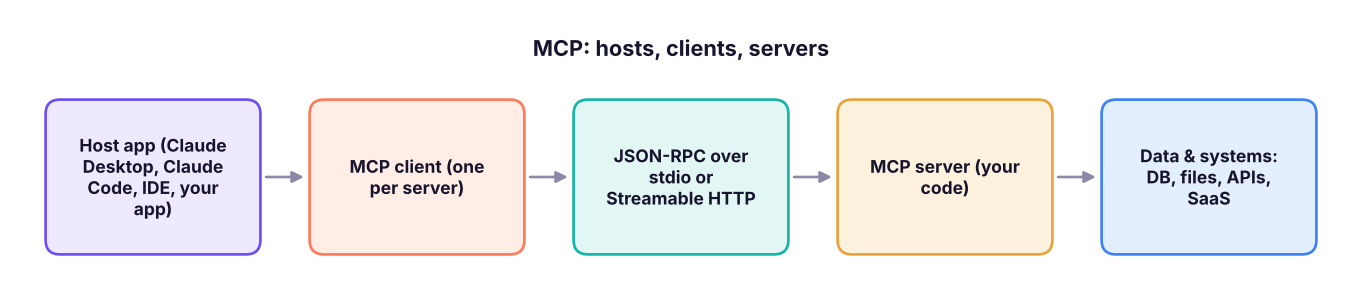
| Role | What it is | Example |
|---|---|---|
| Host | The AI application the user works in | Claude Desktop, Claude Code, VS Code, a custom chatbot |
| Client | Connector inside the host, one per server | Created by the host |
| Server | A program exposing capabilities | "NovaMart sales" server, GitHub, Slack, Postgres, Google Drive |
The three primitives
| Primitive | Controlled by | Purpose | Example |
|---|---|---|---|
| Tools | The model (with user approval) | Actions and computations | run_sql, create_ticket, send_email |
| Resources | The application/user | Read-only context the host can attach | A policy document, a table schema, a file |
| Prompts | The user | Reusable prompt templates (often shown as slash commands) | /monthly-review, /explain-query |
Clients can also offer capabilities to servers, such as sampling (the server asks the host's model to generate text) and elicitation (the server asks the user for input).
Build an MCP server
The official Python SDK makes a server a few decorated functions. Type hints and docstrings become the tool schema and description.
import asyncio, json, duckdb, pandas as pd
from mcp import Client
from mcp.server.mcpserver import MCPServer        # in MCP SDK 1.x this class was FastMCP (from mcp.server.fastmcp import FastMCP)
from mcp.server.mcpserver.exceptions import ToolError
import logging; logging.getLogger("mcp").setLevel(logging.CRITICAL)      # keep the demo output tidy

sales = pd.read_csv("superstore_sales.csv", parse_dates=["order_date"])
con = duckdb.connect(); con.register("sales", sales)
server = MCPServer("NovaMart sales analytics")

@server.tool()
def sales_summary(year: int, dimension: str = "region") -> list[dict]:
    """Total sales, profit and margin for one year, grouped by region, category, segment or sub_category."""
    if dimension not in {"region", "category", "segment", "sub_category"}:
        raise ToolError("dimension must be one of region, category, segment, sub_category")   # a clear message the model can act on
    q = f"""SELECT {dimension}, ROUND(SUM(sales)/1e6, 2) AS sales_m, ROUND(SUM(profit)/1e6, 2) AS profit_m,
            ROUND(100*SUM(profit)/SUM(sales), 1) AS margin_pct FROM sales WHERE YEAR(order_date) = ? GROUP BY 1 ORDER BY sales_m DESC"""
    return con.execute(q, [year]).df().to_dict("records")

@server.tool()
def top_products(category: str, n: int = 5) -> list[dict]:
    """The n most profitable products in a category (Furniture, Office Supplies, Technology)."""
    q = "SELECT product_name, ROUND(SUM(profit)) AS profit FROM sales WHERE category = ? GROUP BY 1 ORDER BY 2 DESC LIMIT ?"
    return con.execute(q, [category, min(n, 20)]).df().to_dict("records")

@server.resource("schema://sales")
def sales_schema() -> str:
    """Column names and types of the sales table."""
    return sales.dtypes.astype(str).to_json()

@server.prompt()
def monthly_review(month: str) -> str:
    """Prompt template for a monthly business review."""
    return f"Using the sales tools, write a monthly business review for {month}: headline numbers, three drivers, one risk and one action. Cite every number's source."

async def demo():
    async with Client(server) as client:                      # in-process connection, ideal for testing
        tools = await client.list_tools()
        for t in tools.tools: print("tool:", t.name, "| inputs:", list(t.input_schema["properties"]))
        r = await client.call_tool("sales_summary", {"year": 2025, "dimension": "category"})
        print("call result:", r.content[0].text[:160])
        bad = await client.call_tool("sales_summary", {"year": 2025, "dimension": "customer_name"})
        print("error is returned, not raised:", bad.is_error, "|", bad.content[0].text[:90])
        res = await client.read_resource("schema://sales"); print("resource:", res.contents[0].text[:80], "...")
        p = await client.get_prompt("monthly_review", {"month": "December 2025"}); print("prompt:", p.messages[0].content.text[:90], "...")
asyncio.run(demo())tool: sales_summary | inputs: ['year', 'dimension']
tool: top_products | inputs: ['category', 'n']
call result: {
"category": "Technology",
"sales_m": 61.65,
"profit_m": 7.2,
"margin_pct": 11.7
}
error is returned, not raised: True | Error executing tool sales_summary: dimension must be one of region, category, segment, su
resource: {"row_id":"int64","order_id":"object","order_date":"datetime64[ns]","ship_date": ...
prompt: Using the sales tools, write a monthly business review for December 2025: headline numbers ...The same server runs for real with one line:
if __name__ == "__main__":
    server.run()            # stdio transport (default): the host launches this script as a subprocess
    # server.run(transport="streamable-http")   # remote server at http://host:8000/mcp
Transports
| Transport | How | Use |
|---|---|---|
| stdio | The host starts the server as a local process and talks over stdin/stdout | Local tools: files, local databases, scripts |
| Streamable HTTP | The server is a web service; clients connect over HTTP (with OAuth) | Shared/remote servers, SaaS integrations, teams |
Connect it to AI applications
Claude Desktop (Settings → Developer → Edit config) — claude_desktop_config.json:
{
  "mcpServers": {
    "novamart-sales": {
      "command": "python",
      "args": ["C:/projects/novamart/sales_server.py"]
    }
  }
}
Claude Code (terminal): claude mcp add novamart-sales -- python sales_server.py, or add a remote server with claude mcp add --transport http github https://api.githubcopilot.com/mcp/.
VS Code / Cursor / Windsurf / ChatGPT / Gemini CLI: each has an MCP settings page or JSON file with the same idea: a command to launch (stdio) or a URL (HTTP).
From the Claude API you can attach remote MCP servers directly with the MCP connector, so your own app gets their tools without writing a client:
response = client.beta.messages.create(
    model="claude-opus-5-5", max_tokens=16000, betas=["mcp-client-2025-11-20"],
    mcp_servers=[{"type": "url", "url": "https://mcp.novamart.example/mcp", "name": "novamart"}],
    tools=[{"type": "mcp_toolset", "mcp_server_name": "novamart"}],
    messages=[{"role": "user", "content": "Compare 2025 sales by category and name the weakest one."}],
)
Useful servers to explore
Official and community servers exist for filesystems, Git/GitHub, Postgres/SQLite/BigQuery/Snowflake, Google Drive, Slack, Notion, Jira, Salesforce, browsers (Playwright), Excel files, and BI tools; the analytics tools from the AI-analytics track (Metabase, MinusX) follow the same idea. Browse the MCP registry and vendor directories, and prefer servers from the vendor itself or well-maintained open-source projects.
Security
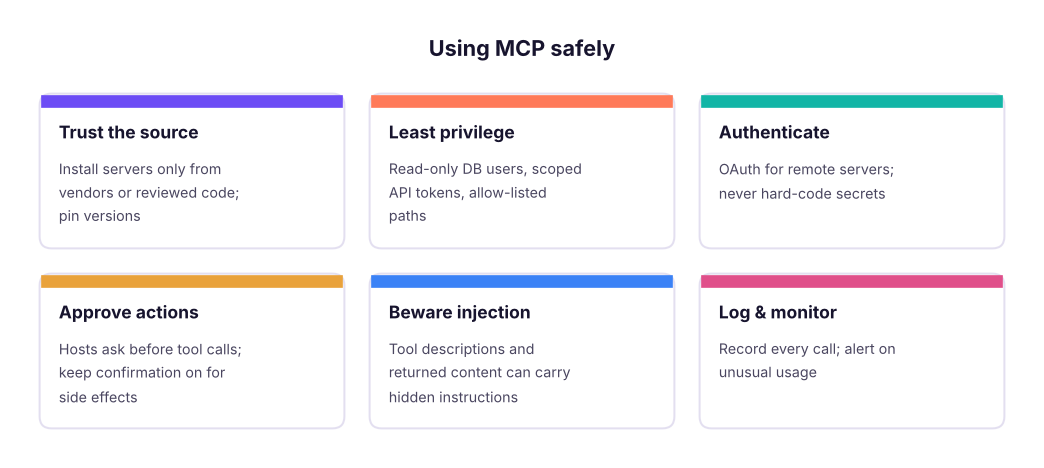
Specific risks: tool poisoning (malicious instructions hidden in a tool's description), prompt injection through returned data (a web page or ticket telling the model to exfiltrate data), over-broad permissions and confused-deputy problems with shared credentials. Validate inputs in every tool (as sales_summary does with dimension and parameterised SQL), and return errors instead of crashing.
MCP vs other integration styles
| Approach | When |
|---|---|
| Direct tool use in your own app (lesson 6) | One app, tools only it needs |
| MCP server | The same capability should work in many assistants (desktop, IDE, your app) or be shared across a team |
| Plugins/skills packages | Bundles of instructions + tools + workflows for an assistant (e.g. Agent Skills) |
| Traditional REST API | Non-AI consumers; MCP servers often wrap these |
Summary
- MCP is an open standard connecting AI hosts to tools and data through servers: build once, use in many assistants.
- Architecture: host app → one client per server → server exposing capabilities over stdio (local) or Streamable HTTP (remote).
- Primitives: tools (model-invoked actions), resources (read-only context), prompts (user-invoked templates).
- The Python SDK turns decorated, typed functions into a server; test in-process with
Client(server). - Secure servers with trusted sources, least privilege, authentication, approvals, input validation and logging.
1. What problem does MCP solve?
2. Which MCP primitive is invoked by the model to take an action?
3. Which transport suits a server running on the same laptop as Claude Desktop?
4. What is "tool poisoning"?
5. How should an MCP tool handle an invalid argument?
is_error and the model can retry.6. When is building an MCP server better than direct tool use inside one app?
(1) Add a margin_trend(sub_category) tool to the server and test it with Client(server). (2) Add a resource listing the valid categories. (3) Save the server as sales_server.py, register it in Claude Desktop or Claude Code, and ask three questions. (4) Review a public MCP server's code and list the permissions it needs.
Show solution
@server.tool()
def margin_trend(sub_category: str) -> list[dict]:
    """Yearly profit margin (%) for one sub-category."""
    return con.execute("SELECT YEAR(order_date) AS yr, ROUND(100*SUM(profit)/SUM(sales), 1) AS margin FROM sales WHERE sub_category = ? GROUP BY 1 ORDER BY 1", [sub_category]).df().to_dict("records")
@server.resource("lists://categories")
def categories() -> str:
    """Valid category names."""
    return json.dumps(sorted(sales.category.unique().tolist()))
async def test():
    async with Client(server) as c: print((await c.call_tool("margin_trend", {"sub_category": "Tables"})).content[0].text)
asyncio.run(test())Q: Explain MCP and why it matters. An open protocol that standardises how AI assistants discover and call external tools and read data. Organisations build a server once and make internal systems available to any compliant assistant, with consistent security and governance.
Q: Tools vs resources in MCP? Tools perform actions or computations and are chosen by the model; resources are read-only data the application or user attaches as context.
Q: What are the main security risks of MCP and how do you mitigate them? Untrusted servers, tool poisoning, prompt injection via returned content, and over-privileged credentials; mitigate with vetted servers, least privilege, OAuth, user approval for side effects, input validation and audit logging.
Practise more online
Free, trusted places to test yourself on this topic. Links open the original site in a new tab.