
AI Agents and Agentic AI: Loops, Planning, Memory, Multi-Agent Systems and When to Use Them
Understand what makes software "agentic". Workflows vs agents, the agent loop (observe, think, act), ReAct-style reasoning with tools, planning and task decomposition, short- and long-term memory, guardrails and stopping conditions, multi-agent patterns (orchestrator–workers, evaluator–optimiser, routing), the 2026 agent platforms, and how to decide whether a problem needs an agent at all, with a runnable data-analysis agent.
- Distinguish single LLM calls, workflows and autonomous agents
- Implement an agent loop with tools, an observation history and stopping conditions
- Apply planning, reflection and memory patterns
- Describe multi-agent patterns and agent frameworks
- Decide when an agent is worth its cost and risk, and design guardrails
AI, GenAI and agentic AI
| Traditional AI / ML | Generative AI | Agentic AI | |
|---|---|---|---|
| Does | Predicts or classifies | Creates content (text, code, images) | Pursues a goal through multi-step actions |
| Example | Churn score | Draft a retention email | Find at-risk customers, draft personalised offers, schedule them, report results |
| Control | Fixed pipeline | One request → one response | Model decides the next step in a loop, using tools |
Workflows vs agents
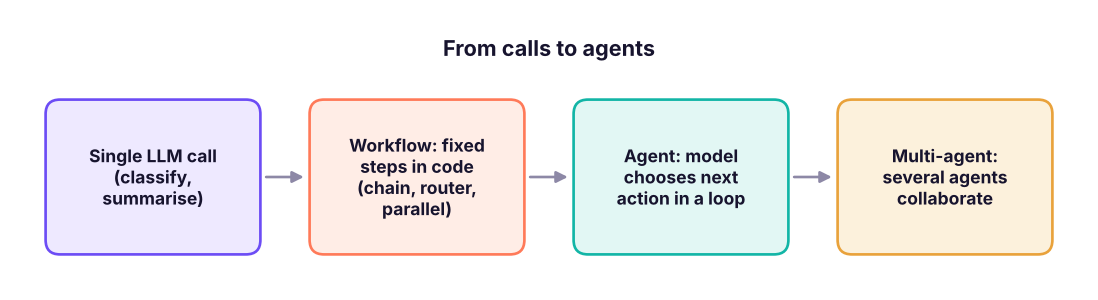
- Workflow: your code decides the path ("extract → classify → if complaint, draft reply"). Predictable, cheap, easy to test.
- Agent: the model decides the path at run time: which tool, which order, when to stop. Flexible for open-ended tasks, but costlier, slower and harder to test.
Anthropic's guidance ("Building effective agents"): use the simplest pattern that works; reach for agents when the task is open-ended, multi-step, valuable enough to justify cost and latency, and errors can be caught (tests, reviews, rollback).
The agent loop
A runnable data-analysis agent
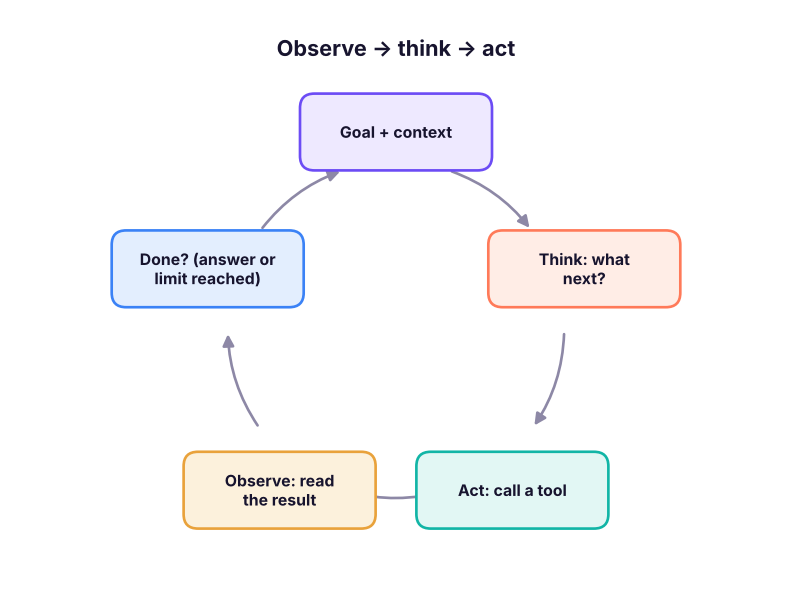
The agent below answers business questions about the sales data. A real LLM would choose each action; here a transparent rule-based "brain" plays that role so the loop runs offline, but the structure (tools, scratchpad, step limit, final answer) is the same as in production frameworks.
import json, re, duckdb, pandas as pd, numpy as np
sales = pd.read_csv("superstore_sales.csv", parse_dates=["order_date"]); con = duckdb.connect(); con.register("sales", sales)
def sql(q): return con.execute(q).df().round(2)
TOOLS = {
    "profit_by": lambda dim, year=2025: sql(f"SELECT {dim}, ROUND(SUM(profit)/1e6, 2) AS profit_m, ROUND(100*SUM(profit)/SUM(sales), 1) AS margin FROM sales WHERE YEAR(order_date) = {int(year)} GROUP BY 1 ORDER BY profit_m"),
    "discount_effect": lambda sub_category: sql(f"SELECT CASE WHEN discount = 0 THEN '0%' WHEN discount <= 0.2 THEN '1-20%' ELSE '>20%' END AS band, COUNT(*) AS n, ROUND(100*SUM(profit)/SUM(sales), 1) AS margin FROM sales WHERE sub_category = '{sub_category}' GROUP BY 1 ORDER BY 1"),
    "trend": lambda sub_category: sql(f"SELECT YEAR(order_date) AS yr, ROUND(SUM(profit)/1e6, 2) AS profit_m FROM sales WHERE sub_category = '{sub_category}' GROUP BY 1 ORDER BY 1"),
}
class Brain:
    """Stand-in for the LLM policy: looks at the goal and the observations so far and picks the next action."""
    def next_action(self, goal, scratch):
        done = [s["action"] for s in scratch]
        if "profit_by" not in done: return {"thought": "First find where we lose money.", "action": "profit_by", "args": {"dim": "sub_category"}}
        worst = scratch[0]["observation"].iloc[0]["sub_category"]
        if "trend" not in done: return {"thought": f"{worst} is the biggest loss-maker. Is it getting worse?", "action": "trend", "args": {"sub_category": worst}}
        if "discount_effect" not in done: return {"thought": f"Check whether discounts explain the {worst} losses.", "action": "discount_effect", "args": {"sub_category": worst}}
        d = scratch[2]["observation"].set_index("band")["margin"]
        return {"thought": "I have enough evidence.", "final": f"{worst} lost ₹{abs(scratch[0]['observation'].iloc[0]['profit_m'])}M in 2025. Margin is {d.get('0%')}% without discount "
                f"but {d.get('>20%')}% when discounts exceed 20%. Recommendation: cap {worst} discounts at 20% and review pricing."}
def run_agent(goal, brain, max_steps=6):
    scratch = []
    for step in range(1, max_steps + 1):
        decision = brain.next_action(goal, scratch)
        print(f"step {step} THINK: {decision['thought']}")
        if "final" in decision: return decision["final"]
        obs = TOOLS[decision["action"]](**decision["args"])
        print(f"        ACT: {decision['action']}({decision['args']}) → {len(obs)} rows; first: {obs.iloc[0].to_dict()}")
        scratch.append({"action": decision["action"], "args": decision["args"], "observation": obs})
    return "Stopped: step limit reached without an answer."
print("\nFINAL:", run_agent("Why is our furniture business losing money and what should we do?", Brain()))step 1 THINK: First find where we lose money.
ACT: profit_by({'dim': 'sub_category'}) → 13 rows; first: {'sub_category': 'Tables', 'profit_m': -0.29, 'margin': -5.4}
step 2 THINK: Tables is the biggest loss-maker. Is it getting worse?
ACT: trend({'sub_category': 'Tables'}) → 3 rows; first: {'yr': 2023.0, 'profit_m': -0.23}
step 3 THINK: Check whether discounts explain the Tables losses.
ACT: discount_effect({'sub_category': 'Tables'}) → 3 rows; first: {'band': '0%', 'n': 168, 'margin': 11.1}
step 4 THINK: I have enough evidence.
FINAL: Tables lost ₹0.29M in 2025. Margin is 11.1% without discount but -22.3% when discounts exceed 20%. Recommendation: cap Tables discounts at 20% and review pricing.With an LLM, next_action becomes a model call whose prompt contains the goal, the tool descriptions and the scratchpad; the model returns either a tool call or a final answer (the tool-use loop of lesson 6). This reason + act cycle is called ReAct.
Planning, reflection and memory
| Pattern | Idea | Example |
|---|---|---|
| Plan-then-execute | Write a step list first, then run it, re-planning if needed | "1. Query losses 2. Check trend 3. Check discounts 4. Recommend" |
| Reflection / self-critique | Review the draft against criteria and revise | "Does every number come from a tool result?" |
| Evaluator–optimiser | One model generates, another grades and gives feedback until it passes | Report must cite figures and stay under 200 words |
| Short-term memory | The conversation and scratchpad in the context window | Observations so far |
| Long-term memory | Facts saved to a store and retrieved later | "This client prefers figures in lakh" |
| Context management | Summarise or clear old tool results in long runs | Compaction, context editing |
def reflect(answer, scratch_numbers):
    issues = []
    nums = set(re.findall(r"-?\d+\.\d+|\d+", answer))
    unsupported = [n for n in nums if n not in scratch_numbers and n not in {"20", "2025"}]
    if unsupported: issues.append(f"numbers not found in tool results: {unsupported}")
    if len(answer.split()) > 80: issues.append("too long")
    if "recommend" not in answer.lower(): issues.append("no recommendation")
    return issues or ["passes checks"]
draft = "Tables lost ₹0.29M in 2025 and margins fell 12.5 points; recommend capping discounts."
known = {"0.29", "2025", "-5.4", "-20.6"}
print(reflect(draft, known))["numbers not found in tool results: ['12.5']"]
A simple automated critic catches an invented number (12.5) before the answer reaches a manager: verification beats trust.
Multi-agent systems
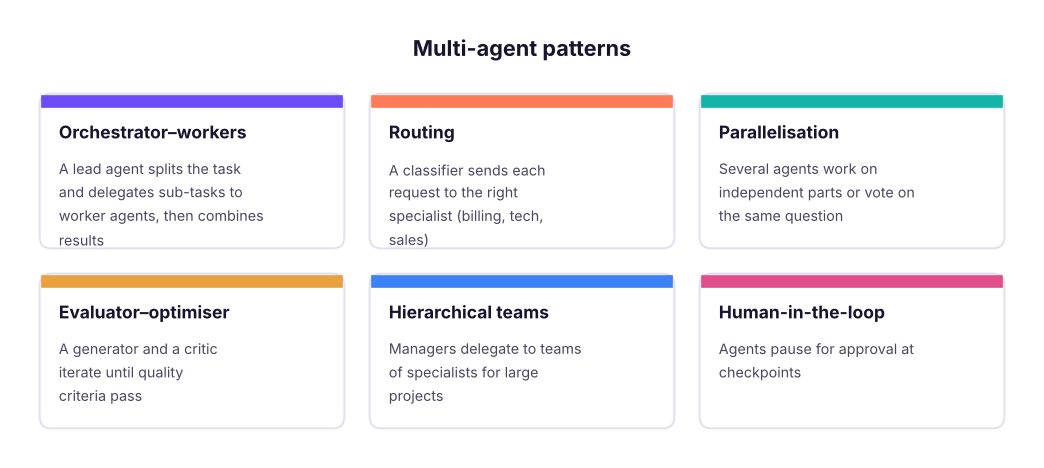
Multi-agent systems help when work splits into independent, context-heavy sub-tasks (research across many sources, many files). They multiply token usage, so use them when the extra quality is worth it.
Agent platforms in 2026
| Platform | What it gives you |
|---|---|
| Claude Agent SDK (Python/TypeScript) | The Claude Code agent harness as a library: file, shell, web and MCP tools, subagents, permissions |
| Claude Managed Agents | Anthropic-hosted agent loop and sandbox, sessions, scheduled runs |
| Anthropic API tool runner | Lightweight loop over your own tools (lesson 6) |
| OpenAI Agents SDK | Agents, handoffs, guardrails, tracing |
| LangGraph (LangChain) | Graph-based stateful workflows and agents with checkpoints |
| CrewAI, AutoGen / AG2, LlamaIndex agents | Multi-agent orchestration frameworks |
| No-code: n8n, Zapier agents, Microsoft Copilot Studio | Business automations with LLM steps |
Pick by: how much control you need, where it must run (your cloud vs hosted), language, observability and team skills. Many production "agents" are really well-designed workflows with one or two agentic steps.
Guardrails and evaluation for agents
| Risk | Control |
|---|---|
| Runaway loops and cost | Step limits, token/time budgets, stop conditions |
| Wrong or harmful actions | Least-privilege tools, approval for side effects, sandboxes, dry-run modes |
| Prompt injection from tools/web | Treat observations as data, restrict tools after reading untrusted content |
| Hallucinated facts | Require tool-sourced numbers, automated checks, citations |
| Silent failure | Tracing every step (LangSmith, Langfuse, OpenTelemetry), alerts |
| Quality drift | Task-level evaluation suites run on every change (lesson 9) |
Should this be an agent? A checklist
- Complexity: is the path hard to specify in advance?
- Value: does the outcome justify extra cost and latency?
- Viability: can current models do each step reliably (test it)?
- Cost of error: can mistakes be caught and undone?
If any answer is "no", build a workflow or a single call instead.
Summary
- Agentic AI pursues goals through multi-step tool use; the model chooses the next action in a loop.
- Prefer single calls and workflows; use agents for open-ended, valuable tasks where errors can be caught.
- The agent loop: think, act (tool), observe, repeat, with step limits and clear stopping conditions (ReAct).
- Planning, reflection/evaluator patterns and memory improve agents; verify outputs against tool results.
- Multi-agent patterns (orchestrator–workers, routing, evaluator–optimiser) add power and cost.
- Guard agents with least privilege, approvals, budgets, tracing and evaluation.
1. What distinguishes an agent from a workflow?
2. What does ReAct stand for in agent design?
3. Which control prevents an agent from looping forever?
4. When is a multi-agent design most useful?
5. An agent's report contains a number not found in any tool result. What pattern catches this?
6. Which is NOT a reason to choose an agent?
(1) Extend the agent with a region_breakdown(sub_category) tool and a step that uses it. (2) Add a reflection step that rejects the final answer if it is over 60 words, and loop back. (3) Draw the architecture of a "monthly business review" agent: tools, data sources, approvals and outputs. (4) Decide workflow or agent for: invoice extraction, competitor research report, password reset.
Show solution
TOOLS["region_breakdown"] = lambda sub_category: sql(f"SELECT region, ROUND(SUM(profit)/1e6, 2) AS profit_m FROM sales WHERE sub_category = '{sub_category}' AND YEAR(order_date) = 2025 GROUP BY 1 ORDER BY 2")
# (4) invoice extraction → single call / workflow with validation; competitor research → agent (open-ended, many sources, human review); password reset → deterministic workflow, no LLM autonomy.Q: What is agentic AI and how is it different from generative AI? Generative AI produces content in response to a prompt; agentic AI uses models in a loop with tools and memory to pursue a goal across multiple steps, deciding what to do next.
Q: How would you design a reliable agent for business reporting? Narrow tools with read-only data access, a planning step, required tool-sourced numbers, an automated checker, human approval before distribution, step and cost limits, tracing, and an evaluation suite of past questions.
Q: When would you not use an agent? When a fixed workflow or single call solves the task, when errors are costly and hard to detect, or when latency and cost budgets are tight.
Practise more online
Free, trusted places to test yourself on this topic. Links open the original site in a new tab.