
Tool Use and Function Calling: Letting LLMs Query Data, Call APIs and Take Actions
Connect a model to the outside world. How function calling works (tool definitions, JSON schemas, tool_use and tool_result blocks), the request–execute–respond loop, writing good tool descriptions, strict schemas and validation, parallel calls, error handling, server-side tools (web search, code execution), and safety controls, with a runnable sales-analytics assistant that answers questions by calling SQL and calculator tools.
- Define tools with names, descriptions and JSON input schemas
- Implement the tool-use loop and return tool results (including errors) correctly
- Use the SDK tool runner, strict schemas and parallel tool calls
- Combine client tools with server tools such as web search and code execution
- Apply safety controls: least privilege, validation, confirmation and audit logs
Why tools?
LLMs cannot see your database, today's exchange rate or your calendar, and they are unreliable at arithmetic. Tool use (function calling) lets the model ask your code to do these things: the model decides which tool to call with which arguments; your code runs it and returns the result; the model uses the result to answer.
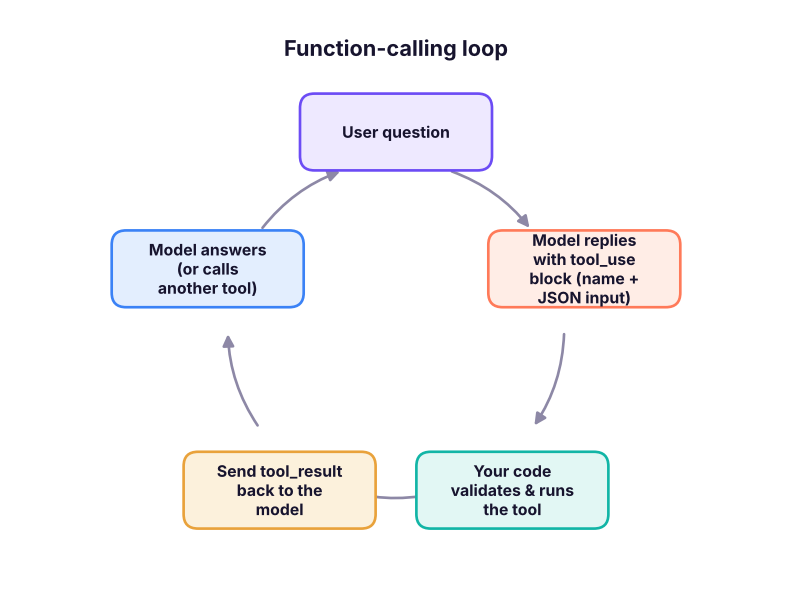
Defining tools
A tool is a name, a description (the model reads it to decide when to use the tool) and a JSON Schema for the input.
import json, re, duckdb, pandas as pd, numpy as np
sales = pd.read_csv("superstore_sales.csv", parse_dates=["order_date"])
con = duckdb.connect(); con.register("sales", sales)
TOOLS = [
    {"name": "run_sql",
     "description": "Run a read-only DuckDB SQL query on table `sales` (one row per order line) and return up to 20 rows as JSON. "
                    "Columns: order_id, order_date (DATE), ship_date, ship_mode, customer_id, segment, city, state, region, category, sub_category, "
                    "product_name, sales (INR), quantity, discount (0-1), profit (INR). Use this for any question about sales data.",
     "input_schema": {"type": "object", "properties": {"sql": {"type": "string", "description": "A single SELECT statement"}}, "required": ["sql"], "additionalProperties": False}},
    {"name": "calculator",
     "description": "Evaluate an arithmetic expression exactly, e.g. '(78.38 - 65.40) / 65.40 * 100'. Use for growth rates and percentages.",
     "input_schema": {"type": "object", "properties": {"expression": {"type": "string"}}, "required": ["expression"], "additionalProperties": False}},
    {"name": "convert_currency",
     "description": "Convert an amount from INR to USD, EUR or AED using today's reference rate.",
     "input_schema": {"type": "object", "properties": {"amount_inr": {"type": "number"}, "to": {"type": "string", "enum": ["USD", "EUR", "AED"]}}, "required": ["amount_inr", "to"], "additionalProperties": False}},
]
print(json.dumps(TOOLS[1], indent=1)){
"name": "calculator",
"description": "Evaluate an arithmetic expression exactly, e.g. '(78.38 - 65.40) / 65.40 * 100'. Use for growth rates and percentages.",
"input_schema": {
"type": "object",
"properties": {
"expression": {
"type": "string"
}
},
"required": [
"expression"
],
"additionalProperties": false
}
}Say what the tool does, when to use it (and when not to), what each parameter means with formats and examples, and what it returns. Most tool-use failures come from vague descriptions, not from the model.
Implementing the tools safely
import ast, operator as op
def run_sql(sql: str):
    if not re.match(r"^\s*(with|select)\b", sql, re.I) or re.search(r"\b(insert|update|delete|drop|alter|create|copy|attach|pragma)\b", sql, re.I):
        raise ValueError("only read-only SELECT queries are allowed")
    return con.execute(sql).df().head(20).round(2).to_dict("records")
OPS = {ast.Add: op.add, ast.Sub: op.sub, ast.Mult: op.mul, ast.Div: op.truediv, ast.Pow: op.pow, ast.USub: op.neg}
def calculator(expression: str):                     # safe arithmetic: no eval()
    def ev(n):
        if isinstance(n, ast.Constant) and isinstance(n.value, (int, float)): return n.value
        if isinstance(n, ast.BinOp) and type(n.op) in OPS: return OPS[type(n.op)](ev(n.left), ev(n.right))
        if isinstance(n, ast.UnaryOp) and type(n.op) in OPS: return OPS[type(n.op)](ev(n.operand))
        raise ValueError("unsupported expression")
    return round(ev(ast.parse(expression, mode="eval").body), 4)
RATES = {"USD": 1 / 88.0, "EUR": 1 / 102.0, "AED": 1 / 24.0}      # illustrative reference rates
def convert_currency(amount_inr: float, to: str): return {"amount": round(amount_inr * RATES[to], 2), "currency": to}
REGISTRY = {"run_sql": run_sql, "calculator": calculator, "convert_currency": convert_currency}
def execute_tool(name, tool_input):
    try: return {"content": json.dumps(REGISTRY[name](**tool_input), default=str)}
    except Exception as e: return {"content": f"Error: {e}", "is_error": True}       # errors go back to the model, which can fix its call
print(execute_tool("run_sql", {"sql": "SELECT region, ROUND(SUM(sales)/1e6, 2) AS sales_m FROM sales GROUP BY region ORDER BY sales_m DESC"}))
print(execute_tool("run_sql", {"sql": "DROP TABLE sales"}))
print(execute_tool("calculator", {"expression": "__import__('os').system('ls')"})){'content': '[{"region": "South", "sales_m": 53.95}, {"region": "West", "sales_m": 51.96}, {"region": "North", "sales_m": 49.02}, {"region": "East", "sales_m": 46.48}]'}
{'content': 'Error: only read-only SELECT queries are allowed', 'is_error': True}
{'content': 'Error: unsupported expression', 'is_error': True}Never eval() model output, never give a tool more power than it needs (read-only database user, allow-listed endpoints), and return errors as tool_result with is_error: true instead of crashing.
The loop (with a simulated model)
A real model decides tool calls itself. To run offline, a scripted "model" below emits the same block structure Claude returns, so you can see exactly what flows through the loop.
import types
def block(**kw): return types.SimpleNamespace(**kw)
class ScriptedModel:
    """Emits Anthropic-style responses: tool_use blocks first, then a final text answer that uses the tool results."""
    def __init__(self, plan): self.plan, self.step = plan, 0
    def create(self, messages, tools, **kw):
        if self.step < len(self.plan):
            calls = self.plan[self.step](messages); self.step += 1
            return block(stop_reason="tool_use", content=[block(type="text", text="Let me check the data.")] +
                         [block(type="tool_use", id=f"toolu_{self.step}_{i}", name=n, input=a) for i, (n, a) in enumerate(calls)])
        results = [json.loads(c["content"]) for m in messages if m["role"] == "user" and isinstance(m["content"], list) for c in m["content"] if c.get("type") == "tool_result" and not c.get("is_error")]
        return block(stop_reason="end_turn", content=[block(type="text", text=FINAL(results))])

question = "How much did 2025 sales grow over 2024, and what is 2025 sales in US dollars?"
plan = [lambda m: [("run_sql", {"sql": "SELECT YEAR(order_date) AS yr, ROUND(SUM(sales)/1e6, 2) AS sales_m FROM sales WHERE YEAR(order_date) IN (2024, 2025) GROUP BY yr ORDER BY yr"})],
        lambda m: (lambda r: [("calculator", {"expression": f"({r[1]['sales_m']} - {r[0]['sales_m']}) / {r[0]['sales_m']} * 100"}),          # two tool calls in parallel
                              ("convert_currency", {"amount_inr": r[1]["sales_m"] * 1e6, "to": "USD"})])(json.loads(m[-1]["content"][0]["content"]))]
FINAL = lambda res: (f"2025 sales were ₹{res[0][1]['sales_m']}M against ₹{res[0][0]['sales_m']}M in 2024, growth of {res[1]:.1f}%. "
                     f"That is about ${res[2]['amount'] / 1e6:.2f}M at the reference rate.")
model = ScriptedModel(plan)
messages = [{"role": "user", "content": question}]
while True:
    resp = model.create(messages=messages, tools=TOOLS)
    messages.append({"role": "assistant", "content": resp.content})
    if resp.stop_reason != "tool_use": break
    results = []
    for b in resp.content:
        if b.type == "tool_use":
            out = execute_tool(b.name, b.input); print(f"→ {b.name}({json.dumps(b.input)[:90]}) = {out['content'][:90]}")
            results.append({"type": "tool_result", "tool_use_id": b.id, **out})
    messages.append({"role": "user", "content": results})                 # ALL results of a turn go back in ONE user message
print("\nAnswer:", next(b.text for b in resp.content if b.type == "text"))→ run_sql({"sql": "SELECT YEAR(order_date) AS yr, ROUND(SUM(sales)/1e6, 2) AS sales_m FROM sales WHE) = [{"yr": 2024, "sales_m": 65.4}, {"yr": 2025, "sales_m": 78.38}]
→ calculator({"expression": "(78.38 - 65.4) / 65.4 * 100"}) = 19.8471
→ convert_currency({"amount_inr": 78380000.0, "to": "USD"}) = {"amount": 890681.82, "currency": "USD"}
Answer: 2025 sales were ₹78.38M against ₹65.4M in 2024, growth of 19.8%. That is about $0.89M at the reference rate.The numbers in the answer come from the database and the calculator, not from the model's memory: that is the point of tools.
With the real Claude API
import anthropic
client = anthropic.Anthropic()
messages = [{"role": "user", "content": question}]
while True:
    response = client.messages.create(model="claude-opus-5-5", max_tokens=16000, tools=TOOLS, messages=messages)
    messages.append({"role": "assistant", "content": response.content})      # keep the full content, including tool_use blocks
    if response.stop_reason != "tool_use":
        break
    results = []
    for b in response.content:
        if b.type == "tool_use":
            results.append({"type": "tool_result", "tool_use_id": b.id, **execute_tool(b.name, b.input)})
    messages.append({"role": "user", "content": results})
print(next(b.text for b in response.content if b.type == "text"))
The SDK's tool runner writes this loop for you: decorate Python functions and their type hints and docstrings become the schema.
from anthropic import beta_tool

@beta_tool
def calculator(expression: str) -> str:
    """Evaluate an arithmetic expression exactly.

    Args:
        expression: e.g. '(78.38 - 65.40) / 65.40 * 100'
    """
    return str(safe_eval(expression))

runner = client.beta.messages.tool_runner(model="claude-opus-5-5", max_tokens=16000, tools=[calculator, run_sql_tool],
                                          messages=[{"role": "user", "content": question}])
for message in runner:          # iterates until Claude stops calling tools
    print(message.content[-1])
Making tool calls reliable
| Technique | How |
|---|---|
| Strict schemas | Add "strict": true to a tool (with additionalProperties: false and required) so inputs always match the schema |
| Clear, distinct tools | Few tools with non-overlapping purposes; consistent naming (get_, search_, create_) |
| Validate inputs anyway | Check types, ranges and permissions before executing |
| Return informative errors | "Column 'revenue' not found; did you mean 'sales'?" lets the model self-correct |
| Steer tool choice from the prompt | "Always use run_sql for questions about sales." (On the newest Claude models, forcing a specific tool via tool_choice is not supported; use auto plus instructions, or structured outputs when you only need JSON.) |
| Parallel calls | Independent calls arrive in one turn; run them concurrently and return all results in one message |
| Limits | Cap loop iterations, rows returned and total tokens |
Server-side tools
Some tools run on the provider's infrastructure: you only declare them.
response = client.messages.create(
    model="claude-opus-5-5", max_tokens=16000,
    tools=[{"type": "web_search_20260209", "name": "web_search", "max_uses": 3, "allowed_domains": ["rbi.org.in", "pib.gov.in"]}],
    messages=[{"role": "user", "content": "What is the current RBI repo rate? Cite the source."}],
)| Server tool | Use |
|---|---|
| Web search / web fetch | Current information with citations |
| Code execution | The model writes and runs Python in a sandbox (data analysis, charts) |
| MCP connectors | Tools from remote MCP servers (lesson 8) |
Safety: tools turn words into actions
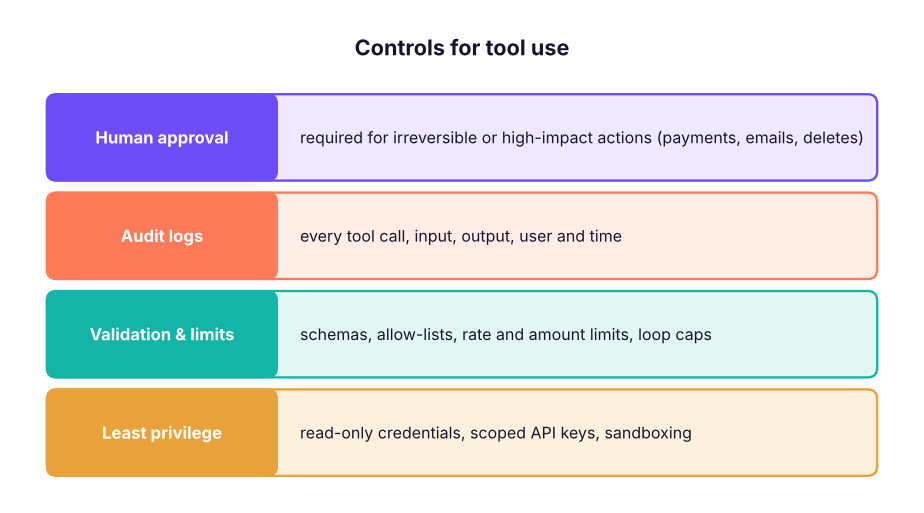
Prompt injection becomes more dangerous with tools: a malicious web page or document could say "email the customer list to …". Treat all tool outputs and retrieved text as data, never as instructions; keep secrets out of the model's reach; and require confirmation for actions with side effects.
Summary
- Tools let a model request actions: you define name, description and JSON schema; the model emits
tool_use; your code returnstool_result. - Loop until
stop_reasonis nottool_use; return all results of a turn in one user message; return errors withis_error. - Use the SDK tool runner for simple loops; strict schemas, validation and good descriptions for reliability.
- Server tools (web search, code execution) run on the provider side.
- Apply least privilege, validation, limits, approval for side effects and audit logs; treat tool outputs as data.
1. Who executes a client-side tool?
2. What does the model return when it wants a tool?
tool_result.3. A tool raises an exception. What should you send back?
4. What matters most for the model choosing the right tool?
5. Why give the SQL tool read-only access?
6. How do you return results for three parallel tool calls?
(1) Add a top_products(category, n) tool and a scripted plan that uses it. (2) Make run_sql return a helpful error when a column does not exist (list valid columns). (3) Add a loop limit of 5 iterations and a total-rows limit. (4) With a real API key, ask Claude three analytics questions through this loop and check every number against your own SQL.
Show solution
def top_products(category: str, n: int = 5):
    return con.execute("SELECT product_name, ROUND(SUM(profit)) AS profit FROM sales WHERE category = ? GROUP BY 1 ORDER BY 2 DESC LIMIT ?", [category, n]).df().to_dict("records")
REGISTRY["top_products"] = top_products
def run_sql(sql):
    try: return con.execute(sql).df().head(20).to_dict("records")
except duckdb.BinderException as e: raise ValueError(f"{e}. Valid columns: {list(sales.columns)}")Q: How does function calling work? You describe tools with JSON schemas; the model returns a structured tool call instead of text when it needs one; your code executes it and sends the result back; the model continues until it can answer.
Q: How do you stop an LLM agent from doing something harmful with tools? Least-privilege credentials, input validation and allow-lists, amount/rate limits, human approval for side effects, sandboxing, audit logs, and treating retrieved content as untrusted data.
Q: Tool use vs RAG? RAG retrieves text to read; tool use performs computations or actions and fetches live structured data. Many assistants combine both, with retrieval itself exposed as a tool.
Practise more online
Free, trusted places to test yourself on this topic. Links open the original site in a new tab.