
Python and SQL: sqlite3, DuckDB, SQLAlchemy and pandas.read_sql
Connect Python to databases. Create and query SQLite with the standard library, use parameterised queries safely, load DataFrames to tables and back, query CSV and DataFrames directly with DuckDB, connect to MySQL, PostgreSQL and SQL Server with SQLAlchemy, and decide what to do in SQL versus pandas.
- Create a SQLite database, run DDL/DML from Python and fetch results
- Write parameterised queries and explain SQL injection
- Move data between pandas and databases with to_sql and read_sql
- Query files and DataFrames with DuckDB
- Connect to server databases with SQLAlchemy connection URLs and secrets kept out of code
Why connect Python to SQL?
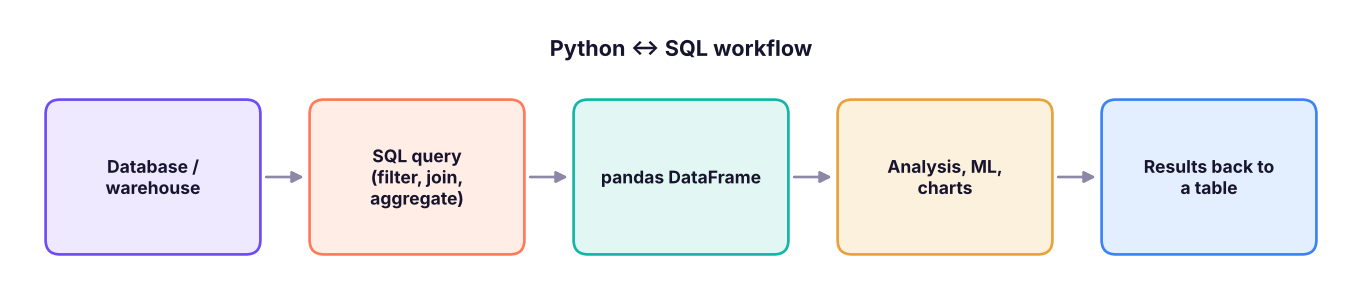
Company data lives in databases and warehouses (MySQL, PostgreSQL, SQL Server, Snowflake, BigQuery, Databricks). The usual pattern: filter and aggregate in SQL (close to the data), then analyse, model and chart in Python.
sqlite3: a database in a file
SQLite ships with Python. It is perfect for learning, prototypes and small apps.
import sqlite3, pandas as pd
con = sqlite3.connect(":memory:")                   # or "shop.db" for a file
cur = con.cursor()
cur.executescript("""
CREATE TABLE customers (id INTEGER PRIMARY KEY, name TEXT NOT NULL, city TEXT);
CREATE TABLE orders (id INTEGER PRIMARY KEY, customer_id INTEGER REFERENCES customers(id), amount REAL, order_date TEXT);
""")
cur.executemany("INSERT INTO customers (name, city) VALUES (?, ?)", [("Asha", "Pune"), ("Ravi", "Delhi"), ("Meera", "Kochi")])
cur.executemany("INSERT INTO orders (customer_id, amount, order_date) VALUES (?, ?, ?)",
                [(1, 1200, "2025-01-05"), (1, 450, "2025-02-11"), (2, 3000, "2025-02-14"), (3, 780, "2025-03-01")])
con.commit()
cur.execute("SELECT c.name, COUNT(*), SUM(o.amount) FROM orders o JOIN customers c ON c.id = o.customer_id GROUP BY c.name ORDER BY 3 DESC")
print(cur.fetchall())
cur.execute("SELECT * FROM customers WHERE city = ?", ("Pune",)); print(cur.fetchone())[('Ravi', 1, 3000.0), ('Asha', 2, 1650.0), ('Meera', 1, 780.0)]
(1, 'Asha', 'Pune')| Method | Use |
|---|---|
con.execute(sql, params) / cursor.execute |
Run one statement |
executemany(sql, rows) |
Insert many rows |
fetchone(), fetchall(), fetchmany(n) |
Read results |
con.commit() / con.rollback() |
Save / undo a transaction |
with con: |
Commits on success, rolls back on error |
Parameterised queries and SQL injection
user_input = "Pune' OR '1'='1"
unsafe = f"SELECT name FROM customers WHERE city = '{user_input}'"       # NEVER build SQL with f-strings
print("unsafe returns:", con.execute(unsafe).fetchall())
print("safe returns: ", con.execute("SELECT name FROM customers WHERE city = ?", (user_input,)).fetchall())unsafe returns: [('Asha',), ('Ravi',), ('Meera',)]
safe returns: []The unsafe query returned every customer because the input changed the SQL. Placeholders (? in SQLite, %s or :name in other drivers) send values separately, so input can never become code.
Transactions
try:
    with con:                                                        # one transaction
        con.execute("UPDATE orders SET amount = amount - 500 WHERE id = 1")
        con.execute("INSERT INTO orders (customer_id, amount) VALUES (2, 500)")          # second change
        raise ValueError("payment gateway down")                      # simulate a failure mid-way
except ValueError as e:
    print("rolled back:", e)
print(con.execute("SELECT id, amount FROM orders WHERE id = 1").fetchone(), con.execute("SELECT COUNT(*) FROM orders").fetchone())rolled back: payment gateway down (1, 1200.0) (4,)
Both changes were undone together: that is atomicity (the A in ACID).
pandas ↔ database
s = pd.read_csv("superstore_sales.csv")
s.to_sql("sales", con, index=False, if_exists="replace")               # DataFrame -> table
q = """
SELECT region, category, ROUND(SUM(sales) / 1e6, 2) AS sales_m, ROUND(100.0 * SUM(profit) / SUM(sales), 1) AS margin_pct
FROM sales WHERE discount <= :max_disc GROUP BY region, category ORDER BY sales_m DESC LIMIT 5
"""
print(pd.read_sql(q, con, params={"max_disc": 0.1}))                  # query -> DataFrame
con.close()region category sales_m margin_pct 0 South Technology 32.14 15.9 1 West Technology 30.21 16.1 2 North Technology 29.93 16.6 3 East Technology 26.57 17.5 4 West Furniture 5.36 10.3
For large tables, read in pieces with chunksize= or push the aggregation into SQL so only the summary travels.
DuckDB: SQL on files and DataFrames
DuckDB is an in-process analytical database: no server, very fast on columnar data, and it can query CSV, Parquet and pandas DataFrames directly.
import duckdb
print(duckdb.sql("""
    SELECT category, COUNT(*) AS lines, ROUND(SUM(sales)/1e6, 2) AS sales_m
    FROM 'superstore_sales.csv' GROUP BY category ORDER BY sales_m DESC
""").df())
customers = pd.read_csv("customers.csv")
top = duckdb.sql("""
    SELECT c.state, COUNT(DISTINCT s.customer_id) AS customers, ROUND(SUM(s.sales)/1e6, 2) AS sales_m,
           RANK() OVER (ORDER BY SUM(s.sales) DESC) AS rnk
    FROM s JOIN customers c USING (customer_id)                       -- s and customers are pandas DataFrames!
    GROUP BY c.state QUALIFY rnk <= 5 ORDER BY rnk
""").df()
print(top, duckdb.__version__) category lines sales_m
0 Technology 1892 156.44
1 Furniture 1917 34.84
2 Office Supplies 2514 10.13
state customers sales_m rnk
0 Maharashtra 93 25.67 1
1 Delhi 54 15.66 2
2 Kerala 48 14.71 3
3 Madhya Pradesh 57 14.41 4
4 West Bengal 54 13.89 5 2.0.0DuckDB also writes Parquet (COPY (SELECT ...) TO 'out.parquet'), reads from S3, and powers tools such as MotherDuck and the Metabase/MinusX demos in the AI analytics track.
Server databases with SQLAlchemy
SQLAlchemy gives one interface to many databases. You need the database's driver package too.
from sqlalchemy import create_engine, text
import os, pandas as pd

# Connection URLs:  dialect+driver://user:password@host:port/database
url = os.environ["DB_URL"]          # e.g. "postgresql+psycopg://analyst:***@db.company.com:5432/sales"
#   MySQL:       "mysql+pymysql://user:pw@host:3306/db"
#   SQL Server:  "mssql+pyodbc://user:pw@server/db?driver=ODBC+Driver+18+for+SQL+Server"
#   SQLite:      "sqlite:///shop.db"
engine = create_engine(url)

with engine.connect() as conn:
    df = pd.read_sql(text("SELECT * FROM orders WHERE order_date >= :d"), conn, params={"d": "2025-01-01"})

df_summary.to_sql("daily_summary", engine, if_exists="append", index=False, chunksize=10_000)
Warehouses have their own connectors (snowflake-connector-python, google-cloud-bigquery, databricks-sql-connector), and most also accept SQLAlchemy URLs.
Read passwords from environment variables, a .env file (with python-dotenv) that is in .gitignore, or a secrets manager. Use a read-only database user for analysis.
SQL or pandas?
| Do it in SQL when… | Do it in pandas when… |
|---|---|
| The data is large and lives in the database | The data fits in memory |
| Filtering, joining, aggregating | Complex reshaping, statistics, ML, charts |
| Many people need the same logic (views) | Exploratory, one-off analysis |
| You want the database's indexes and compute | You need Python libraries |
Summary
sqlite3creates databases in a file or memory;execute,executemany,fetchall,commit;with con:wraps a transaction.- Always use parameter placeholders, never f-strings, to prevent SQL injection.
df.to_sqlwrites tables;pd.read_sql(query, con, params=...)reads results into DataFrames.- DuckDB runs fast SQL directly on CSV/Parquet files and pandas DataFrames.
- SQLAlchemy connects to MySQL, PostgreSQL, SQL Server and warehouses with a URL; keep credentials in environment variables.
1. How should user input be passed into a SQL query?
2. What does with con: do in sqlite3?
3. Which writes a DataFrame to a database table?
if_exists controls replace/append.4. What is special about DuckDB?
5. Where should a database password be stored?
6. Why aggregate in SQL before loading into pandas?
(1) Load customers.csv and superstore_sales.csv into SQLite. (2) In SQL, find the top 5 cities by profit and read the result into pandas. (3) Repeat with DuckDB directly on the CSV files. (4) Write a function get_sales(con, region) that uses a parameterised query.
Show solution
con = sqlite3.connect(":memory:")
pd.read_csv("customers.csv").to_sql("customers", con, index=False)
pd.read_csv("superstore_sales.csv").to_sql("sales", con, index=False)
print(pd.read_sql("SELECT city, SUM(profit) p FROM sales GROUP BY city ORDER BY p DESC LIMIT 5", con))
print(duckdb.sql("SELECT city, SUM(profit) p FROM 'superstore_sales.csv' GROUP BY city ORDER BY p DESC LIMIT 5").df())
def get_sales(con, region):
    return pd.read_sql("SELECT SUM(sales) AS sales FROM sales WHERE region = ?", con, params=(region,))
print(get_sales(con, "West"))Q: What is SQL injection and how do you prevent it? Malicious input that changes a query's meaning; prevent it with parameterised queries (and least-privilege accounts, input validation, ORMs).
Q: How do you load a 50 GB table for analysis? Aggregate or sample in the database, read in chunks, or use a columnar engine (DuckDB, Spark, the warehouse itself) instead of pulling everything into pandas.
Q: What does ACID mean? Atomicity, Consistency, Isolation, Durability: transactions are all-or-nothing, keep rules valid, do not interfere, and survive crashes.
Practise more online
Free, trusted places to test yourself on this topic. Links open the original site in a new tab.