
Python Capstone: End-to-End Retail Sales Analytics Project
Bring the whole Python track together on the Superstore data. Structure a project, build a validated data pipeline, compute KPIs, growth and Pareto analysis, cohort retention and discount impact, create a chart pack and an Excel report, and write the README and executive summary you can put in your portfolio.
- Organise an analysis as a reproducible project with functions, checks and outputs
- Build a load → validate → transform pipeline with assertions
- Analyse KPIs, growth, Pareto concentration, cohorts and discount effects
- Produce a multi-sheet Excel report and a chart pack
- Write an executive summary and a portfolio-ready README
The brief
The sales director of an Indian office-supplies retailer asks: How did 2025 go, where do we make and lose money, how loyal are our customers, and what should we change in 2026? Deliver a short report with charts and an Excel workbook her team can filter.

Project layout (Lesson 13): data/raw, src/ (functions below), notebooks/ (exploration), reports/ (outputs), README.md.
1. Load and validate
import pandas as pd, numpy as np, matplotlib.pyplot as plt
pd.set_option("display.max_columns", 20); pd.set_option("display.width", 160)

def load(path="superstore_sales.csv"):
    df = pd.read_csv(path, parse_dates=["order_date", "ship_date"])
    return df

def validate(df):
    checks = {
        "row_id unique": df["row_id"].is_unique,
        "no missing values": df.isna().sum().sum() == 0,
        "sales positive": (df["sales"] > 0).all(),
        "discount between 0 and 1": df["discount"].between(0, 1).all(),
        "ship after order": (df["ship_date"] >= df["order_date"]).all(),
        "quantity 1-20": df["quantity"].between(1, 20).all(),
    }
    for name, ok in checks.items(): print(f"  {'PASS' if ok else 'FAIL'}  {name}")
    assert all(checks.values()), "validation failed"
    return df

s = validate(load())
print(s.shape, s.order_date.min().date(), "→", s.order_date.max().date())PASS row_id unique PASS no missing values PASS sales positive PASS discount between 0 and 1 PASS ship after order PASS quantity 1-20 (6323, 19) 2023-01-01 → 2025-12-31
2. Transform and enrich
def enrich(df):
    out = df.copy()
    out["year"] = out.order_date.dt.year
    out["month"] = out.order_date.dt.to_period("M")
    out["margin_pct"] = 100 * out.profit / out.sales
    out["ship_days"] = (out.ship_date - out.order_date).dt.days
    out["discount_band"] = pd.cut(out.discount, [-0.01, 0, 0.1, 0.2, 1], labels=["0%", "1–10%", "11–20%", ">20%"])
    return out
s = enrich(s)
print(s[["order_id", "year", "month", "sales", "profit", "margin_pct", "discount_band"]].head(3))order_id year month sales profit margin_pct discount_band 0 IN-2023-00001 2023 2023-01 36000.0 3472.55 9.645972 0% 1 IN-2023-00001 2023 2023-01 3850.0 1169.54 30.377662 0% 2 IN-2023-00001 2023 2023-01 62080.0 6044.47 9.736582 0%
3. Headline KPIs and growth
def kpis(df):
    g = df.groupby("year").agg(sales=("sales", "sum"), profit=("profit", "sum"), orders=("order_id", "nunique"), customers=("customer_id", "nunique"), units=("quantity", "sum"))
    g["margin_%"] = 100 * g.profit / g.sales
    g["aov"] = g.sales / g.orders
    g["sales_growth_%"] = 100 * g.sales.pct_change()
    g["profit_growth_%"] = 100 * g.profit.pct_change()
    return g
k = kpis(s)
view = k.assign(sales=k.sales / 1e6, profit=k.profit / 1e6, aov=k.aov / 1e3).round(1)
view.columns = ["sales ₹M", "profit ₹M", "orders", "customers", "units", "margin %", "AOV ₹K", "sales growth %", "profit growth %"]
print(view)sales ₹M profit ₹M orders customers units margin % AOV ₹K sales growth % profit growth % year 2023 57.6 4.7 883 540 4714 8.2 65.3 NaN NaN 2024 65.4 6.1 1085 590 5404 9.4 60.3 13.5 29.9 2025 78.4 7.5 1232 623 6266 9.6 63.6 19.8 22.1
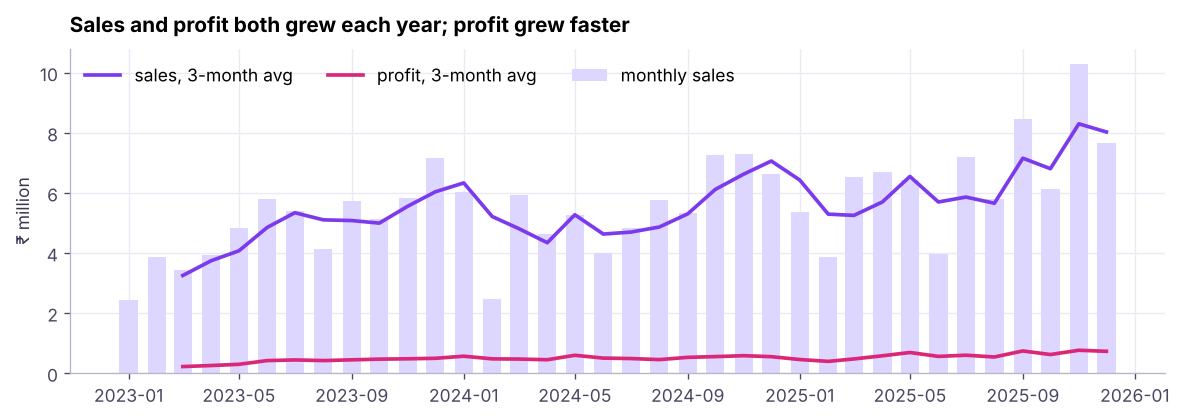
4. Where we make and lose money
sub = s[s.year == 2025].groupby(["category", "sub_category"]).agg(sales=("sales", "sum"), profit=("profit", "sum"), avg_disc=("discount", "mean"))
sub["margin_%"] = (100 * sub.profit / sub.sales).round(1)
sub = sub.sort_values("profit")
print((sub.assign(sales=sub.sales / 1e6, profit=sub.profit / 1e6)).round(2)) sales profit avg_disc margin_%
category sub_category
Furniture Tables 5.30 -0.29 0.17 -5.4
Bookcases 3.92 -0.17 0.19 -4.3
Office Supplies Art 0.10 0.02 0.08 15.3
Binders 0.16 0.02 0.08 14.2
Furniture Furnishings 0.49 0.03 0.08 5.2
Office Supplies Paper 0.19 0.03 0.07 15.8
Furniture Chairs 3.05 0.13 0.08 4.3
Office Supplies Storage 0.98 0.14 0.08 14.1
Technology Accessories 1.22 0.15 0.07 11.9
Office Supplies Appliances 2.54 0.38 0.07 14.9
Technology Phones 12.94 1.71 0.06 13.2
Machines 16.50 2.00 0.08 12.1
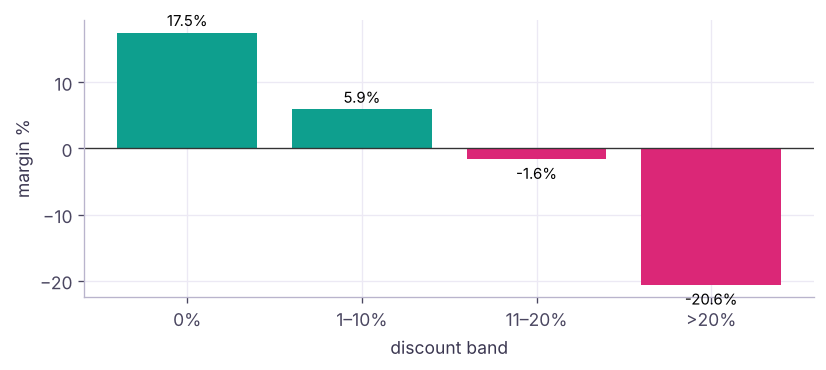
Copiers 30.98 3.35 0.08 10.8db = s.groupby("discount_band", observed=True).agg(lines=("row_id", "size"), sales=("sales", "sum"), profit=("profit", "sum"))
db["margin_%"] = (100 * db.profit / db.sales).round(1); db["share_of_lines_%"] = (100 * db.lines / db.lines.sum()).round(1)
print(db.assign(sales=(db.sales / 1e6).round(1), profit=(db.profit / 1e6).round(2)))lines sales profit margin_% share_of_lines_% discount_band 0% 3480 123.9 21.72 17.5 55.0 1–10% 726 21.9 1.29 5.9 11.5 11–20% 1217 35.9 -0.59 -1.6 19.2 >20% 900 19.7 -4.06 -20.6 14.2
5. Customer concentration (Pareto)
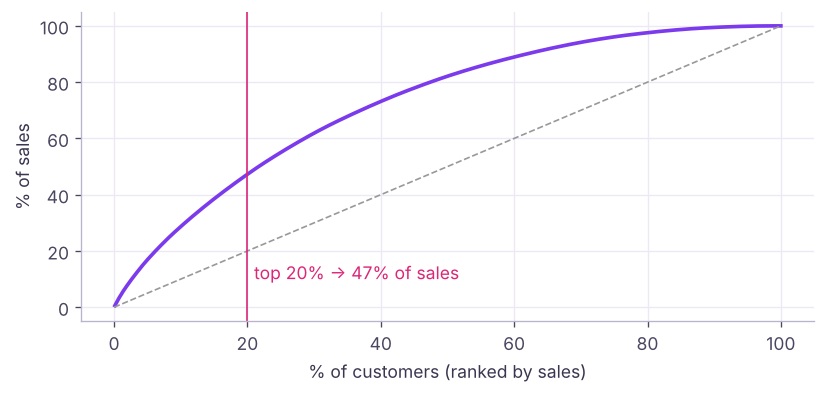
cust = s.groupby("customer_id")["sales"].sum().sort_values(ascending=False)
cum = cust.cumsum() / cust.sum()
top20 = int(len(cust) * 0.2)
print(f"{len(cust)} customers | top 20% ({top20}) bring {cum.iloc[top20 - 1]:.0%} of sales | customers needed for 50% of sales: {(cum < 0.5).sum() + 1}")785 customers | top 20% (157) bring 47% of sales | customers needed for 50% of sales: 171
6. Cohort retention
A cohort groups customers by the month (here: quarter) of their first purchase; retention tracks how many buy again later.
s["quarter"] = s.order_date.dt.to_period("Q")
first = s.groupby("customer_id")["quarter"].min().rename("cohort")
c = s.join(first, on="customer_id")
c["age_q"] = (c.quarter - c.cohort).apply(lambda d: d.n)
active = c.groupby(["cohort", "age_q"])["customer_id"].nunique().unstack()
retention = (active.div(active[0], axis=0) * 100).round(0)
print(active[0].rename("cohort size").head(6).to_dict())
print(retention.iloc[:6, :8]){Period('2023Q1', 'Q-DEC'): 151.0, Period('2023Q2', 'Q-DEC'): 142.0, Period('2023Q3', 'Q-DEC'): 127.0, Period('2023Q4', 'Q-DEC'): 120.0, Period('2024Q1', 'Q-DEC'): 71.0, Period('2024Q2', 'Q-DEC'): 42.0}
age_q 0 1 2 3 4 5 6 7
cohort
2023Q1 100.0 23.0 26.0 28.0 22.0 26.0 35.0 38.0
2023Q2 100.0 20.0 33.0 29.0 26.0 25.0 25.0 31.0
2023Q3 100.0 24.0 26.0 22.0 35.0 36.0 26.0 20.0
2023Q4 100.0 25.0 22.0 29.0 45.0 25.0 32.0 27.0
2024Q1 100.0 38.0 17.0 37.0 34.0 25.0 27.0 38.0
2024Q2 100.0 31.0 24.0 31.0 24.0 24.0 40.0 NaN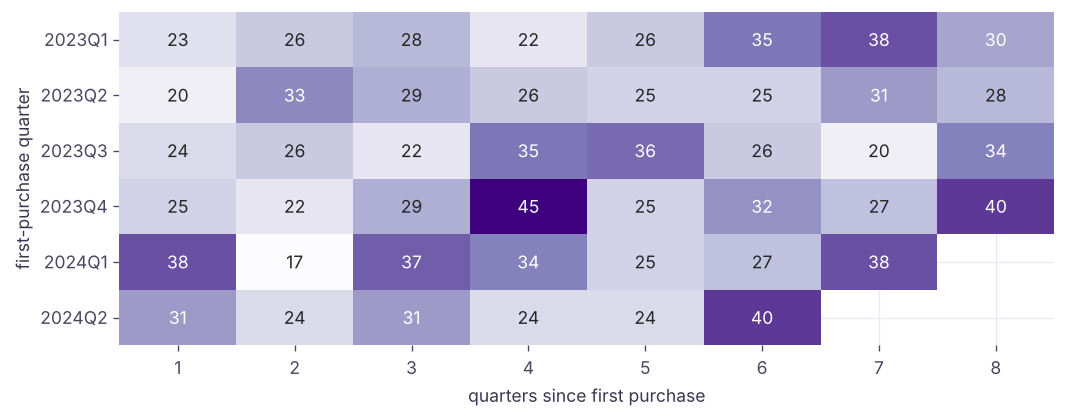
7. Operations: shipping
ship = s.groupby("ship_mode").agg(lines=("row_id", "size"), avg_days=("ship_days", "mean"), sales=("sales", "sum"))
ship["share_%"] = (100 * ship.lines / ship.lines.sum()).round(1)
print(ship.round(1).sort_values("avg_days"))
reg = s[s.year == 2025].groupby("region").agg(sales=("sales", "sum"), profit=("profit", "sum"))
reg["margin_%"] = (100 * reg.profit / reg.sales).round(1); print((reg.assign(sales=reg.sales / 1e6, profit=reg.profit / 1e6)).round(2)) lines avg_days sales share_%
ship_mode
Same Day 321 0.0 10082429.5 5.1
First Class 948 1.5 31455543.0 15.0
Second Class 1249 3.0 40858316.0 19.8
Standard Class 3805 5.6 119017280.5 60.2
sales profit margin_%
region
East 18.91 2.07 10.9
North 16.43 1.56 9.5
South 20.80 1.77 8.5
West 22.23 2.10 9.48. Excel report for the business
from pathlib import Path
out = Path("reports"); out.mkdir(exist_ok=True)
with pd.ExcelWriter(out / "sales_review_2025.xlsx", engine="openpyxl") as xw:
    view.to_excel(xw, sheet_name="KPIs")
    sub.reset_index().to_excel(xw, sheet_name="Sub-category 2025", index=False)
    db.reset_index().to_excel(xw, sheet_name="Discount bands", index=False)
    retention.reset_index().astype(str).to_excel(xw, sheet_name="Cohort retention", index=False)
    s[s.year == 2025].drop(columns=["month", "quarter"]).to_excel(xw, sheet_name="Data 2025", index=False)
import openpyxl
wb = openpyxl.load_workbook(out / "sales_review_2025.xlsx")
for ws in wb.worksheets:
    ws.freeze_panes = "B2"; ws.auto_filter.ref = ws.dimensions
    for col in ws.columns: ws.column_dimensions[col[0].column_letter].width = 16
wb.save(out / "sales_review_2025.xlsx")
print(wb.sheetnames, f"{(out / 'sales_review_2025.xlsx').stat().st_size / 1e6:.1f} MB")
import shutil; shutil.rmtree(out)['KPIs', 'Sub-category 2025', 'Discount bands', 'Cohort retention', 'Data 2025'] 0.3 MB
9. Executive summary (template)
Write the summary from the numbers above; every claim should point to a table or chart.
Fill each line from your outputs: 1. Growth: 2025 sales of ₹M (+% on 2024), profit ₹M (+%), margin __%. 2. Profit engines: __ and __ deliver __% of profit; __ and lose mon. 3. **Discounts**: lines discounted above 20% he a __% mgin, against __% at no discount. 4. **Customers**: the top 20% of customers brin__% of sales, an__% of a cohort is still buying a year later. 5. Actions for 2026: cap discounts on __; review pricing of __; a loyalty programme for the top customers; a retention push in the first quarter after a customer's first purchase.
10. README for your portfolio
# Superstore India: 2025 Sales Review (Python)
**Question:** How did 2025 perform, where is profit made and lost, how loyal are customers?
**Data:** 6,323 order lines, 2023–2025 (synthetic, modelled on the Superstore dataset).
**Tools:** pandas, Matplotlib, Seaborn, openpyxl.
**Method:** validation checks → enrichment → KPIs, Pareto, cohort retention, discount analysis.
**Key findings:** (3–5 bullets with numbers)
**Recommendations:** (3 bullets)
**How to run:** `pip install -r requirements.txt && python src/run_report.py`
**Repo:** data/ · src/ · notebooks/ · reports/ · README.md
Summary
- A project is a pipeline: load → validate (assertions) → enrich → analyse → visualise → report.
- KPI tables with growth, sub-category profitability, discount bands, Pareto concentration and cohort retention answer most retail questions.
pd.ExcelWriter+ openpyxl create business-ready, filterable workbooks.- Finish with an executive summary tied to numbers and a portfolio README.
1. Why put validation checks at the start of the pipeline?
2. What does a Pareto analysis of customers show?
3. What is a cohort in retention analysis?
4. Which tool writes several sheets to one Excel file?
5. What belongs in an executive summary?
6. Why write analysis steps as functions?
(1) Add product-level ABC analysis (A = top 80% of sales). (2) Compute RFM scores for 2025 customers (see ML track lesson on segmentation). (3) Turn the chart cells into a function that saves PNGs to reports/. (4) Publish the project on GitHub with the README template and one chart in the README.
Show solution
prod = s.groupby("product_name")["sales"].sum().sort_values(ascending=False)
share = prod.cumsum() / prod.sum()
abc = pd.cut(share, [0, .8, .95, 1], labels=["A", "B", "C"]); print(abc.value_counts())
snap = s.order_date.max() + pd.Timedelta(days=1)
rfm = s[s.year == 2025].groupby("customer_id").agg(R=("order_date", lambda d: (snap - d.max()).days), F=("order_id", "nunique"), M=("sales", "sum"))
rfm["score"] = pd.qcut(-rfm.R, 4, labels=False) + pd.qcut(rfm.F.rank(method="first"), 4, labels=False) + pd.qcut(rfm.M, 4, labels=False)
print(rfm.sort_values("score", ascending=False).head())Q: Walk me through a project you are proud of. Use STAR: the business situation and question, your task, the actions (data, cleaning, analysis, tools), and the result with numbers and what changed. Keep it to two minutes and be ready to go deeper on any step.
Q: How do you make sure your numbers are right? Validation checks, reconciling totals with a trusted source, spot-checking individual records, peer review, and versioned, re-runnable code.
Q: What would you do next with more time? Automate the refresh (schedule + Parquet/database), add a dashboard, build a churn or demand-forecast model, and run an experiment on discount policy.
Practise more online
Free, trusted places to test yourself on this topic. Links open the original site in a new tab.