SkillNavoraData Science & AI Handbook
SQL for Data Analysis · Lesson 1 of 15

Databases, RDBMS & SQL Basics

Understand what a database is, how relational databases organise data into tables, the vocabulary of SQL, the four families of SQL statements (DDL, DML, DCL, TCL), how SQL compares with Excel, and how to install SQL Server and SSMS and run your first query.

● SQL class 1✦ SQL Server 2022 / SSMS 21, 2026Beginner⏱ 100 min
⬇ Download PDF
By the end of this lesson you can
  • Explain what a database, a DBMS and an RDBMS are and why companies use them instead of spreadsheets
  • Use the core vocabulary (table, row/record, column/field, schema, query, result set)
  • Classify SQL statements into DDL, DML, DQL, DCL and TCL
  • Compare Excel and SQL and know when to use each
  • Install SQL Server Developer edition and SSMS, connect, create a database and run a first SELECT

What is a database?

A database is an organised collection of data stored so that it can be found, updated and analysed efficiently and safely by many people at the same time. A DBMS (database management system) is the software that manages it. Your bank balance, every Swiggy order, every Aadhaar-linked record and every hospital appointment lives in a database.
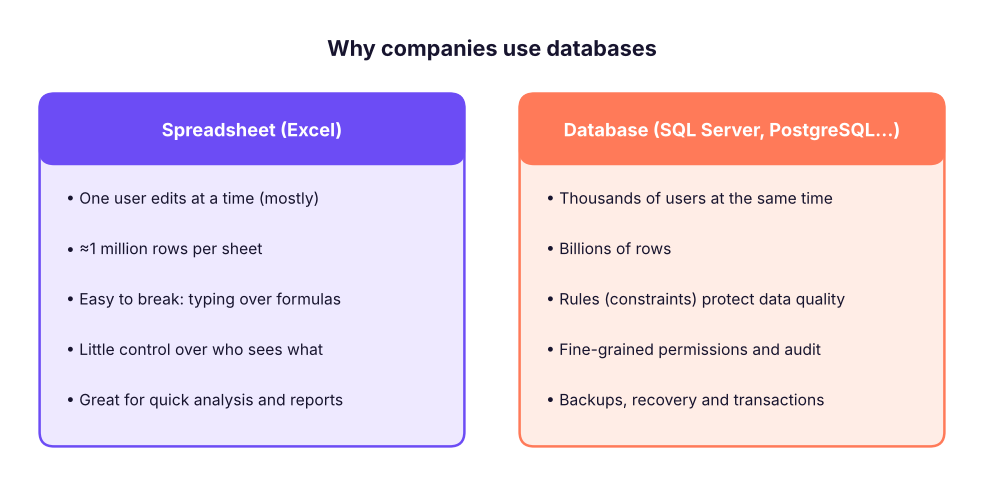
Spreadsheets are personal tools; databases are shared systems built for scale, safety and many users.

Types of databases

Type Organises data as Examples Typical use
Relational (RDBMS) Tables with rows and columns, linked by keys SQL Server, PostgreSQL, MySQL, Oracle, SQLite Orders, payments, HR, finance: most business data
Document JSON-like documents MongoDB, Cosmos DB Product catalogues, app content
Key-value Key → value pairs Redis, DynamoDB Caching, sessions
Column-family / warehouse Columns, built for analytics Snowflake, BigQuery, Redshift, Databricks SQL Analytics on huge data
Graph Nodes and edges Neo4j Social networks, fraud rings
Vector Number vectors (embeddings) pgvector, Pinecone AI search and RAG (GenAI track)

This track focuses on relational databases and SQL, the language almost every data role uses daily. You will practise in Microsoft SQL Server with SSMS, as in class. The SQL you learn transfers to PostgreSQL, MySQL, Snowflake and BigQuery with small differences in functions.

How a relational database organises data
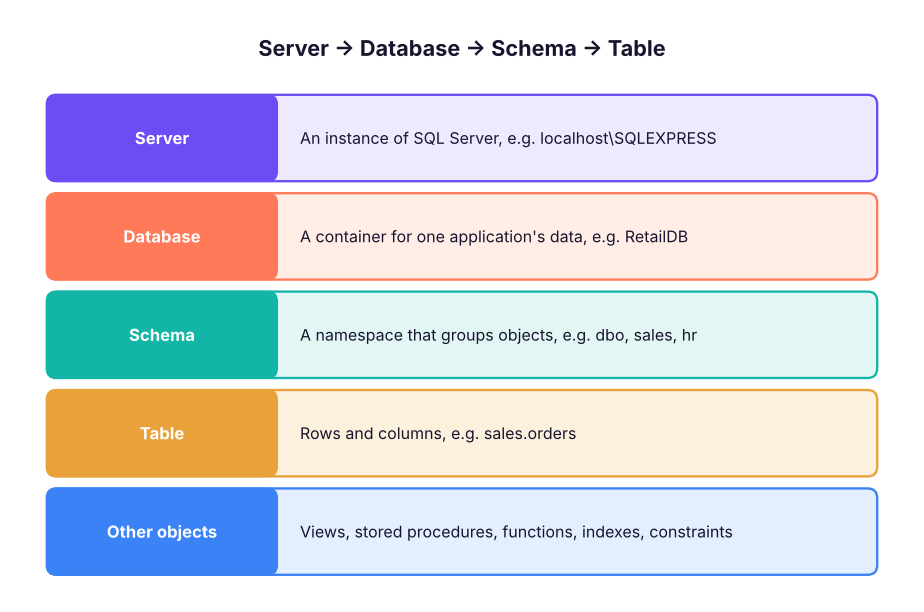
The hierarchy inside SQL Server: a server holds databases, a database holds schemas, a schema holds tables and other objects.

The vocabulary

DefinitionTerms you will use every day

Table (relation): a set of rows about one kind of thing, such as customers or orders. Row (record, tuple): one item, such as one customer. Column (field, attribute): one property, such as city. Every value in a column has the same data type. Primary key: the column (or columns) that uniquely identifies each row, such as customer_id. Foreign key: a column that refers to the primary key of another table, linking them. Schema: (1) the structure of the database (tables, columns, types, relationships); (2) in SQL Server, a named container of objects such as dbo. Query: a request for data written in SQL. Its output is a result set. SQL: Structured Query Language, the standard language for relational databases (ANSI/ISO standard since 1986–87). Pronounced "S-Q-L" or "sequel". T-SQL: Transact-SQL, Microsoft SQL Server's dialect with extra features (variables, TOP, procedures).

Here is the course's retail database. The order data is split into related tables instead of one wide sheet:
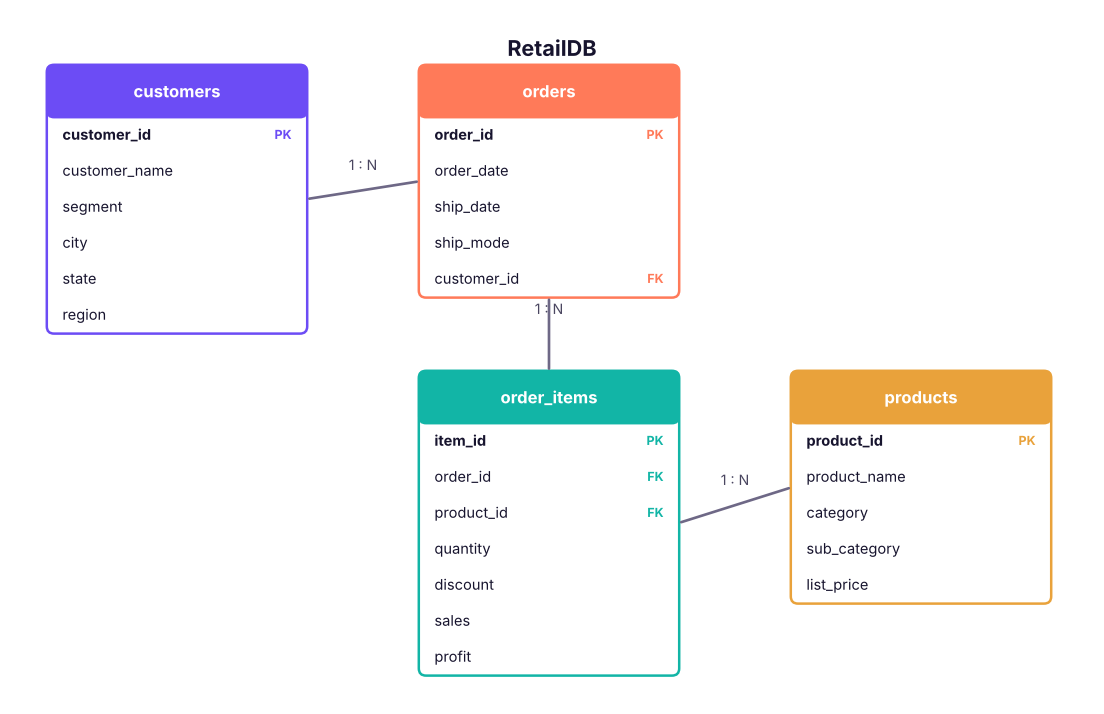
The course retail database. Each order belongs to one customer; each order has many order items; each item refers to one product.

Your first queries

A SELECT statement asks for columns FROM a table. Here are the first rows of the customers table:

SQL
SELECT TOP 6 customer_id, customer_name, segment, city, region
FROM customers;
Result
customer_id customer_name segment city region
C0001 Saanvi Khan Corporate Chandigarh North
C0002 Meera Bose Corporate Delhi North
C0003 Riya Shah Consumer Kolkata East
C0004 Diya Fernandes Corporate Indore West
C0005 Neha Sharma Corporate Hyderabad South
C0006 Vikram Mehta Consumer Chandigarh North
6 rows × 5 columns

How many rows are in each table?

SQL
SELECT 'customers' AS table_name, COUNT(*) AS row_count FROM customers
UNION ALL SELECT 'orders', COUNT(*) FROM orders
UNION ALL SELECT 'order_items', COUNT(*) FROM order_items
UNION ALL SELECT 'products', COUNT(*) FROM products;
Result
table_name row_count
customers 800
orders 3200
order_items 6323
products 78
4 rows × 2 columns

A taste of what is coming: total sales by region in one statement (Lesson 7 explains GROUP BY):

SQL
SELECT c.region,
       COUNT(DISTINCT o.order_id) AS orders,
       ROUND(SUM(oi.sales), 0)     AS total_sales
FROM customers AS c
JOIN orders AS o       ON o.customer_id = c.customer_id
JOIN order_items AS oi ON oi.order_id = o.order_id
GROUP BY c.region
ORDER BY total_sales DESC;
Result
region orders total_sales
South 831 53,952,769
West 811 51,958,521
North 792 49,018,161
East 766 46,484,119
4 rows × 3 columns
TipSQL reads almost like English

"Select the region, the number of distinct orders and the total sales, from customers joined to orders and order items, grouped by region, ordered by total sales descending." That readability is why SQL has lasted 50 years.

Properties of SQL

  1. Declarative: you say what you want, not how to get it. The database's query optimiser decides the fastest way (which index, which join order).
  2. Set-based: statements work on whole sets of rows at once, not one row at a time like a loop.
  3. Not case-sensitive for keywords: select, SELECT and Select are the same. By convention, keywords are written in UPPERCASE. In SQL Server, text comparisons are usually case-insensitive too (default collation).
  4. Whitespace does not matter: you can split a query over many lines; indent it for readability.
  5. Statements end with a semicolon ; (optional in SQL Server for most statements, but a good habit).
  6. Standard, with dialects: the core is an ANSI/ISO standard; each product adds its own functions (T-SQL, PL/pgSQL, MySQL).

The families of SQL statements

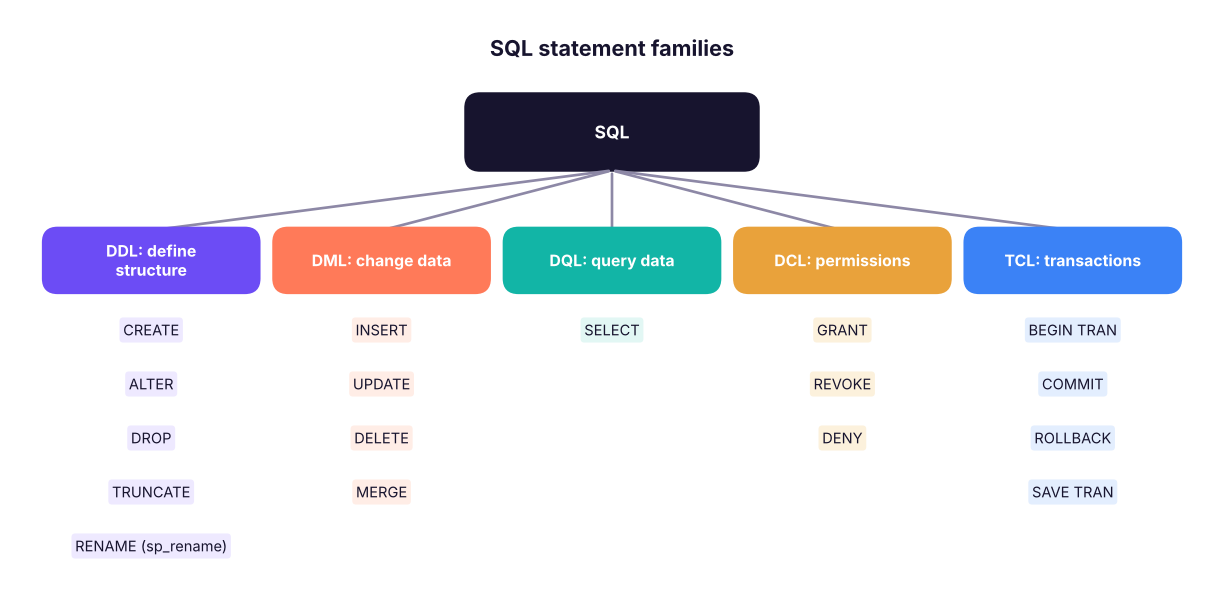
SQL statements fall into five families.
Family Full name What it does Example
DDL Data Definition Language Creates and changes the structure: databases, tables, columns CREATE TABLE customers (...)
DML Data Manipulation Language Adds, changes and removes rows INSERT INTO customers VALUES (...)
DQL Data Query Language Reads data SELECT * FROM customers
DCL Data Control Language Gives and removes permissions GRANT SELECT ON customers TO analyst
TCL Transaction Control Language Groups changes so they succeed or fail together BEGIN TRAN … COMMIT

Many books put SELECT inside DML; others separate it as DQL. Both are fine in interviews if you explain them.

Excel vs SQL

Task Excel SQL
See the data Open the sheet SELECT * FROM table
Filter rows AutoFilter WHERE
Sort Sort dialog ORDER BY
New calculated column Formula in a new column Expression in SELECT
Totals by group Pivot table / SUMIFS GROUP BY with SUM
Filter groups Pivot value filter HAVING
Lookup from another table VLOOKUP / XLOOKUP JOIN
Stack two tables Copy-paste / Power Query Append UNION ALL
Remove duplicates Remove Duplicates DISTINCT
Rank / running total RANK, SUM($B$2:B2) Window functions RANK() OVER, SUM() OVER
Data size ~1 million rows per sheet Billions of rows
Repeatability Manual steps (unless Power Query) Saved queries, views, procedures
Sharing Files get copied One source of truth with permissions

Use Excel for quick, small, ad-hoc analysis and presentation; use SQL to get, combine and summarise data at source. In practice analysts use both: SQL to extract the right data, Excel or Power BI to present it.

Installing SQL Server and SSMS

Step by stepInstall on Windows (free)
  1. Download SQL Server 2022 Developer edition (free, full-featured, for development and learning) from Microsoft's SQL Server downloads page. Choose Basic installation. Express edition is also free but limited to 10 GB per database.
  2. Note the instance name shown at the end (for example MSSQLSERVER = default, or SQLEXPRESS).
  3. Download and install SQL Server Management Studio (SSMS) from Microsoft Learn ("Download SSMS"). SSMS is the editor you write queries in.
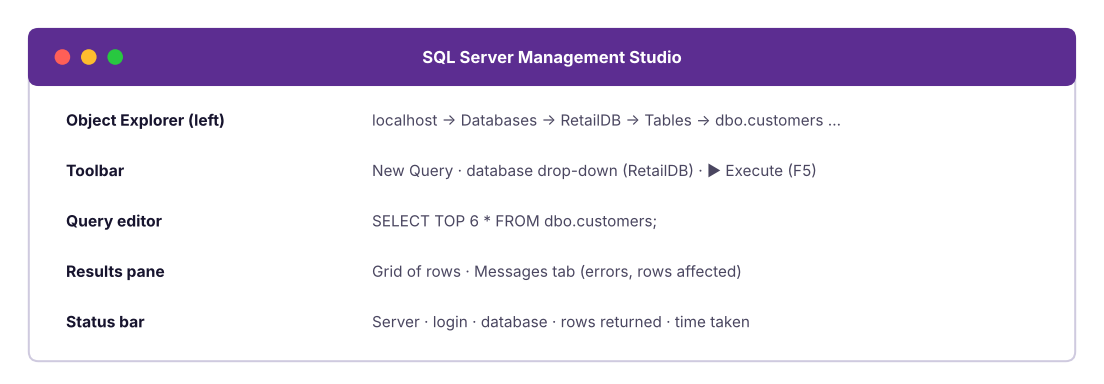
  4. Open SSMS → Connect to Server: Server type Database Engine; Server name localhost (or localhost\SQLEXPRESS); Authentication Windows Authentication; tick Trust server certificate → Connect.
  5. In Object Explorer you will see Databases, Security and more. Click New Query (Ctrl + N).
NoteMac or Linux?

SQL Server runs in Docker on Mac and Linux (mcr.microsoft.com/mssql/server image). Connect with VS Code + the MSSQL extension or Azure Data Studio's successor tools. Alternatively, practise the same SQL in PostgreSQL (pgAdmin) or SQLite (DB Browser); only a few functions differ.

The SSMS window: Object Explorer on the left, the query editor in the middle, results below.

Create a database and load data

SQL
-- 1. Create the database and switch to it
CREATE DATABASE RetailDB;
GO
USE RetailDB;
GO
-- 2. Check which database you are in
SELECT DB_NAME() AS current_database;

To load the course CSV files: right-click the database → Tasks → Import Flat File → choose customers.csv → check the column names and data types in the preview (make IDs nvarchar, dates date, amounts decimal(12,2)) → Finish. Repeat for the other files. Lesson 4 shows how to create tables with SQL and load them with BULK INSERT.

Running queries in SSMS

Action Shortcut
Execute the whole window (or the selected text only) F5 or Ctrl + E
New query window Ctrl + N
Comment / uncomment selected lines Ctrl + K, Ctrl + C / Ctrl + K, Ctrl + U
Show/hide results pane Ctrl + R
IntelliSense refresh (after creating tables) Ctrl + Shift + R
Results to grid / text / file Ctrl + D / Ctrl + T / Ctrl + Shift + F
Estimated execution plan Ctrl + L
TipSelect a part, run a part

Highlight just one statement and press F5 to run only that statement. This is how you test a long script step by step.

Summary

Key takeaways
Quick quiz6 questions · tap an answer to check it

1. Which statement family does CREATE TABLE belong to?

Answer: A. DDL defines structure: CREATE, ALTER, DROP, TRUNCATE.

2. In a relational database, what links the orders table to the customers table?

Answer: B. orders.customer_id is a foreign key that refers to customers.customer_id.

3. What does "SQL is declarative" mean?

Answer: B. The optimiser chooses the execution plan; you write the logic.

4. Which is NOT an advantage of a database over a spreadsheet?

Answer: D. For quick one-off charts, Excel is usually faster. Databases win on scale, safety and sharing.

5. GRANT SELECT ON orders TO analyst_role is an example of:

Answer: C. DCL controls permissions.

6. In SSMS, what does pressing F5 with part of the script highlighted do?

Answer: A. Highlighting limits execution to the selected text.
ExerciseMap the vocabulary

For the orders table in RetailDB, name: (a) one row; (b) one column; (c) the primary key; (d) the foreign key and the table it refers to; (e) the statement family of INSERT INTO orders ….

Show solution

(a) One order, for example the row for IN-2023-00001. (b) Any field, for example ship_mode. (c) order_id. (d) customer_id, which refers to customers.customer_id. (e) DML.

Interview cornerQuestions you may be asked

Q: What is the difference between DBMS and RDBMS? A DBMS manages data in any form; an RDBMS stores data in tables with relationships defined by keys, enforces integrity with constraints and uses SQL. Examples: SQL Server, PostgreSQL, MySQL, Oracle.

Q: Explain DDL, DML, DCL and TCL with examples. DDL changes structure (CREATE, ALTER, DROP, TRUNCATE); DML changes rows (INSERT, UPDATE, DELETE); DCL manages permissions (GRANT, REVOKE); TCL manages transactions (COMMIT, ROLLBACK, SAVE TRANSACTION). SELECT is sometimes called DQL.

Q: Why would a company keep data in SQL Server instead of Excel files? Concurrency, scale, data integrity (constraints, transactions), security and auditing, backup and recovery, and a single source of truth for reports and applications.

Practise more online

Free, trusted places to test yourself on this topic. Links open the original site in a new tab.