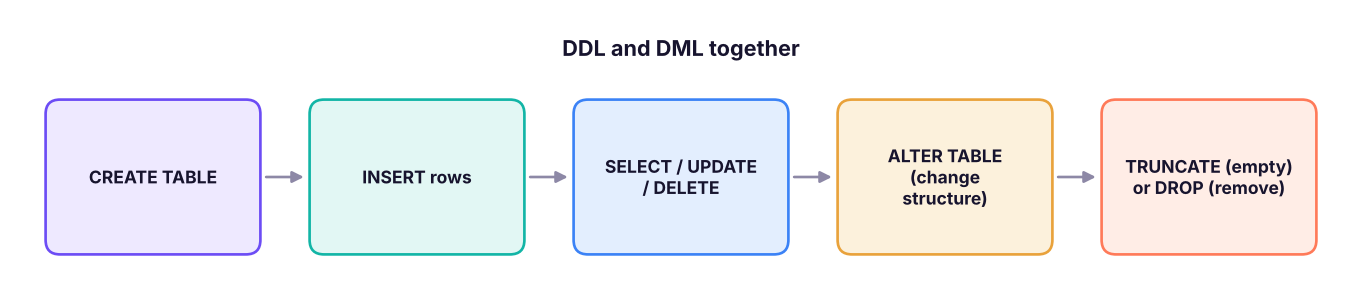
Create and change tables with DDL (CREATE, ALTER, DROP, TRUNCATE), add, change and remove rows with DML (INSERT, UPDATE, DELETE, MERGE), protect data quality with constraints (PRIMARY KEY, FOREIGN KEY, UNIQUE, NOT NULL, CHECK, DEFAULT, IDENTITY) and understand DELETE vs TRUNCATE vs DROP.
● SQL classes 2–3✦ SQL Server 2022, 2026Beginner⏱ 120 min
In SQL Server you would usually write IDENTITY(1,1) for an auto-numbered key, BIT for the flag and DEFAULT GETDATE() for today. Here is the same staff table in full T-SQL style, with named constraints (names make error messages and later changes much easier):
SELECT emp_id, full_name, dept_id, salary, join_date, is_active FROM staff;
Result
emp_id
full_name
dept_id
salary
join_date
is_active
1
Kavya Iyer
30
97,000
2016-02-28
True
2
Imran Reddy
10
157,000
2019-12-14
True
3
Harpreet Kulkarni
10
131,000
2024-10-05
True
4
Rahul Iyer
20
112,000
2017-02-06
True
5
Isha Mehta
40
57,000
2021-09-07
True
5 rows × 6 columns
DEFAULT filled HR's location with Bengaluru and every employee's is_active with TRUE.
TipAlways list the columns
INSERT INTO staff VALUES (…) without a column list depends on the column order and breaks the day someone adds a column. Always write INSERT INTO staff (col1, col2, …) VALUES (…).
INSERT … SELECT and SELECT … INTO
Copy rows from a query into a table:
SQL
-- Into an existing tableINSERTINTO staff_archive (emp_id, full_name, dept_id, salary)
SELECT emp_id, full_name, dept_id, salary
FROM staff
WHERE is_active = 0;
-- SQL Server: create a NEW table from a query (structure + data, no constraints)SELECT emp_id, full_name, salary
INTO staff_backup_2026
FROM staff;
The portable equivalent of SELECT … INTO is CREATE TABLE new_table AS SELECT … (PostgreSQL, MySQL, Snowflake, DuckDB).
What constraints do when rules are broken
Constraints reject bad data at the database, whatever app or person sends it. These statements would all fail in SQL Server with the messages shown (abridged):
Statement
Broken rule
SQL Server message
INSERT INTO departments VALUES (10,'Ops','Pune')
PRIMARY KEY
Violation of PRIMARY KEY constraint 'pk_departments'. Cannot insert duplicate key … The duplicate key value is (10).
INSERT INTO staff (…, dept_id, …) VALUES (…, 99, …)
FOREIGN KEY
The INSERT statement conflicted with the FOREIGN KEY constraint "fk_staff_dept".
INSERT INTO staff (emp_id, email, dept_id) VALUES (9,'[email protected]',10)
NOT NULL
Cannot insert the value NULL into column 'full_name' … column does not allow nulls. INSERT fails.
UPDATE staff SET salary = -500 WHERE emp_id = 1
CHECK
The UPDATE statement conflicted with the CHECK constraint "ck_staff_salary".
DELETE FROM departments WHERE dept_id = 10
FOREIGN KEY (children exist)
The DELETE statement conflicted with the REFERENCE constraint "fk_staff_dept".
Our practice engine raises the same kind of error. For example, trying to add an employee to a department that does not exist:
Output
Error: Constraint Error: Violates foreign key constraint because key "dept_id: 99" does not exist in the referenced table
UPDATE: changing rows
SQL
-- Give everyone in Finance a 5% raiseUPDATE staff
SET salary = salary * 1.05WHERE dept_id = 10;
-- Change two columns for one personUPDATE staff
SET dept_id = 20, salary = 60000WHERE emp_id = 5;
SELECT emp_id, full_name, dept_id, salary FROM staff ORDERBY emp_id;
Result
(2 rows affected)
(1 row affected)
emp_id
full_name
dept_id
salary
1
Kavya Iyer
30
97,000
2
Imran Reddy
10
164,850
3
Harpreet Kulkarni
10
137,550
4
Rahul Iyer
20
112,000
5
Isha Mehta
20
60,000
5 rows × 4 columns
Watch outUPDATE or DELETE without WHERE changes EVERY row
UPDATE staff SET salary = 0; sets every salary to zero. Before any UPDATE or DELETE:
1. Write the WHERE first and run it as a SELECT to see exactly which rows will change.
2. Wrap the change in a transaction (BEGIN TRAN … then check, then COMMIT or ROLLBACK) (Lesson 14).
3. On production data, take a backup or work in a copy.
UPDATE with a join (SQL Server)
SQL
-- Mark staff in Mumbai departments as 'on-site'UPDATE s
SET s.work_mode = 'on-site'FROM staff AS s
JOIN departments AS d ON d.dept_id = s.dept_id
WHERE d.location = 'Mumbai';
DELETE: removing rows
SQL
DELETEFROM staff
WHERE emp_id = 5;
SELECTCOUNT(*) AS staff_left FROM staff;
ALTERTABLE staff ADD phone VARCHAR(15) NULL; -- add a column (no COLUMN keyword in T-SQL)ALTERTABLE staff ALTERCOLUMN full_name NVARCHAR(150) NOTNULL; -- change type / nullabilityALTERTABLE staff DROPCOLUMN phone; -- remove a columnALTERTABLE staff ADDCONSTRAINT ck_staff_mode CHECK (work_mode IN ('remote','hybrid','on-site'));
ALTERTABLE staff DROPCONSTRAINT ck_staff_mode; -- remove a constraint by nameEXEC sp_rename 'staff.full_name', 'employee_name', 'COLUMN'; -- rename a columnEXEC sp_rename 'staff', 'employees_master'; -- rename a table
NoteChanging a column that has data
Making a column smaller (VARCHAR(100) → VARCHAR(10)) fails if existing values do not fit; adding NOT NULL fails if NULLs exist. Clean the data first, or add a DEFAULT.
DELETE vs TRUNCATE vs DROP
This is one of the most common SQL interview questions.
DELETE
TRUNCATE TABLE
DROP TABLE
Family
DML
DDL
DDL
Removes
Some or all rows
All rows
The whole table: rows, structure, indexes, constraints, permissions
WHERE allowed
Yes
No
No
Speed on large tables
Slower: logs each row
Very fast: deallocates pages
Fast
Logging
Every row logged
Minimal (page deallocations)
Minimal
Fires DELETE triggers
Yes
No
No
Resets IDENTITY
No
Yes, back to the seed
Table is gone
Works when referenced by a FK
Yes (if no child rows violate it)
No
No (drop the FK first)
Can be rolled back in a transaction
Yes
Yes in SQL Server (inside an explicit transaction)
Yes in SQL Server (inside an explicit transaction)
SQL
CREATETABLE temp_log (id INT, msg VARCHAR(50));
INSERTINTO temp_log VALUES (1, 'start'), (2, 'load'), (3, 'end');
DELETEFROM temp_log WHERE id = 2; -- removes one rowSELECTCOUNT(*) AS after_delete FROM temp_log;
The SSMS Import Flat File wizard is easier for one-off loads; BULK INSERT, bcp or an ETL tool (SSIS, Azure Data Factory, Fabric pipelines) are used for repeatable loads.
Do it with AIDo it with AI
Ask: "Write SQL Server CREATE TABLE statements with constraints for a hospital database: patients, doctors, appointments (a patient can see many doctors; a doctor sees many patients). Include primary keys, foreign keys, CHECK constraints for appointment status, and sensible data types." Then review it: are the keys right, is money DECIMAL, are dates DATE/DATETIME2, are the constraints named?
Constraints (PK, FK, UNIQUE, NOT NULL, CHECK, DEFAULT, IDENTITY) protect data quality at the source; name them.
Always list columns in INSERT; always test the WHERE of an UPDATE/DELETE with a SELECT first, inside a transaction.
DELETE removes chosen rows (logged, triggers fire); TRUNCATE empties the table fast and resets IDENTITY; DROP removes the table.
MERGE performs upserts; BULK INSERT and the Import wizard load files.
Quick quiz6 questions · tap an answer to check it
1. Which statement removes all rows but keeps the table structure and resets the IDENTITY counter?
Answer: B. TRUNCATE empties the table quickly and resets IDENTITY to its seed.
2. You run UPDATE staff SET salary = 50000; by mistake. What happened?
Answer: B. Without WHERE, UPDATE changes every row. Use transactions and test with SELECT first.
3. Which constraint stops a salary of −500?
Answer: C. CHECK validates values against a condition.
4. Inserting an employee with dept_id 99 fails with a FOREIGN KEY error. Why?
Answer: B. A foreign key value must exist in the referenced table.
5. Which is TRUE about DELETE?
Answer: A. DELETE is DML, works row by row with a WHERE, and fires triggers.
6. How do you add a column phone to staff in SQL Server?
Answer: B. T-SQL uses ADD without the COLUMN keyword (PostgreSQL/MySQL accept ADD COLUMN).
ExerciseBuild and populate a small schema
Create projects(project_id PK, name UNIQUE NOT NULL, budget DECIMAL(12,2) CHECK budget ≥ 0, start_date DATE, status with CHECK IN ('planned','active','closed') DEFAULT 'planned') and assignments(project_id FK, emp_id FK, role, hours, PRIMARY KEY (project_id, emp_id)). Insert 3 projects and 4 assignments, raise the budget of active projects by 10%, close one project, and delete assignments of closed projects.
Show solution
SQL
CREATETABLE projects (
project_id INTPRIMARYKEY, name VARCHAR(80) NOTNULLUNIQUE,
budget DECIMAL(12,2) CHECK (budget >= 0), start_date DATE,
status VARCHAR(10) DEFAULT'planned'CHECK (status IN ('planned','active','closed')));
CREATETABLE assignments (
project_id INTREFERENCESprojects(project_id), emp_id INTREFERENCESstaff(emp_id),
role VARCHAR(30), hours INTCHECK (hours > 0), PRIMARYKEY (project_id, emp_id));
INSERTINTO projects (project_id, name, budget, start_date, status) VALUES
(1,'CRM revamp',2500000,'2026-01-10','active'), (2,'Payroll audit',600000,'2026-03-01','active'), (3,'Data lake',4000000,'2026-06-01','planned');
INSERTINTO assignments VALUES (1,1,'Analyst',120),(1,4,'Developer',300),(2,2,'Lead',80),(3,3,'Architect',40);
UPDATE projects SET budget = budget * 1.10WHERE status = 'active';
UPDATE projects SET status = 'closed'WHERE project_id = 2;
DELETEFROM assignments WHERE project_id IN (SELECT project_id FROM projects WHERE status = 'closed');
Interview cornerQuestions you may be asked
Q: DELETE vs TRUNCATE vs DROP?
DELETE (DML) removes chosen rows with WHERE, logs each row, fires triggers and keeps IDENTITY. TRUNCATE (DDL) removes all rows quickly, minimal logging, resets IDENTITY, no WHERE, not allowed when referenced by a FK. DROP removes the whole table and its definition.
Q: What are constraints and why use them instead of app validation?
Rules enforced by the database (PK, FK, UNIQUE, NOT NULL, CHECK, DEFAULT). They protect data no matter which app, script or person writes to the table.
Q: How do you safely run an UPDATE on production?
Run the WHERE as a SELECT first, wrap in BEGIN TRAN, check @@ROWCOUNT and the result, then COMMIT or ROLLBACK; have a backup.
Practise more online
Free, trusted places to test yourself on this topic. Links open the original site in a new tab.