Make SQL safe and fast. Understand transactions and ACID (BEGIN, COMMIT, ROLLBACK, SAVE), isolation and locking, indexes (clustered, non-clustered, covering), how to read an execution plan, a checklist for writing fast queries, and permissions with GRANT, REVOKE and roles (DCL).
● SQL class 6 (extended)✦ SQL Server 2022, 2026Advanced⏱ 110 min
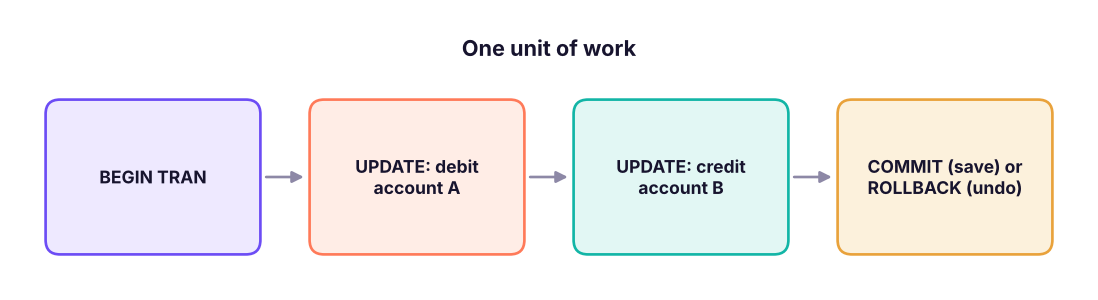
A transaction is a group of statements treated as one unit of work: all succeed (commit) or none do (rollback). Moving ₹5,000 between two accounts is two updates; if the server crashes between them, money would vanish without a transaction.
A bank transfer as a transaction. Either both updates are saved, or both are undone.
Property
Meaning
Example
Atomicity
All or nothing
Both account updates happen, or neither
Consistency
Data stays valid (constraints hold)
Total money before = total after; no negative balance if a CHECK forbids it
Isolation
Concurrent transactions do not see each other's half-finished work
Another user does not see the debit without the credit
Durability
Once committed, it survives a crash
Transaction log is written to disk first
Transaction commands
Command
Purpose
BEGIN TRANSACTION (BEGIN TRAN)
Start a transaction
COMMIT
Make all changes permanent
ROLLBACK
Undo everything since BEGIN (or since a savepoint)
SAVE TRANSACTION name
Create a savepoint inside the transaction
ROLLBACK TRANSACTION name
Undo back to the savepoint only
@@TRANCOUNT
How many transactions are open (should be 0 when you leave)
By default SQL Server runs in autocommit mode: every single statement is its own transaction. Wrap several statements in BEGIN TRAN … COMMIT to group them.
Seeing a rollback
SQL
CREATETABLE accounts (acct_id INTPRIMARYKEY, holder VARCHAR(20), balance DECIMAL(12,2));
INSERTINTO accounts VALUES (1, 'Asha', 20000), (2, 'Ravi', 5000);
BEGINTRANSACTION;
UPDATE accounts SET balance = balance - 5000WHERE acct_id = 1;
UPDATE accounts SET balance = balance + 5000WHERE acct_id = 2;
SELECT * FROM accounts ORDERBY acct_id; -- inside the transaction: changes visible to usROLLBACK; -- something went wrong: undo both updatesSELECT * FROM accounts ORDERBY acct_id; -- balances are back to the originals
The pattern that protects you from the "UPDATE without WHERE" disaster (Lesson 4):
SQL
BEGINTRAN;
UPDATE dbo.staff SET salary = salary * 1.05WHERE dept_id = 10;
SELECT @@ROWCOUNT AS rows_changed; -- expected: 2?SELECT emp_id, salary FROM dbo.staff WHERE dept_id = 10; -- sanity-check-- If everything looks right:COMMIT;
-- Otherwise:-- ROLLBACK;
Watch outNever leave a transaction open
An open transaction holds locks that block other users and keeps the log from truncating. Always end with COMMIT or ROLLBACK; check SELECT @@TRANCOUNT; if a query window seems "stuck".
Concurrency: isolation, locks and deadlocks
When many users work at once, the database uses locks to keep transactions isolated. Isolation levels trade consistency for concurrency:
Level
Prevents
Notes
READ UNCOMMITTED
Nothing (allows dirty reads; NOLOCK hint)
Can read data that is later rolled back; avoid for reports needing accuracy
READ COMMITTED (default)
Dirty reads
A row you read can change before you read it again
REPEATABLE READ
Dirty and non-repeatable reads
Holds read locks longer
SERIALIZABLE
Also phantom rows
Safest, least concurrent
SNAPSHOT / RCSI
Readers do not block writers (row versions)
Common in modern systems, uses tempdb
Blocking: one session waits for a lock held by another. Fix: shorter transactions, indexes, row versioning.
Deadlock: two sessions each hold a lock the other needs; SQL Server kills one (the "victim", error 1205). Fix: access tables in the same order, keep transactions short, retry on error 1205.
Indexes: how databases find rows fast
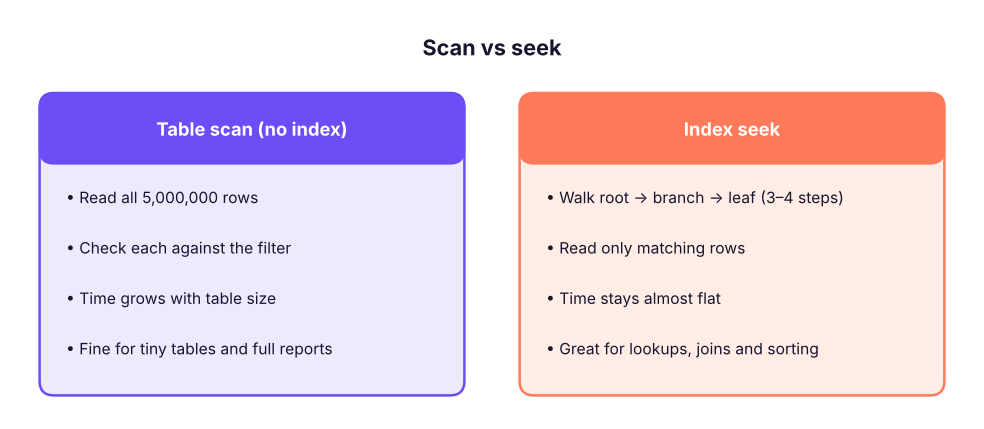
Without an index, a query like WHERE customer_id = 'C0042' scans every row (table scan). An index is a sorted structure (a B-tree) that lets the database jump straight to matching rows, like the index of a book.
A table scan reads every row. An index seek follows a short path through a B-tree.
Index type
What it is
How many per table
Clustered
Defines the physical order of the table's rows; the table is the index. Created by default with a PRIMARY KEY
One
Non-clustered
A separate sorted copy of selected columns with pointers to the rows
Many (up to 999)
Unique
Enforces uniqueness (created for UNIQUE constraints)
Many
Covering (INCLUDE)
A non-clustered index that contains every column a query needs, so the table is never touched
Filtered
Indexes only rows matching a condition
Columnstore
Column-wise compressed storage for analytics on huge tables
SQL
CREATECLUSTEREDINDEX cx_orders_date ON dbo.orders (order_date); -- if not already clustered by the PKCREATENONCLUSTEREDINDEX ix_orders_customer
ON dbo.orders (customer_id)
INCLUDE (order_date, ship_mode); -- covering index for "orders per customer" queriesCREATENONCLUSTEREDINDEX ix_items_product ON dbo.order_items (product_id); -- foreign keys deserve indexesDROPINDEX ix_orders_customer ON dbo.orders;
SQL
CREATEINDEX ix_super_city ON superstore (city);
SELECT index_name, table_name FROMduckdb_indexes() WHERE table_name = 'superstore';
Result
index_name
table_name
ix_super_city
superstore
1 rows × 2 columns
Which queries can use an index?
Pattern
Uses an index?
Why
WHERE customer_id = 'C0042'
Yes (seek)
Equality on the leading column
WHERE order_date >= '2025-01-01' AND order_date < '2026-01-01'
Yes
Range on an indexed column
WHERE YEAR(order_date) = 2025
No (scan)
The function must run on every row: non-SARGable
WHERE customer_name LIKE 'Ra%'
Yes
Prefix match
WHERE customer_name LIKE '%Rao'
No
Leading wildcard
WHERE UPPER(city) = 'PUNE'
No
Function on the column (the default collation is already case-insensitive)
WHERE city = 'Pune' OR product_id = 'P0012'
Often no
OR across different columns
WHERE CAST(order_id AS VARCHAR) = '1001'
No
Type conversion on the column
TipSARGable predicates
SARG = Search ARGument able. Keep the column bare on one side of the comparison and do the maths on the other side: use order_date >= '2025-01-01' AND order_date < '2026-01-01' instead of YEAR(order_date) = 2025, and sales > 100 / 1.18 instead of sales * 1.18 > 100.
Index trade-offs
Indexes speed up reads but slow down writes (every INSERT/UPDATE/DELETE must also update each index) and use disk space. Index columns used in WHERE, JOIN, ORDER BY and GROUP BY, and foreign keys; do not index everything. Analytic warehouses (Snowflake, BigQuery) use different techniques (partitioning, clustering, columnar storage) instead of manual indexes.
Execution plans
In SSMS press Ctrl + L (estimated plan) or Ctrl + M then run (actual plan). The plan is a diagram of operators read right to left. Things to look for:
Operator
Meaning
Concern
Index Seek
Direct lookup
Good
Index / Clustered Index Scan
Reads many rows
Fine for big reports, suspicious for single-row lookups
Table Scan
Reads the heap
Usually add an index
Key Lookup
Fetches extra columns from the table per row
Consider a covering index (INCLUDE)
Hash / Merge / Nested Loops Join
Join algorithms
Hash for big unsorted inputs; nested loops for small; merge for sorted
Sort
Sorting rows
Expensive; an index in the right order avoids it
Thick arrows, big estimated vs actual row differences
Bad estimates
Update statistics
SET STATISTICS IO, TIME ON; shows logical reads (the best measure of work) and CPU time for each query.
Performance checklist for analysts
Select only the columns and rows you need: avoid SELECT *; filter early.
Make filters SARGable (no functions on columns; use ranges for dates).
Join on indexed keys with matching data types (an INT joined to a VARCHAR forces conversions).
Aggregate before joining when joining big tables (reduce rows first, avoids row explosion).
UNION ALL instead of UNION; EXISTS instead of IN (huge list); avoid DISTINCT as a bandage for join duplicates.
Avoid row-by-row logic (cursors, scalar UDF in WHERE); think in sets.
Test on realistic data; look at the actual plan; keep statistics updated.
Pull less data into BI tools: summarise in SQL, or create views and aggregate tables.
Limit while developing: SELECT TOP 100 or WHERE on a date range, then remove it.
Security: DCL
Data Control Language gives and removes permissions. Follow the principle of least privilege: grant only what each person or application needs.
SQL
-- Logins (server level) and users (database level)CREATE LOGIN priya_analyst WITH PASSWORD = 'Use-A-Strong-Passphrase-1!';
CREATE USER priya_analyst FOR LOGIN priya_analyst;
-- Roles group permissionsCREATE ROLE analyst_role;
GRANTSELECTONSCHEMA::dbo TO analyst_role; -- read all tables in dbo
DENY SELECTON dbo.customers (phone, email) TO analyst_role; -- but hide personal columnsGRANTEXECUTEON dbo.usp_sales_by_region TO analyst_role;
ALTER ROLE analyst_role ADD MEMBER priya_analyst; -- SQL Server 2012+: ALTER ROLE … ADD MEMBERREVOKESELECTON dbo.orders FROM analyst_role; -- take back a permission
Statement
Effect
GRANT
Gives a permission
REVOKE
Removes a previously granted (or denied) permission
Other protections: Row-Level Security (a region manager sees only their rows), Dynamic Data Masking (show XXXX-1234), Always Encrypted and TDE (encryption), auditing, and never embedding passwords in scripts (use Windows/Entra ID authentication or a secret store). In India, personal data handling also falls under the DPDP Act 2023: collect only what you need and restrict who can see it.
Do it with AIDo it with AI
Paste a slow query and its actual execution plan (as XML or text) into an assistant: "Explain what this plan is doing and suggest indexes or rewrites. Do not invent columns." AI can spot scans, key lookups and non-SARGable filters quickly, but test every suggestion; an index that helps one query can hurt a hundred writes.
Summary
Key takeaways
A transaction groups statements to commit or roll back together; ACID = atomicity, consistency, isolation, durability. Use BEGIN TRAN … COMMIT/ROLLBACK, check @@ROWCOUNT, never leave transactions open.
Isolation levels and locks keep concurrent users consistent; blocking and deadlocks are managed with short transactions and consistent access order.
Indexes (clustered = row order, one per table; non-clustered = separate structure; covering = INCLUDE) speed up reads and slow writes. SARGable filters keep the column bare.
Read execution plans for scans, key lookups and bad estimates; use SET STATISTICS IO, TIME ON.
DCL: GRANT, REVOKE, DENY, roles, least privilege; protect personal data.
Quick quiz6 questions · tap an answer to check it
1. Which ACID property says that a committed transaction survives a power failure?
Answer: D. Durability: committed changes are written to the log/disk.
2. Which filter can use an index on order_date?
Answer: B. The column must be bare (SARGable); functions on the column force a scan.
3. How many clustered indexes can a table have?
Answer: B. The clustered index defines the physical order, so there can be only one.
4. You ran BEGIN TRAN; UPDATE …; and closed the window. What is the risk?
Answer: A. Open transactions keep locks until committed or rolled back.
5. What does DENY do?
Answer: B. DENY takes precedence over GRANT.
6. In an execution plan, a "Key Lookup" repeated for many rows suggests:
Answer: B. Key lookups fetch missing columns from the table row by row; covering the query avoids them.
ExerciseMake it faster
This query is slow on 50 million order lines:
SELECT * FROM order_items WHERE YEAR(order_date) = 2025 AND UPPER(region) = 'WEST' ORDER BY sales DESC; Rewrite it and suggest an index.
Show solution
SQL
SELECT item_id, order_id, product_id, quantity, sales, profit -- only the needed columnsFROM dbo.order_items
WHERE order_date >= '2025-01-01'AND order_date < '2026-01-01'-- SARGable range instead of YEAR()AND region = 'West'-- default collation is case-insensitive; no UPPER neededORDERBY sales DESC;
CREATENONCLUSTEREDINDEX ix_items_date_region
ON dbo.order_items (order_date, region) INCLUDE (order_id, product_id, quantity, sales, profit);
Check the actual plan for a seek, compare logical reads with SET STATISTICS IO ON, and consider whether the extra index slows nightly loads.
Interview cornerQuestions you may be asked
Q: What is ACID?
Atomicity (all or nothing), Consistency (valid state), Isolation (concurrent transactions do not interfere), Durability (committed data persists).
Q: Clustered vs non-clustered index?
A clustered index sorts and stores the table rows in index order (one per table). A non-clustered index is a separate structure with pointers to rows (many per table).
Q: Why is WHERE YEAR(date) = 2025 slow?
It applies a function to every row, so the index on date cannot be used (non-SARGable). Use a date range.
Q: How do you find and fix a slow query?
Look at the actual execution plan and I/O statistics, find scans/lookups/bad estimates, make predicates SARGable, add or adjust indexes, reduce columns/rows early, and re-test.
Practise more online
Free, trusted places to test yourself on this topic. Links open the original site in a new tab.