Retrieve exactly the rows and columns you need. Master SELECT, aliases with AS, DISTINCT, TOP, WHERE with comparison and logical operators, IN, BETWEEN, LIKE wildcards, IS NULL, ORDER BY, and the logical order in which SQL processes a query.
● SQL class 3✦ SQL Server 2022, 2026Beginner⏱ 120 min
SELECT column_list -- what to showFROM table_name -- where it comes fromWHERE row_conditions -- which rows to keepGROUPBY grouping_columns -- (Lesson 7)HAVING group_conditions -- (Lesson 7)ORDERBY sort_columns; -- how to sort the result
Only SELECT is required (SELECT 1 + 1; works). Everything else is optional but must appear in this order.
SELECT: columns, expressions and aliases
SQL
SELECTTOP5
order_id,
order_date,
customer_name,
sales,
profit,
sales - profit AS cost,
ROUND(100.0 * profit / sales, 1) AS margin_pct,
'INR'AS currency
FROM superstore;
Result
order_id
order_date
customer_name
sales
profit
cost
margin_pct
currency
IN-2023-00001
2023-01-01
Ishaan Gupta
36,000
3,472.55
32,527.45
9.6
INR
IN-2023-00001
2023-01-01
Ishaan Gupta
3,850
1,169.54
2,680.46
30.4
INR
IN-2023-00001
2023-01-01
Ishaan Gupta
62,080
6,044.47
56,035.53
9.7
INR
IN-2023-00002
2023-01-03
Kabir Singh
5,216
450.16
4,765.84
8.6
INR
IN-2023-00003
2023-01-03
Sneha Khan
24,591
-5,512.33
30,103.33
-22.4
INR
5 rows × 8 columns
SELECT * returns every column. Use it to explore, never in production code (it breaks when columns change and reads more data than needed).
An alias renames a column or table in the result: AS margin_pct. AS is optional (sales - profit cost) but makes code clearer. Aliases with spaces need brackets or quotes: AS [Margin %].
Expressions can use operators, functions and literals.
Table aliases
SQL
SELECT s.order_id, s.sales
FROM superstore AS s;          -- 's' is a short name for the table
Table aliases become essential with joins (Lesson 8).
DISTINCT: unique values
SQL
SELECTDISTINCT region
FROM superstore
ORDERBY region;
Result
region
East
North
South
West
4 rows × 1 columns
SQL
SELECTDISTINCT category, sub_category
FROM superstore
ORDERBY category, sub_category;
Result
category
sub_category
Furniture
Bookcases
Furniture
Chairs
Furniture
Furnishings
Furniture
Tables
Office Supplies
Appliances
Office Supplies
Art
Office Supplies
Binders
Office Supplies
Paper
Office Supplies
Storage
Technology
Accessories
Technology
Copiers
Technology
Machines
13 rows × 2 columns (first 12 shown)
DISTINCT applies to the whole row of selected columns: the second query returns each category–sub-category combination once. To count unique values: COUNT(DISTINCT customer_id).
TOP: limit the rows
SQL
SELECTTOP5 order_id, customer_name, city, sales
FROM superstore
ORDERBY sales DESC;
Result
order_id
customer_name
city
sales
IN-2024-01857
Arjun Fernandes
Delhi
619,290
IN-2023-00564
Krishna Reddy
Hyderabad
551,530
IN-2024-01040
Aditya Kulkarni
Chennai
551,530
IN-2025-02880
Farhan Khan
Kochi
530,820
IN-2023-00809
Rohan Singh
Jaipur
526,396
5 rows × 4 columns
Dialect
Syntax for "first 5 rows"
SQL Server
SELECT TOP 5 … ORDER BY … (also TOP 10 PERCENT, TOP 5 WITH TIES)
SQL Server 2012+, ANSI
ORDER BY … OFFSET 0 ROWS FETCH NEXT 5 ROWS ONLY (Lesson 11)
PostgreSQL, MySQL, SQLite, DuckDB
… ORDER BY … LIMIT 5
Oracle
FETCH FIRST 5 ROWS ONLY
Watch outTOP without ORDER BY
Without ORDER BY, the database returns rows in no guaranteed order, so "top 5" may differ between runs. Always sort when you use TOP.
WHERE: filtering rows
Comparison operators
SQL
SELECTCOUNT(*) AS lines_over_50k
FROM superstore
WHERE sales > 50000;
Result
lines_over_50k
1126
1 rows × 1 columns
SQL
SELECT order_id, city, category, sales, discount
FROM superstore
WHERE region = 'West'AND category = 'Furniture'AND discount >= 0.3ORDERBY sales DESC;
Result
order_id
city
category
sales
discount
IN-2025-02904
Ahmedabad
Furniture
76,048
0.3
IN-2025-02783
Pune
Furniture
69,762
0.3
IN-2024-01002
Indore
Furniture
58,135
0.3
IN-2023-00431
Ahmedabad
Furniture
54,474
0.3
IN-2025-02016
Ahmedabad
Furniture
54,138
0.3
IN-2024-01490
Indore
Furniture
49,728
0.3
139 rows × 5 columns (first 6 shown)
Text values go in single quotes ('West'). Double quotes are for identifiers in standard SQL. Dates are written as text in ISO format: order_date >= '2025-01-01'.
IN and NOT IN
IN is shorthand for several OR conditions on the same column.
SQL
SELECT city, COUNT(*) AS order_lines
FROM superstore
WHERE city IN ('Pune', 'Mumbai', 'Ahmedabad')
GROUPBY city
ORDERBY city;
Result
city
order_lines
Ahmedabad
373
Mumbai
283
Pune
529
3 rows × 2 columns
SQL
SELECTCOUNT(*) AS non_metro_lines
FROM superstore
WHERE city NOTIN ('Delhi', 'Mumbai', 'Bengaluru', 'Chennai', 'Kolkata', 'Hyderabad');
Result
non_metro_lines
3918
1 rows × 1 columns
Common mistakesNOT IN with a NULL
If the list (or subquery) inside NOT IN contains a NULL, NOT IN returns no rows at all, because x <> NULL is UNKNOWN. Use NOT EXISTS (Lesson 10) or filter NULLs out of the subquery.
BETWEEN
BETWEEN a AND b is inclusive of both ends.
SQL
SELECTCOUNT(*) AS lines_between_10k_and_20k
FROM superstore
WHERE sales BETWEEN10000AND20000;
Result
lines_between_10k_and_20k
896
1 rows × 1 columns
For dates, prefer a half-open range: order_date >= '2025-01-01' AND order_date < '2026-01-01'. It works whether the column is DATE or DATETIME2; BETWEEN '2025-01-01' AND '2025-12-31' silently misses orders placed after midnight on 31-Dec when the column has times.
SQL
SELECTCOUNT(DISTINCT order_id) AS orders_in_2025
FROM superstore
WHERE order_date >= '2025-01-01'AND order_date < '2026-01-01';
Result
orders_in_2025
1232
1 rows × 1 columns
LIKE: pattern matching
Wildcard
Meaning
Example
Matches
%
Any sequence of characters (including none)
'Apex%'
Apex Chair 412, Apex Phone 118
_
Exactly one character
'C00_1'
C0011, C0021 …
[ ] (SQL Server)
One character from a set or range
'[A-C]%'
starts with A, B or C
[^ ] (SQL Server)
One character not in the set
'[^A-M]%'
starts with N–Z
SQL
SELECTDISTINCT product_name
FROM superstore
WHERE product_name LIKE'Apex Ch%'ORDERBY product_name;
Result
product_name
Apex Chair 969
1 rows × 1 columns
SQL
SELECTCOUNT(DISTINCT customer_id) AS customers_named_with_khan
FROM superstore
WHERE customer_name LIKE'%Khan%';
Result
customers_named_with_khan
44
1 rows × 1 columns
SQL
SELECTDISTINCT city
FROM superstore
WHERE city NOTLIKE'%a%'-- city names without a lowercase 'a'ORDERBY city;
Result
city
Delhi
Indore
Kochi
Lucknow
Pune
5 rows × 1 columns
NoteCase sensitivity
SQL Server's default collation is case-insensitive, so LIKE 'apex%' also matches "Apex…". PostgreSQL is case-sensitive (use ILIKE), and so is the practice engine used for the outputs in this handbook. Write patterns in the same case as the data to be safe everywhere.
Leading wildcards ('%Khan') cannot use an index and scan the whole table; fine for analysis, slow for apps on big tables.
IS NULL and IS NOT NULL
SQL
SELECTCOUNT(*) AS homes_missing_area
FROM houses
WHERE area_sqft ISNULL;
Result
homes_missing_area
25
1 rows × 1 columns
(The houses table is loaded from house_prices.csv; 25 houses have a missing area, which you will clean in the Python track.)
Combining conditions
SQL
SELECT order_id, region, category, ship_mode, sales, profit
FROM superstore
WHERE (region = 'North'OR region = 'East')
AND category <> 'Office Supplies'AND ship_mode IN ('First Class', 'Same Day')
AND profit < 0ORDERBY profit;
Result
order_id
region
category
ship_mode
sales
profit
IN-2023-00320
North
Technology
Same Day
337,316
-67,392.8
IN-2024-01213
East
Technology
Same Day
317,128
-35,733.2
IN-2024-01808
North
Technology
First Class
155,328
-31,737.4
IN-2023-00406
North
Technology
First Class
159,390
-27,928.8
IN-2023-00358
North
Technology
Same Day
77,664
-18,678.2
IN-2024-01289
East
Technology
First Class
149,088
-18,075.8
IN-2025-02849
East
Technology
First Class
81,522
-17,598.3
IN-2024-01055
East
Technology
First Class
86,968
-16,505.7
128 rows × 6 columns (first 8 shown)
ORDER BY: sorting
SQL
SELECT region, city, COUNT(*) AS lines, ROUND(SUM(sales), 0) AS sales
FROM superstore
GROUPBY region, city
ORDERBY region ASC, sales DESC;
Result
region
city
lines
sales
East
Kolkata
430
13,888,466
East
Patna
375
12,444,393
East
Bhubaneswar
383
10,482,685
East
Guwahati
335
9,668,576
North
Delhi
453
15,657,610
North
Chandigarh
361
11,541,792
North
Lucknow
422
11,328,882
North
Jaipur
294
10,489,878
16 rows × 4 columns (first 8 shown)
ASC (default) or DESC for each column separately.
Sort by an expression or alias: ORDER BY sales - profit DESC, ORDER BY margin_pct.
Sort by column position (ORDER BY 2 DESC) works but is fragile; avoid it in saved code.
NULLs sort first in ascending order in SQL Server (last in PostgreSQL/Oracle by default).
Custom order with CASE: ORDER BY CASE ship_mode WHEN 'Same Day' THEN 1 WHEN 'First Class' THEN 2 ELSE 3 END.
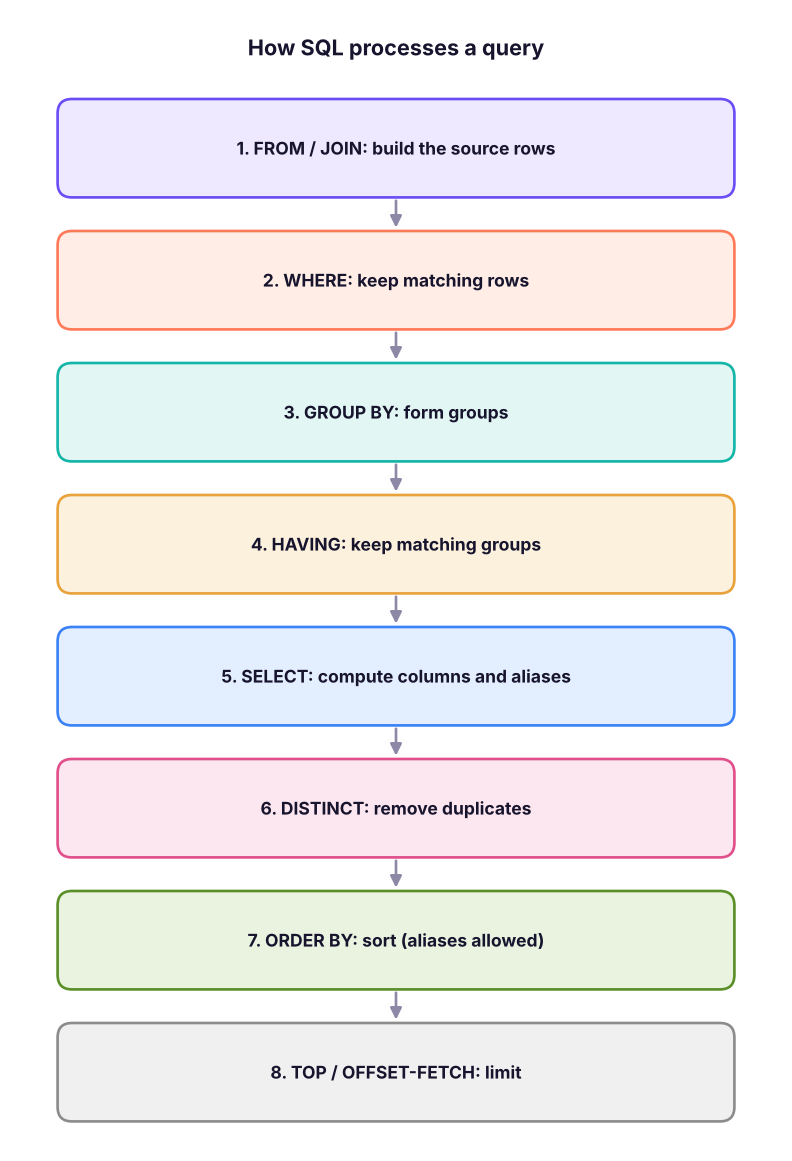
The logical processing order
You writeSELECT first, but SQL processes the clauses in a different order. This explains several common errors.
Logical processing order of a SELECT statement. Each step works on the output of the previous one.
Consequences:
You cannot use a column alias in WHERE, because WHERE runs before SELECT: WHERE margin_pct > 10 fails. Repeat the expression, or use a subquery/CTE.
You can use an alias in ORDER BY, because it runs after SELECT.
WHERE cannot contain aggregate functions (WHERE SUM(sales) > 100); use HAVING (Lesson 7).
SQL
-- Fails: Invalid column name 'margin_pct'SELECT order_id, 100.0 * profit / sales AS margin_pct
FROM superstore
WHERE margin_pct > 10;
-- Works: repeat the expression in WHERE, use the alias in ORDER BYSELECT order_id, 100.0 * profit / sales AS margin_pct
FROM superstore
WHERE100.0 * profit / sales > 10ORDERBY margin_pct DESC;
From business question to query
Step by stepTranslate a question
Question: "Which Technology orders in the South had a discount but still made more than ₹10,000 profit in 2025? Show the biggest first."
1. Table: superstore.
2. Rows (WHERE): category = Technology, region = South, discount > 0, profit > 10000, order date in 2025.
3. Columns (SELECT): order_id, order_date, city, sub_category, discount, profit.
4. Order: profit descending.
SQL
SELECT order_id, order_date, city, sub_category, discount, profit
FROM superstore
WHERE category = 'Technology'AND region = 'South'AND discount > 0AND profit > 10000AND order_date >= '2025-01-01'AND order_date < '2026-01-01'ORDERBY profit DESC;
Result
order_id
order_date
city
sub_category
discount
profit
IN-2025-02318
2025-04-26
Kochi
Machines
0.1
21,209.4
IN-2025-02908
2025-10-29
Bengaluru
Phones
0.1
16,734.2
IN-2025-02157
2025-03-08
Bengaluru
Copiers
0.1
12,678.4
IN-2025-03094
2025-12-08
Bengaluru
Machines
0.1
11,292.0
IN-2025-02514
2025-07-09
Bengaluru
Machines
0.1
10,891.9
IN-2025-03146
2025-12-20
Bengaluru
Copiers
0.1
10,679.1
IN-2025-02547
2025-07-20
Kochi
Phones
0.1
10,558.6
7 rows × 6 columns
Do it with AIDo it with AI
Give an assistant your table's column list and a question, and ask for SQL Server syntax: "Table superstore(order_id, order_date, region, city, category, sub_category, sales, discount, profit). Write a T-SQL query for: Furniture orders in Kolkata or Patna in 2024 with negative profit, sorted by profit." Read the query before running it: check the date range, the brackets around OR, and that it uses the column names you gave.
Summary
Key takeaways
SELECT columns and expressions; name them with AS; avoid SELECT * in saved queries.
DISTINCT removes duplicate rows of the selected columns; TOP n with ORDER BY limits results.
Filter with =, <>, >, <, >=, <=, AND/OR/NOT (use brackets), IN, BETWEEN (inclusive), LIKE with % and _, and IS NULL.
For dates use half-open ranges: >= start AND < next_start.
ORDER BY sorts ascending by default; can use aliases.
Logical order: FROM → WHERE → GROUP BY → HAVING → SELECT → DISTINCT → ORDER BY → TOP. That is why aliases fail in WHERE.
Quick quiz6 questions · tap an answer to check it
1. Which query returns each distinct region exactly once?
Answer: B. DISTINCT removes duplicate rows from the result.
2.WHERE sales BETWEEN 100 AND 200 includes which values?
Answer: B. BETWEEN is inclusive of both boundaries.
3. Which pattern finds product names that contain "Desk" anywhere?
Answer: C. % on both sides matches any characters before and after.
4. Why does WHERE margin_pct > 10 fail when margin_pct is an alias defined in SELECT?
Answer: A. Logical order: WHERE comes before SELECT.
5. What is wrong with WHERE order_date BETWEEN '2025-01-01' AND '2025-12-31' on a DATETIME2 column?
Answer: B. '2025-12-31' means midnight; later times that day are excluded. Use < '2026-01-01'.
6.SELECT TOP 3 * FROM orders without ORDER BY returns:
Answer: C. Without ORDER BY, row order is not defined.
ExerciseSuperstore filters
Write queries for: (1) all Same Day orders in the West with sales over ₹50,000; (2) customers whose names start with A, B or C (distinct, sorted); (3) order lines with a 40% discount in the Furniture category, showing the 10 biggest losses; (4) the number of order lines in 2024 for the Corporate segment in Pune or Indore.
Show solution
SQL
-- (1)SELECT order_id, order_date, city, sales FROM superstore
WHERE ship_mode = 'Same Day'AND region = 'West'AND sales > 50000ORDERBY sales DESC;
-- (2) SQL ServerSELECTDISTINCT customer_name FROM superstore WHERE customer_name LIKE'[A-C]%'ORDERBY customer_name;
-- (3)SELECTTOP10 order_id, product_name, sales, profit FROM superstore
WHERE discount = 0.4AND category = 'Furniture'ORDERBY profit ASC;
-- (4)SELECTCOUNT(*) AS lines FROM superstore
WHERE segment = 'Corporate'AND city IN ('Pune', 'Indore')
AND order_date >= '2024-01-01'AND order_date < '2025-01-01';
Interview cornerQuestions you may be asked
Q: What is the order of execution of a SQL query?
FROM/JOIN, WHERE, GROUP BY, HAVING, SELECT, DISTINCT, ORDER BY, then TOP/OFFSET-FETCH.
Q: Difference between WHERE and HAVING?
WHERE filters rows before grouping and cannot use aggregates; HAVING filters groups after aggregation.
Q: How do you find employees whose name's second letter is "a"?WHERE name LIKE '_a%'.
Q: IN vs EXISTS?
IN compares a value with a list or subquery result; EXISTS checks whether a correlated subquery returns any row. EXISTS is safer with NULLs and often efficient for large subqueries (Lesson 10).
Practise more online
Free, trusted places to test yourself on this topic. Links open the original site in a new tab.