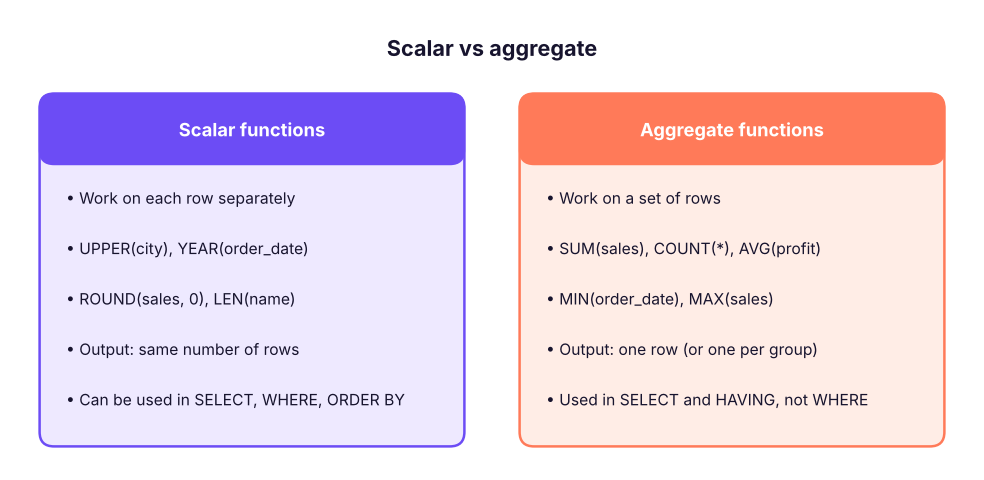
Scalar functions return one value per row. Aggregate functions collapse many rows into one value (per group).
Aggregate functions
Function
Returns
NULL handling
COUNT(*)
Number of rows
Counts every row
COUNT(col)
Number of non-NULL values
Skips NULLs
COUNT(DISTINCT col)
Number of distinct non-NULL values
Skips NULLs
SUM(col)
Total
Skips NULLs
AVG(col)
Average of non-NULL values
Skips NULLs (they are not treated as 0)
MIN(col), MAX(col)
Smallest / largest (numbers, text, dates)
Skips NULLs
STDEV(col), VAR(col)
Sample standard deviation / variance
Skips NULLs
STRING_AGG(col, sep)
Values joined into one string
Skips NULLs
SQL
SELECTCOUNT(*) AS order_lines,
COUNT(DISTINCT order_id) AS orders,
COUNT(DISTINCT customer_id) AS customers,
ROUND(SUM(sales), 0) AS total_sales,
ROUND(AVG(sales), 0) AS avg_line_sales,
MIN(order_date) AS first_order,
MAX(order_date) AS last_order,
ROUND(STDEV(sales), 0) AS sd_sales
FROM superstore;
Result
order_lines
orders
customers
total_sales
avg_line_sales
first_order
last_order
sd_sales
6323
3200
785
201,413,569
31,854
2023-01-01
2025-12-31
60,414
1 rows × 8 columns
SQL
SELECT category,
STRING_AGG(sub_category, ', ') AS sub_categories
FROM (SELECTDISTINCT category, sub_category FROM superstore) AS t
GROUPBY category
ORDERBY category;
Result
category
sub_categories
Furniture
Tables, Furnishings, Bookcases, Chairs
Office Supplies
Storage, Appliances, Art, Binders, Paper
Technology
Copiers, Phones, Machines, Accessories
3 rows × 2 columns
In SQL Server add WITHIN GROUP (ORDER BY sub_category) after STRING_AGG(...) to control the order of the joined values.
Watch outAVG of integers
AVG on an INT column returns an integer in SQL Server (AVG of 1, 2 = 1). Use AVG(quantity * 1.0) or AVG(CAST(quantity AS DECIMAL(10,2))) for decimals.
Text (string) functions
Function
Example
Result
LEN(s)
LEN('Pune ')
4 (trailing spaces not counted)
UPPER(s), LOWER(s)
UPPER('pune')
PUNE
LEFT(s, n), RIGHT(s, n)
LEFT('IN-2025-00042', 2)
IN
SUBSTRING(s, start, n)
SUBSTRING('IN-2025-00042', 4, 4)
2025
CHARINDEX(find, s)
CHARINDEX('-', 'IN-2025-00042')
3
REPLACE(s, old, new)
REPLACE('2025-04-27', '-', '/')
2025/04/27
TRIM(s), LTRIM, RTRIM
TRIM(' Delhi ')
Delhi
CONCAT(a, b, …)
CONCAT(city, ', ', state)
Pune, Maharashtra
REVERSE(s)
REVERSE('abc')
cba
REPLICATE(s, n)
REPLICATE('*', 3)
***
STRING_SPLIT(s, sep)
SELECT value FROM STRING_SPLIT('a,b,c', ',')
3 rows
FORMAT(value, fmt)
FORMAT(1234567, 'N0', 'en-IN')
12,34,567
SQL
SELECTTOP6
order_id,
LEFT(order_id, 2) AS country,
SUBSTRING(order_id, 4, 4) AS order_year,
RIGHT(order_id, 5) AS order_no,
product_name,
LEFT(product_name, CHARINDEX(' ', product_name) - 1) AS brand,
UPPER(city) AS city_upper,
LEN(customer_name) AS name_length
FROM superstore
ORDERBY row_id;
Result
order_id
country
order_year
order_no
product_name
brand
city_upper
name_length
IN-2023-00001
IN
2023
00001
Nova Phone 223
Nova
BENGALURU
12
IN-2023-00001
IN
2023
00001
Orbit Appliance 798
Orbit
BENGALURU
12
IN-2023-00001
IN
2023
00001
Orbit Table 248
Orbit
BENGALURU
12
IN-2023-00002
IN
2023
00002
Crest Storage 946
Crest
AHMEDABAD
11
IN-2023-00003
IN
2023
00003
Crest Bookcase 170
Crest
AHMEDABAD
10
IN-2023-00003
IN
2023
00003
Zenith Table 111
Zenith
AHMEDABAD
10
6 rows × 8 columns
The brand is everything before the first space: CHARINDEX(' ', product_name) finds the space position, and LEFT(…, position − 1) cuts there. This is the SQL version of Excel's LEFT(A2, FIND(" ", A2) - 1) from Excel Lesson 5.
Cleaning text
SQL
WITH raw AS (
SELECT' bengaluru 'AS city UNIONALLSELECT'BENGALURU'UNIONALLSELECT'Bangalore'UNIONALLSELECT'Bengaluru'
)
SELECT city AS raw_value,
CONCAT(UPPER(LEFT(TRIM(city), 1)), LOWER(SUBSTRING(TRIM(city), 2, 100))) AS proper_case,
CASEWHENLOWER(TRIM(city)) IN ('bangalore', 'bengaluru') THEN'Bengaluru'ELSETRIM(city) ENDAS standardised
FROM raw;
Result
raw_value
proper_case
standardised
bengaluru
Bengaluru
Bengaluru
BENGALURU
Bengaluru
Bengaluru
Bangalore
Bangalore
Bengaluru
Bengaluru
Bengaluru
Bengaluru
4 rows × 3 columns
(SQL Server has no PROPER function; joining UPPER(LEFT(…,1)) and LOWER(SUBSTRING(…,2,…)) capitalises the first letter of a single word. Standardising spellings is best done with CASE or a mapping table joined in.)
Note`+` vs CONCAT for text
In SQL Server 'a' + 'b' joins text, but 'a' + NULL is NULL and 'Q' + 2 fails (it tries to convert 'Q' to a number). CONCAT('Q', 2) gives Q2 and treats NULL as empty. Prefer CONCAT.
Date and time functions
Function
Example (d = '2026-04-27')
Result
GETDATE(), SYSDATETIME()
Current date and time
CAST(GETDATE() AS DATE)
Today's date
YEAR(d), MONTH(d), DAY(d)
MONTH(d)
4
DATEPART(part, d)
DATEPART(quarter, d)
2
DATENAME(part, d)
DATENAME(month, d), DATENAME(weekday, d)
April, Monday
DATEADD(part, n, d)
DATEADD(month, 3, d)
2026-07-27
DATEDIFF(part, start, end)
DATEDIFF(day, '2026-04-01', d)
26
EOMONTH(d, [n])
EOMONTH(d)
2026-04-30
DATEFROMPARTS(y, m, d)
DATEFROMPARTS(2026, 4, 1)
2026-04-01
DATETRUNC(part, d) (2022+)
DATETRUNC(month, d)
2026-04-01
FORMAT(d, 'MMM-yyyy')
Apr-2026
Date parts you can use: year, quarter, month, dayofyear, day, week, weekday, hour, minute, second.
SQL
SELECTTOP6
order_id,
order_date,
ship_date,
YEAR(order_date) AS yr,
DATEPART(quarter, order_date) AS qtr,
DATENAME(month, order_date) AS month_name,
DATENAME(weekday, order_date) AS weekday_name,
DATEDIFF(day, order_date, ship_date) AS days_to_ship,
EOMONTH(order_date) AS month_end
FROM orders
ORDERBY order_date DESC;
Result
order_id
order_date
ship_date
yr
qtr
month_name
weekday_name
days_to_ship
month_end
IN-2025-03197
2025-12-31
2026-01-04
2025
4
December
Wednesday
4
2025-12-31
IN-2025-03198
2025-12-31
2026-01-04
2025
4
December
Wednesday
4
2025-12-31
IN-2025-03199
2025-12-31
2026-01-02
2025
4
December
Wednesday
2
2025-12-31
IN-2025-03200
2025-12-31
2026-01-06
2025
4
December
Wednesday
6
2025-12-31
IN-2025-03194
2025-12-30
2026-01-03
2025
4
December
Tuesday
4
2025-12-31
IN-2025-03195
2025-12-30
2026-01-06
2025
4
December
Tuesday
7
2025-12-31
6 rows × 9 columns
SQL
SELECT ship_mode,
COUNT(*) AS orders,
AVG(DATEDIFF(day, order_date, ship_date) * 1.0) AS avg_days_to_ship,
MAX(DATEDIFF(day, order_date, ship_date)) AS max_days
FROM orders
GROUPBY ship_mode
ORDERBY avg_days_to_ship;
Result
ship_mode
orders
avg_days_to_ship
max_days
Same Day
176
0.00
0
First Class
467
1.53
2
Second Class
621
3.00
4
Standard Class
1936
5.54
7
4 rows × 4 columns
Watch outDATEDIFF counts boundaries
DATEDIFF(year, '2025-12-31', '2026-01-01') returns 1, because one year boundary is crossed, even though only one day passed. For exact age use DATEDIFF(day, …)/365.25 or compare month and day as well.
Useful date patterns
SQL
-- Orders in the last 30 daysWHERE order_date >= DATEADD(day, -30, CAST(GETDATE() ASDATE))
-- First day of the monthSELECTDATEFROMPARTS(YEAR(order_date), MONTH(order_date), 1) -- or DATETRUNC(month, order_date)-- Indian financial year (April–March)SELECTCASEWHENMONTH(order_date) >= 4THENYEAR(order_date) + 1ELSEYEAR(order_date) ENDAS fy
-- Month label for reportsSELECTFORMAT(order_date, 'MMM-yyyy') AS month_label
Number functions
Function
Example
Result
ROUND(n, d)
ROUND(1234.567, 1)
1234.600
ROUND(n, -2)
ROUND(1234.567, -2)
1200.000
CEILING(n)
CEILING(4.1)
5
FLOOR(n)
FLOOR(4.9)
4
ABS(n)
ABS(-250)
250
POWER(n, p)
POWER(2, 10)
1024
SQRT(n), SQUARE(n)
SQRT(144)
12
SIGN(n)
SIGN(-3)
−1
n % m
17 % 5
2
RAND()
Random float 0–1
SQL
SELECT sub_category,
ROUND(SUM(sales), -3) AS sales_to_thousand,
CEILING(SUM(quantity) / 12.0) AS boxes_of_12,
ROUND(100.0 * SUM(profit) / SUM(sales), 2) AS margin_pct,
ABS(SUM(profit)) AS abs_profit,
SIGN(SUM(profit)) AS profit_sign
FROM superstore
GROUPBY sub_category
ORDERBY margin_pct;
Returns NULL instead of an error: great for dirty data
TRY_CONVERT, TRY_PARSE
Same idea
SQL
-- Find rows where a text column does not contain a valid numberSELECT * FROM staging_sales WHERE amount_text ISNOTNULLANDTRY_CAST(amount_text ASDECIMAL(12,2)) ISNULL;
Conditional functions (preview)
Function
Example
COALESCE(a, b, …)
COALESCE(phone, email, 'no contact')
ISNULL(a, b)
ISNULL(discount, 0)
NULLIF(a, b)
profit / NULLIF(sales, 0)
IIF(cond, a, b)
IIF(profit < 0, 'Loss', 'Profit')
CASE WHEN … END
Multi-branch logic (Lesson 7)
SQL
SELECTTOP6 order_id, sales, profit,
IIF(profit < 0, 'Loss', 'Profit') AS result,
ROUND(profit / NULLIF(sales, 0) * 100, 1) AS margin_pct
FROM superstore
ORDERBY profit;
Result
order_id
sales
profit
result
margin_pct
IN-2025-03027
318,492
-75,874
Loss
-23.8
IN-2023-00320
337,316
-67,393
Loss
-20.0
IN-2023-00372
378,192
-59,796
Loss
-15.8
IN-2024-01335
194,160
-56,392
Loss
-29.0
IN-2025-02299
202,475
-46,375
Loss
-22.9
IN-2023-00077
240,940
-45,712
Loss
-19.0
6 rows × 5 columns
Do it with AIDo it with AI
Prompt: "In SQL Server, write a query on superstore(order_id, order_date, ship_date, ship_mode) that returns the average and 90th percentile of days to ship by ship mode and quarter." Expect it to use DATEDIFF, DATEPART(quarter, …) and PERCENTILE_CONT(0.9) WITHIN GROUP (ORDER BY …) OVER (PARTITION BY …), which you will meet with window functions in Lesson 12.
Summary
Key takeaways
Scalar functions work per row; aggregate functions summarise many rows.
Convert with CAST/CONVERT; use TRY_CAST on dirty data.
Quick quiz6 questions · tap an answer to check it
1. A column has values 10, NULL, 20. What does AVG(col) return?
Answer: B. AVG ignores NULLs: (10 + 20) / 2 = 15.
2. What does SUBSTRING('IN-2025-00042', 4, 4) return?
Answer: B. Starting at position 4, take 4 characters.
3. Which returns the number of days between order and ship dates?
Answer: B. DATEDIFF(datepart, start, end) counts the boundaries between the two dates.
4. What does ROUND(45678.9, -3) return?
Answer: C. −3 rounds to the nearest thousand.
5. Which function returns NULL instead of an error when text cannot be converted?
Answer: C. TRY_CAST and TRY_CONVERT return NULL on conversion failure.
6. Which counts unique customers?
Answer: B. COUNT(DISTINCT …) counts distinct non-NULL values.
ExerciseFunction practice on Superstore
Write one query that returns, for each order year: the number of orders, the number of distinct customers, total sales rounded to the nearest lakh (100,000), the average days to ship, and a comma-separated list of the ship modes used.
Show solution
SQL
WITH modes AS ( -- one row per year and ship modeSELECTDISTINCTYEAR(order_date) AS order_year, ship_mode FROM orders
),
mode_list AS (
SELECT order_year, STRING_AGG(ship_mode, ', ') AS ship_modes FROM modes GROUPBY order_year
)
SELECTYEAR(o.order_date) AS order_year,
COUNT(DISTINCT o.order_id) AS orders,
COUNT(DISTINCT o.customer_id) AS customers,
ROUND(SUM(oi.sales), -5) AS sales_nearest_lakh,
AVG(DATEDIFF(day, o.order_date, o.ship_date) * 1.0) AS avg_days_to_ship,
MAX(m.ship_modes) AS ship_modes
FROM orders AS o
JOIN order_items AS oi ON oi.order_id = o.order_id
JOIN mode_list AS m ON m.order_year = YEAR(o.order_date)
GROUPBYYEAR(o.order_date)
ORDERBY order_year;
STRING_AGG(DISTINCT …) is not allowed in SQL Server, so the distinct ship modes are collected in a CTE first (CTEs are covered in Lesson 13). Note that averaging days to ship over order lines weights orders with more items more heavily; average over orders alone if each order should count once.
Interview cornerQuestions you may be asked
Q: COUNT() vs COUNT(column) vs COUNT(DISTINCT column)?
COUNT() counts rows; COUNT(column) counts non-NULL values; COUNT(DISTINCT column) counts unique non-NULL values.
Q: How do you extract the domain from an email in SQL Server?SUBSTRING(email, CHARINDEX('@', email) + 1, LEN(email)) or RIGHT(email, LEN(email) - CHARINDEX('@', email)).
Q: How do you get the last day of the previous month?EOMONTH(GETDATE(), -1).
Q: Difference between CAST and CONVERT?
CAST is ANSI standard; CONVERT is SQL Server-specific and accepts a style argument for date/number formatting.
Practise more online
Free, trusted places to test yourself on this topic. Links open the original site in a new tab.