GROUP BY, HAVING, CASE WHEN, ROLLUP, CUBE & COALESCE
Turn rows into business summaries. Group with GROUP BY, filter groups with HAVING, create conditional columns and buckets with CASE WHEN, pivot data with conditional aggregation, and add subtotals and grand totals with ROLLUP, CUBE and GROUPING SETS, cleaning the labels with COALESCE and GROUPING().
● SQL class 4 · SQL–Power BI bridge✦ SQL Server 2022, 2026Intermediate⏱ 130 min
GROUP BY collapses rows that share the same value(s) into one row, and aggregate functions summarise each group. It is the SQL version of a pivot table (Excel Lesson 8) and of groupby() in pandas.
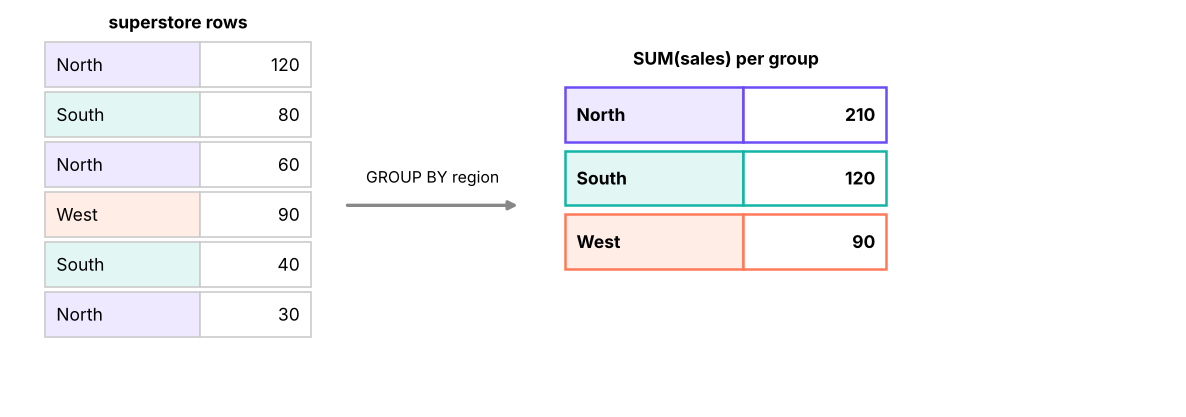
GROUP BY region: rows with the same region are collected into one group, then SUM is computed for each group.
SQL
SELECT region,
COUNT(DISTINCT order_id) AS orders,
ROUND(SUM(sales), 0) AS sales,
ROUND(SUM(profit), 0) AS profit,
ROUND(100.0 * SUM(profit) / SUM(sales), 1) AS margin_pct
FROM superstore
GROUPBY region
ORDERBY sales DESC;
Result
region
orders
sales
profit
margin_pct
South
831
53,952,769
4,702,012
8.7
West
811
51,958,521
4,719,833
9.1
North
792
49,018,161
4,555,830
9.3
East
766
46,484,119
4,374,490
9.4
4 rows × 5 columns
Grouping by several columns
SQL
SELECT category,
sub_category,
COUNT(*) AS lines,
ROUND(SUM(sales), 0) AS sales,
ROUND(SUM(profit), 0) AS profit
FROM superstore
GROUPBY category, sub_category
ORDERBY category, sales DESC;
Result
category
sub_category
lines
sales
profit
Furniture
Tables
505
14,046,224
-816,042
Furniture
Bookcases
477
11,274,849
-422,786
Furniture
Chairs
493
8,091,474
342,043
Furniture
Furnishings
442
1,429,307
78,632
Office Supplies
Appliances
492
6,333,529
944,927
Office Supplies
Storage
507
2,659,340
397,228
Office Supplies
Paper
559
493,232
75,040
Office Supplies
Binders
494
401,219
61,074
Office Supplies
Art
462
245,985
36,526
Technology
Copiers
468
78,749,926
8,436,141
Technology
Machines
491
42,590,335
5,186,711
Technology
Phones
488
31,919,223
3,663,117
13 rows × 5 columns (first 12 shown)
Grouping by an expression
SQL
SELECTYEAR(order_date) AS order_year,
COUNT(DISTINCT order_id) AS orders,
ROUND(SUM(sales), 0) AS sales
FROM superstore
GROUPBYYEAR(order_date)
ORDERBY order_year;
Result
order_year
orders
sales
2023
883
57,640,217
2024
1085
65,396,556
2025
1232
78,376,797
3 rows × 3 columns
Watch outThe golden rule of GROUP BY
Every column in SELECT must either be in the GROUP BY or inside an aggregate function. SELECT region, city, SUM(sales) FROM superstore GROUP BY region fails in SQL Server: "Column 'city' is invalid in the select list because it is not contained in either an aggregate function or the GROUP BY clause." Which city should it show for the North group? SQL refuses to guess.
HAVING: filtering groups
WHERE filters rows before grouping; HAVING filters groups after aggregation.
SQL
SELECT city,
COUNT(DISTINCT order_id) AS orders,
ROUND(SUM(profit), 0) AS profit
FROM superstore
WHERE category = 'Furniture'-- 1. keep only furniture rowsGROUPBY city -- 2. one row per cityHAVINGSUM(profit) < 0-- 3. keep only loss-making citiesORDERBY profit;
Result
city
orders
profit
Chennai
100
-122,258
Delhi
101
-106,170
Chandigarh
92
-92,165
Lucknow
100
-87,616
Guwahati
77
-80,036
Kochi
93
-71,758
Bengaluru
101
-52,961
Bhubaneswar
80
-50,956
Ahmedabad
96
-50,770
Kolkata
111
-39,811
Patna
86
-38,624
Indore
102
-30,482
15 rows × 3 columns (first 12 shown)
WHERE
HAVING
Runs
Before GROUP BY
After GROUP BY
Filters
Individual rows
Groups
Can use aggregates
No
Yes
Example
WHERE region = 'West'
HAVING COUNT(*) > 100
Performance
Reduces rows early (faster)
Applied to fewer, summarised rows
TipFilter as early as possible
Put conditions that do not need aggregates in WHERE, not HAVING: HAVING region = 'West' works but makes the database group every region first and discard most of them.
CASE WHEN: conditional columns
CASE is SQL's IF/IFS (Excel Lesson 5). It returns a value for the first condition that is true.
SQL
CASEWHEN condition1 THEN result1
WHEN condition2 THEN result2
ELSE default_result -- optional; without ELSE, unmatched rows get NULLEND
SQL
SELECT order_id, sales, discount, profit,
CASEWHEN discount = 0THEN'No discount'WHEN discount <= 0.2THEN'Up to 20%'ELSE'Above 20%'ENDAS discount_band,
CASEWHEN profit < 0THEN'Loss'ELSE'Profit'ENDAS result
FROM superstore
ORDERBY row_id;
Result
order_id
sales
discount
profit
discount_band
result
IN-2023-00001
36,000
0.0
3,472.55
No discount
Profit
IN-2023-00001
3,850
0.0
1,169.54
No discount
Profit
IN-2023-00001
62,080
0.0
6,044.47
No discount
Profit
IN-2023-00002
5,216
0.2
450.16
Up to 20%
Profit
IN-2023-00003
24,591
0.3
-5,512.33
Above 20%
Loss
IN-2023-00003
8,288
0.3
-1,598.43
Above 20%
Loss
IN-2023-00003
2,100
0.0
510.43
No discount
Profit
IN-2023-00003
69,280
0.0
15,852.15
No discount
Profit
6,323 rows × 6 columns (first 8 shown)
The simple form compares one expression with values:
SQL
CASE ship_mode
WHEN'Same Day'THEN1WHEN'First Class'THEN2ELSE3END
CASE inside GROUP BY: buckets
SQL
SELECTCASEWHEN discount = 0THEN'0%'WHEN discount <= 0.2THEN'1–20%'ELSE'>20%'ENDAS discount_band,
COUNT(*) AS lines,
ROUND(SUM(sales), 0) AS sales,
ROUND(SUM(profit), 0) AS profit,
ROUND(100.0 * SUM(profit) / SUM(sales), 1) AS margin_pct
FROM superstore
GROUPBYCASEWHEN discount = 0THEN'0%'WHEN discount <= 0.2THEN'1–20%'ELSE'>20%'ENDORDERBY discount_band;
Result
discount_band
lines
sales
profit
margin_pct
0%
3480
123,936,290
21,718,963
17.5
1–20%
1943
57,729,097
697,141
1.2
>20%
900
19,748,182
-4,063,940
-20.6
3 rows × 5 columns
The same insight as the Excel crosstab and dashboard: discounts above 20% turn the margin sharply negative.
Conditional aggregation: pivoting with CASE
Put CASE inside an aggregate to turn row values into columns, which is how analysts build pivot-style reports in SQL:
SQL
SELECT region,
ROUND(SUM(CASEWHEN category = 'Furniture'THEN sales ELSE0END), 0) AS furniture,
ROUND(SUM(CASEWHEN category = 'Office Supplies'THEN sales ELSE0END), 0) AS office_supplies,
ROUND(SUM(CASEWHEN category = 'Technology'THEN sales ELSE0END), 0) AS technology,
ROUND(SUM(sales), 0) AS total
FROM superstore
GROUPBY region
ORDERBY region;
Result
region
furniture
office_supplies
technology
total
East
7,942,093
2,719,513
35,822,514
46,484,119
North
7,975,869
2,219,543
38,822,750
49,018,161
South
9,593,302
2,468,888
41,890,579
53,952,769
West
9,330,590
2,725,361
39,902,570
51,958,521
4 rows × 5 columns
SQL
SELECT department,
COUNT(*) AS employees,
SUM(CASEWHEN attrition = 'Yes'THEN1ELSE0END) AS leavers,
ROUND(100.0 * SUM(CASEWHEN attrition = 'Yes'THEN1ELSE0END) / COUNT(*), 1) AS attrition_pct,
ROUND(AVG(CASEWHEN overtime = 'Yes'THEN1.0ELSE0END) * 100, 1) AS overtime_pct
FROM employees
GROUPBY department
ORDERBY attrition_pct DESC;
Result
department
employees
leavers
attrition_pct
overtime_pct
Sales
414
126
30.4
26.6
R&D
389
101
26.0
32.1
IT
309
75
24.3
29.8
HR
83
19
22.9
31.3
Finance
154
35
22.7
20.1
Operations
151
33
21.9
32.5
6 rows × 5 columns
AVG(CASE WHEN … THEN 1.0 ELSE 0 END) is a neat way to get a percentage of rows meeting a condition.
NoteThe PIVOT operator
SQL Server also has a PIVOT operator:
SQL
SELECT region, [Furniture], [Office Supplies], [Technology]
FROM (SELECT region, category, sales FROM superstore) AS src
PIVOT (SUM(sales) FOR category IN ([Furniture], [Office Supplies], [Technology])) AS p;
Conditional aggregation is more flexible (several measures, any conditions) and works in every database, so most analysts prefer it. UNPIVOT does the reverse, like Power Query's Unpivot (Excel Lesson 12).
Subtotals and grand totals: ROLLUP, CUBE, GROUPING SETS
ROLLUP
GROUP BY ROLLUP (a, b) returns the groups for (a, b), subtotals for each a, and a grand total. Subtotal rows show NULL in the rolled-up columns.
SQL
SELECT region,
category,
ROUND(SUM(sales), 0) AS sales
FROM superstore
GROUPBYROLLUP (region, category)
ORDERBY region, category;
Result
region
category
sales
East
Furniture
7,942,093
East
Office Supplies
2,719,513
East
Technology
35,822,514
East
NULL
46,484,119
North
Furniture
7,975,869
North
Office Supplies
2,219,543
North
Technology
38,822,750
North
NULL
49,018,161
South
Furniture
9,593,302
South
Office Supplies
2,468,888
South
Technology
41,890,579
South
NULL
53,952,769
West
Furniture
9,330,590
West
Office Supplies
2,725,361
West
Technology
39,902,570
West
NULL
51,958,521
NULL
NULL
201,413,569
17 rows × 3 columns
Cleaning the labels with COALESCE and GROUPING()
NULLs in subtotal rows are confusing. COALESCE replaces them with a label. If the data itself could contain NULL categories, use GROUPING(col), which returns 1 only on rows where the column was rolled up:
SQL
SELECTCASEWHENGROUPING(region) = 1THEN'All regions'ELSE region ENDAS region,
CASEWHENGROUPING(category) = 1THEN'Subtotal'ELSE category ENDAS category,
ROUND(SUM(sales), 0) AS sales
FROM superstore
GROUPBYROLLUP (region, category)
ORDERBYGROUPING(region), region, GROUPING(category), category;
Result
region
category
sales
East
Furniture
7,942,093
East
Office Supplies
2,719,513
East
Technology
35,822,514
East
Subtotal
46,484,119
North
Furniture
7,975,869
North
Office Supplies
2,219,543
North
Technology
38,822,750
North
Subtotal
49,018,161
South
Furniture
9,593,302
South
Office Supplies
2,468,888
South
Technology
41,890,579
South
Subtotal
53,952,769
West
Furniture
9,330,590
West
Office Supplies
2,725,361
West
Technology
39,902,570
West
Subtotal
51,958,521
All regions
Subtotal
201,413,569
17 rows × 3 columns
The simple version used in class, COALESCE(region, 'All regions'), gives the same labels when the data has no real NULLs.
CUBE
CUBE (a, b) returns every combination of subtotals: by (a, b), by a, by b, and the grand total. Use it when you need totals in both directions, like a pivot table with row and column grand totals.
SQL
SELECTCOALESCE(segment, 'All segments') AS segment,
COALESCE(region, 'All regions') AS region,
COUNT(DISTINCT order_id) AS orders
FROM superstore
GROUPBYCUBE (segment, region)
ORDERBYGROUPING(segment), segment, GROUPING(region), region;
Result
segment
region
orders
Consumer
East
355
Consumer
North
402
Consumer
South
385
Consumer
West
412
Consumer
All regions
1554
Corporate
East
245
Corporate
North
224
Corporate
South
269
Corporate
West
217
Corporate
All regions
955
Home Office
East
166
Home Office
North
166
Home Office
South
177
Home Office
West
182
Home Office
All regions
691
All segments
East
766
All segments
North
792
All segments
South
831
All segments
West
811
All segments
All regions
3200
20 rows × 3 columns
GROUPING SETS
GROUPING SETS lists exactly the groupings you want in one query:
SQL
SELECTCOALESCE(category, '—') AS category,
COALESCE(ship_mode, '—') AS ship_mode,
ROUND(SUM(sales), 0) AS sales
FROM superstore
GROUPBY GROUPING SETS ((category), (ship_mode), ())
ORDERBY category, ship_mode;
Result
category
ship_mode
sales
Furniture
—
34,841,853
Office Supplies
—
10,133,304
Technology
—
156,438,413
—
First Class
31,455,543
—
Same Day
10,082,430
—
Second Class
40,858,316
—
Standard Class
119,017,281
—
—
201,413,569
8 rows × 3 columns
This returns totals by category, totals by ship mode and the grand total, without the category × ship mode detail.
Syntax
Groupings produced for (a, b)
GROUP BY a, b
(a, b)
ROLLUP (a, b)
(a, b), (a), ()
CUBE (a, b)
(a, b), (a), (b), ()
GROUPING SETS ((a), (b), ())
exactly (a), (b), ()
TipBridge to Power BI
Power BI matrices compute these subtotals automatically, but ROLLUP/CUBE are perfect when you must deliver a fixed report table from SQL, feed a paginated report, or check that a dashboard's totals are right.
A complete analysis query
Question: "For 2025, show each sub-category's sales, profit and margin, a performance label, and only sub-categories with at least ₹10 lakh sales, best margin first."
SQL
SELECT sub_category,
ROUND(SUM(sales), 0) AS sales,
ROUND(SUM(profit), 0) AS profit,
ROUND(100.0 * SUM(profit) / SUM(sales), 1) AS margin_pct,
CASEWHENSUM(profit) < 0THEN'Loss-making'WHEN100.0 * SUM(profit) / SUM(sales) < 8THEN'Low margin'ELSE'Healthy'ENDAS status
FROM superstore
WHERE order_date >= '2025-01-01'AND order_date < '2026-01-01'GROUPBY sub_category
HAVINGSUM(sales) >= 1000000ORDERBY margin_pct DESC;
Result
sub_category
sales
profit
margin_pct
status
Appliances
2,539,536
379,442
14.9
Healthy
Phones
12,935,910
1,708,007
13.2
Healthy
Machines
16,502,707
2,000,026
12.1
Healthy
Accessories
1,221,677
145,007
11.9
Healthy
Copiers
30,984,937
3,349,006
10.8
Healthy
Chairs
3,053,530
132,519
4.3
Low margin
Bookcases
3,918,269
-169,018
-4.3
Loss-making
Tables
5,297,064
-286,188
-5.4
Loss-making
8 rows × 5 columns
Summary
Key takeaways
GROUP BY makes one row per group; every selected column must be grouped or aggregated.
WHERE filters rows before grouping; HAVING filters groups after (can use aggregates).
CASE WHEN … THEN … ELSE … END creates conditional columns and buckets; without ELSE, unmatched rows are NULL.
Conditional aggregation (SUM(CASE WHEN … THEN x ELSE 0 END)) pivots rows into columns and computes percentages.
ROLLUP adds hierarchical subtotals + grand total; CUBE adds all combinations; GROUPING SETS picks exactly the groupings you need.
Label subtotal rows with COALESCE or, more robustly, GROUPING().
Quick quiz6 questions · tap an answer to check it
1. Why does SELECT region, city, SUM(sales) FROM superstore GROUP BY region fail?
Answer: B. Every selected column must appear in GROUP BY or in an aggregate.
2. Which clause keeps only customers with more than 10 orders?
Answer: B. Conditions on aggregates go in HAVING.
3. What does a CASE expression return when no WHEN matches and there is no ELSE?
Answer: C. Without ELSE, unmatched rows return NULL.
4.GROUP BY ROLLUP (region, category) produces which groupings?
Answer: A. ROLLUP is hierarchical; CUBE would also include (category).
5. What does AVG(CASE WHEN attrition = 'Yes' THEN 1.0 ELSE 0 END) compute?
Answer: B. The average of 1s and 0s is the proportion of 1s.
6. Which function tells you that a row is a subtotal created by ROLLUP?
Answer: C. GROUPING(col) returns 1 when col was aggregated away in that row.
ExerciseHR summary
Using the employees table (HR data): (1) headcount, average monthly income and attrition % by department and gender, only for groups with at least 30 employees; (2) a column per education level showing headcount, one row per department; (3) average income by job satisfaction (1–4) with a grand total row using ROLLUP.
Show solution
SQL
-- (1)SELECT department, gender, COUNT(*) AS headcount,
ROUND(AVG(monthly_income * 1.0), 0) AS avg_income,
ROUND(100.0 * SUM(CASEWHEN attrition = 'Yes'THEN1ELSE0END) / COUNT(*), 1) AS attrition_pct
FROM employees GROUPBY department, gender HAVINGCOUNT(*) >= 30ORDERBY department, gender;
-- (2)SELECT department,
SUM(CASEWHEN education = 'Diploma'THEN1ELSE0END) AS diploma,
SUM(CASEWHEN education = 'Bachelor''s'THEN1ELSE0END) AS bachelors,
SUM(CASEWHEN education = 'Master''s'THEN1ELSE0END) AS masters,
SUM(CASEWHEN education = 'PhD'THEN1ELSE0END) AS phd
FROM employees GROUPBY department;
-- (3)SELECTCOALESCE(CAST(job_satisfaction ASVARCHAR(5)), 'All') AS satisfaction,
ROUND(AVG(monthly_income * 1.0), 0) AS avg_income
FROM employees GROUPBYROLLUP (job_satisfaction) ORDERBYGROUPING(job_satisfaction), job_satisfaction;
Note the doubled apostrophe in 'Bachelor''s': that is how you write a quote inside a SQL string.
Interview cornerQuestions you may be asked
Q: WHERE vs HAVING?
WHERE filters rows before aggregation and cannot use aggregate functions; HAVING filters groups after GROUP BY and can.
Q: How do you pivot rows to columns in SQL?
Conditional aggregation SUM(CASE WHEN col = 'X' THEN value END) per output column, or SQL Server's PIVOT operator.
Q: What are ROLLUP and CUBE?
GROUP BY extensions that add subtotal and grand-total rows: ROLLUP follows the column hierarchy; CUBE produces all combinations. GROUPING() identifies the subtotal rows.
Q: Write a query to find the second-highest salary per department.
Use DENSE_RANK() in a subquery/CTE (Lesson 11): WHERE rnk = 2.
Practise more online
Free, trusted places to test yourself on this topic. Links open the original site in a new tab.