
The scikit-learn Workflow: Train/Test Split, Baselines, Pipelines and Saving Models
Learn the standard machine-learning workflow in scikit-learn. The estimator API (fit, predict, transform), splitting data into train, validation and test sets with stratification and time order, baselines, ColumnTransformer and Pipeline to avoid leakage, comparing models, and saving and loading a trained pipeline.
- Use the fit / predict / predict_proba / transform / score API consistently
- Split data into train and test (stratified, time-based) and explain why the test set is touched once
- Build dummy baselines and compare real models against them
- Combine preprocessing and a model in a Pipeline with ColumnTransformer
- Save, load and use a trained pipeline on new data
The estimator API
Every scikit-learn model follows the same pattern, which makes swapping algorithms easy.
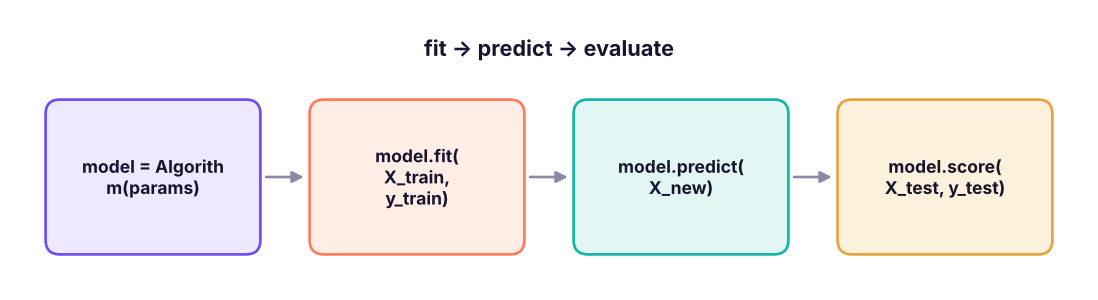
| Method | Available on | Does |
|---|---|---|
fit(X, y) |
Every estimator | Learns parameters from training data |
predict(X) |
Models | Predicted labels or values |
predict_proba(X) |
Most classifiers | Class probabilities |
transform(X) |
Transformers (scalers, encoders, PCA) | Converts features using fitted parameters |
fit_transform(X) |
Transformers | Fit then transform (training data only!) |
score(X, y) |
Models | Default metric (accuracy or R²) |
get_params() / set_params() |
All | Hyperparameters |
X is a 2-D table of features (DataFrame or array, shape n_samples × n_features); y is a 1-D target.
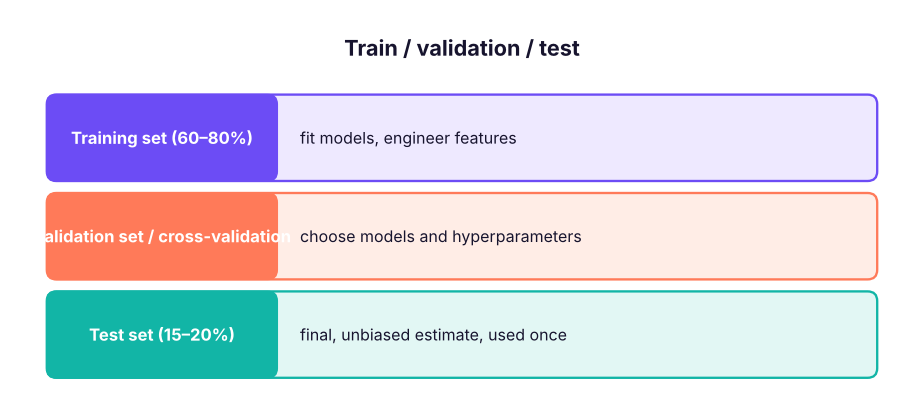
Train/test split
We judge a model on data it has never seen. Hold out a test set before doing anything else.
import pandas as pd, numpy as np
from sklearn.model_selection import train_test_split
tc = pd.read_csv("telecom_churn.csv")
X = tc.drop(columns=["customer_id", "churn", "total_charges"])          # total_charges ≈ tenure × monthly: redundant
y = (tc["churn"] == "Yes").astype(int)
X_train, X_test, y_train, y_test = train_test_split(X, y, test_size=0.2, stratify=y, random_state=42)
print(X_train.shape, X_test.shape, f"churn rate train {y_train.mean():.3f} | test {y_test.mean():.3f}")(2400, 7) (600, 7) churn rate train 0.258 | test 0.257
| Option | Use |
|---|---|
test_size=0.2 |
Hold out 20% |
stratify=y |
Keep the class balance the same in both sets (classification) |
random_state=42 |
Reproducible split |
| Time-based split | For time series and anything predicted in the future: train on the past, test on the most recent period |
Group split (GroupShuffleSplit) |
Keep all rows of a customer/store in one set |
If you try many models and keep the one with the best test score, the test score is no longer an unbiased estimate. Choose with cross-validation on the training set (lesson 15); look at the test set once.
Baselines
A model is only useful if it beats a simple baseline.
from sklearn.dummy import DummyClassifier, DummyRegressor
from sklearn.metrics import accuracy_score, recall_score
base = DummyClassifier(strategy="most_frequent").fit(X_train, y_train)
pred = base.predict(X_test)
print(f"always 'no churn': accuracy {accuracy_score(y_test, pred):.3f} | recall of churners {recall_score(y_test, pred):.3f}")
rule = ((X_test.contract == "Month-to-month") & (X_test.tenure_months <= 12)).astype(int)        # business rule from the EDA
print(f"rule 'new month-to-month': accuracy {accuracy_score(y_test, rule):.3f} | recall {recall_score(y_test, rule):.3f}")always 'no churn': accuracy 0.743 | recall of churners 0.000 rule 'new month-to-month': accuracy 0.777 | recall 0.240
74% accuracy by predicting "no churn" for everyone shows why accuracy alone is misleading for imbalanced problems (lesson 14).
Preprocessing with ColumnTransformer
Models need numbers on comparable scales. Numeric and categorical columns need different treatment.
from sklearn.compose import ColumnTransformer
from sklearn.preprocessing import StandardScaler, OneHotEncoder
from sklearn.impute import SimpleImputer
from sklearn.pipeline import Pipeline, make_pipeline
num_cols = ["senior_citizen", "tenure_months", "monthly_charges", "support_calls"]
cat_cols = ["contract", "internet_service", "payment_method"]
prep = ColumnTransformer([
    ("num", make_pipeline(SimpleImputer(strategy="median"), StandardScaler()), num_cols),
    ("cat", make_pipeline(SimpleImputer(strategy="most_frequent"), OneHotEncoder(handle_unknown="ignore")), cat_cols),
])
Xt = prep.fit_transform(X_train)
print(Xt.shape, list(prep.get_feature_names_out())[:7], "...")(2400, 14) ['num__senior_citizen', 'num__tenure_months', 'num__monthly_charges', 'num__support_calls', 'cat__contract_Month-to-month', 'cat__contract_One year', 'cat__contract_Two year'] ...
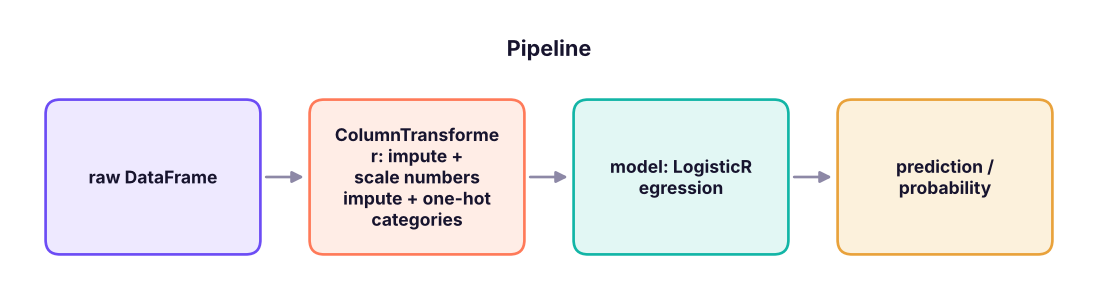
Pipelines: preprocessing + model as one object
from sklearn.linear_model import LogisticRegression
from sklearn.ensemble import RandomForestClassifier, HistGradientBoostingClassifier
from sklearn.neighbors import KNeighborsClassifier
from sklearn.metrics import roc_auc_score
models = {"logistic regression": LogisticRegression(max_iter=1000), "k-nearest neighbours": KNeighborsClassifier(25),
          "random forest": RandomForestClassifier(300, min_samples_leaf=5, random_state=0), "gradient boosting": HistGradientBoostingClassifier(random_state=0)}
for name, model in models.items():
    pipe = Pipeline([("prep", prep), ("model", model)]).fit(X_train, y_train)
    proba = pipe.predict_proba(X_test)[:, 1]
print(f"{name:22s} accuracy {pipe.score(X_test, y_test):.3f} | ROC-AUC {roc_auc_score(y_test, proba):.3f} | recall {recall_score(y_test, pipe.predict(X_test)):.3f}")logistic regression accuracy 0.790 | ROC-AUC 0.803 | recall 0.396 k-nearest neighbours accuracy 0.785 | ROC-AUC 0.759 | recall 0.344 random forest accuracy 0.798 | ROC-AUC 0.793 | recall 0.403 gradient boosting accuracy 0.760 | ROC-AUC 0.755 | recall 0.455
Why pipelines?
- No leakage: scalers and imputers learn their statistics from the training data only, inside each fit (and inside every cross-validation fold).
- One object to tune, save and deploy: raw data in, predictions out.
- Less code and fewer mistakes when switching models.
A regression example
from sklearn.linear_model import LinearRegression
from sklearn.metrics import mean_absolute_error, r2_score
h = pd.read_csv("house_prices.csv")
Xh, yh = h.drop(columns=["house_id", "price_lakh"]), h["price_lakh"]
Xh_tr, Xh_te, yh_tr, yh_te = train_test_split(Xh, yh, test_size=0.2, random_state=1)
prep_h = ColumnTransformer([("num", make_pipeline(SimpleImputer(strategy="median"), StandardScaler()), ["area_sqft", "bedrooms", "bathrooms", "age_years", "distance_to_center_km", "parking"]),
                            ("cat", OneHotEncoder(handle_unknown="ignore"), ["city"])])
for name, m in [("mean baseline", DummyRegressor()), ("linear regression", LinearRegression())]:
    p = Pipeline([("prep", prep_h), ("m", m)]).fit(Xh_tr, yh_tr).predict(Xh_te)
print(f"{name:18s} MAE {mean_absolute_error(yh_te, p):6.2f} lakh | R² {r2_score(yh_te, p):.3f}")mean baseline MAE 23.53 lakh | R² -0.005 linear regression MAE 7.18 lakh | R² 0.900
Saving and loading a model
import joblib, os
best = Pipeline([("prep", prep), ("model", LogisticRegression(max_iter=1000))]).fit(X_train, y_train)
joblib.dump(best, "churn_model.joblib")
loaded = joblib.load("churn_model.joblib")
new_customers = pd.DataFrame([{"senior_citizen": 0, "tenure_months": 3, "contract": "Month-to-month", "internet_service": "Fiber", "payment_method": "UPI", "monthly_charges": 95.0, "support_calls": 3},
                              {"senior_citizen": 1, "tenure_months": 60, "contract": "Two year", "internet_service": "DSL", "payment_method": "Auto-debit", "monthly_charges": 55.0, "support_calls": 0}])
print(loaded.predict_proba(new_customers)[:, 1].round(3), f"| file size {os.path.getsize('churn_model.joblib') / 1024:.0f} KB")
os.remove("churn_model.joblib")[0.864 0.008] | file size 5 KB
Save the whole pipeline, note the library versions (sklearn.__version__), and keep a model card (data, date, metrics, intended use). Load models only from sources you trust: joblib/pickle files can run code.
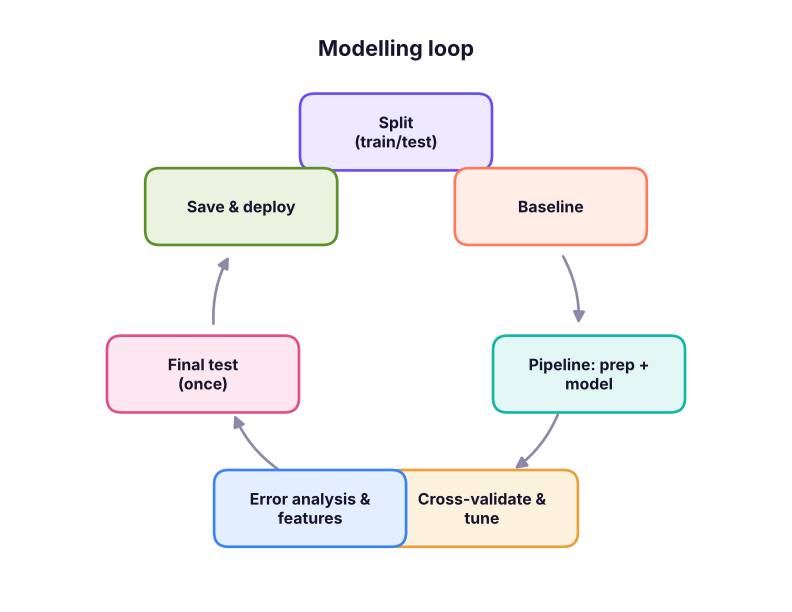
The workflow, end to end
Summary
- Every estimator uses
fit, thenpredict/predict_probaortransform; X is 2-D, y is 1-D. - Split first (stratified for classification, by time for forecasting); the test set is used once.
- Always compare with a baseline (
DummyClassifier,DummyRegressor, or a business rule). ColumnTransformer+Pipelineapply the right preprocessing to each column type and prevent leakage.- Save the fitted pipeline with joblib and document versions and metrics.
1. Why use stratify=y in train_test_split?
2. Where should a StandardScaler learn its mean and standard deviation?
3. A churn model has 74% accuracy and churn is 26%. What can you say?
4. What does ColumnTransformer do?
5. Which split suits forecasting next month's demand?
6. What should you save for deployment?
(1) Build a pipeline for hr_employees.csv that predicts attrition with logistic regression; compare it with a dummy baseline using ROC-AUC. (2) Add job_title as a categorical feature: does AUC change? (3) Save and reload the pipeline and score two made-up employees.
Show solution
hr = pd.read_csv("hr_employees.csv")
y2 = (hr.attrition == "Yes").astype(int); X2 = hr.drop(columns=["emp_id", "attrition", "hire_date"])
nums = X2.select_dtypes("number").columns.tolist(); cats = [c for c in X2.columns if c not in nums]
p2 = Pipeline([("prep", ColumnTransformer([("n", StandardScaler(), nums), ("c", OneHotEncoder(handle_unknown="ignore"), cats)])), ("m", LogisticRegression(max_iter=2000))])
a, b, c, d = train_test_split(X2, y2, test_size=.2, stratify=y2, random_state=0)
print(roc_auc_score(d, p2.fit(a, c).predict_proba(b)[:, 1]), roc_auc_score(d, DummyClassifier().fit(a, c).predict_proba(b)[:, 1]))Q: Why do we need a train/test split? To estimate how the model performs on new, unseen data; training performance is optimistic because the model has seen those examples.
Q: What is a pipeline and why use one? A chain of preprocessing steps and a model trained and applied as one object; it prevents leakage, simplifies tuning and makes deployment reliable.
Q: What is the difference between fit_transform and transform?
fit_transform learns parameters (e.g. mean, categories) and applies them, used on training data; transform applies already-learned parameters, used on validation, test and new data.
Practise more online
Free, trusted places to test yourself on this topic. Links open the original site in a new tab.